The Best Employee Time Tracking Apps in 2026 for Project Managers and Team Leads
Explore the top employee time tracking apps and see how they compare, helping project managers choose the right fit for their teams and workflows clearly.
What Is an Employee Time Tracking App?
An employee time tracking app helps teams record how much time they spend on work. Instead of guessing hours or filling out spreadsheets, people can log time while they work or add it later in a few clicks.
For project managers and team leads, this makes work easier to manage. You can see how time is being used and compare it with team capacity and planned work, spot problems early, and plan projects more accurately. For team members, it’s a clear and simple way to show what they’re working on without constant check-ins.
Most modern time tracking apps do more than track hours. They often include project tracking, time approvals, and basic reports. When used the right way, these tools help teams stay organized, work better together, and deliver projects on time without adding extra stress.
10 Best Employee Time Tracking Apps Shortlist
- TaskFord: Best for complete time tracking with timesheet approvals and project visibility.
- Ebility: Best for productivity analytics and automatic time tracking
- Gusto: Best for payroll and HR–centric teams
- Xero: Best for accounting-led teams
- ClickTime: Best for utilization and cost control
- Time Doctor: Best for accountability and productivity monitoring
- OnTheClock: Best for hourly and on-site time tracking
- RescueTime: Best for teams that want productivity awareness
- Timeero: Best for location-based tracking
- Paymo: Best for small teams managing tasks and work hours together
Why Project Teams Need Time Tracking in 2026
Work has changed significantly. Teams are more remote, projects move faster, and expectations are higher. For project managers and team leads, relying on guesswork or end-of-week timesheets no longer works.
Time tracking apps reveal what happens daily. With the right tool, you can:
- See how time is used across tasks and projects
- Compare actual work with team capacity and plans
- Spot bottlenecks early before they slow projects down
- Balance workloads and avoid burnout
- Support fair pay on real work data
- Plan future projects with more realistic timelines
- Reduce the need for constant check-ins and status meetings
In 2026, employee time tracking is no longer just about logging hours. It’s about clarity, better planning, and helping teams deliver good work without extra stress.
What Features Make the Best Employee Time Tracking Apps
Not all time tracking tools are equally useful for project teams. The best employee time tracking apps should include all of these features:
- Timesheet Approval – Collect and approve logged time in one place
- Timer and Time Logs – Track time live or add it manually
- Project and Task Tracking – See where time goes across work
- Workload Management – Balance work and avoid overload
- Capacity Planning – Compare planned work with available time
- Reports and Analytics – Turn time data into clear insights
- Holiday and Leave Integration – Keep plans realistic
How We Evaluated Employee Time Tracking Apps
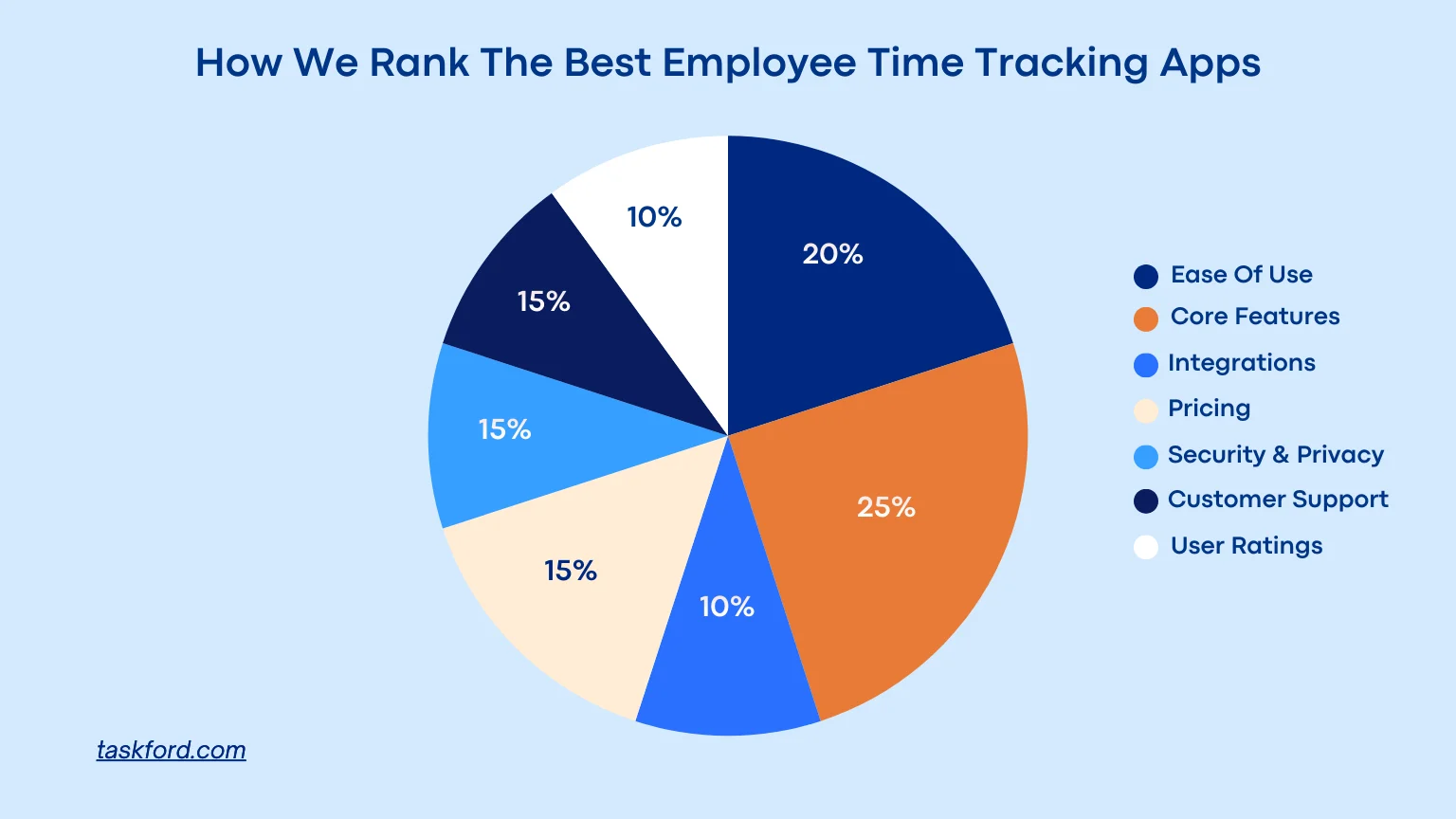
To rank the top employee time tracking apps, we evaluated each tool using a weighted framework designed for project managers, team leads, and growing teams.
We focused on:
- Ease of use (20%), including interface clarity, intuitive workflows, and mobile responsiveness
- Core features (25%), such as timers, manual entries, idle detection, reporting, and offline tracking
- Integrations (10%), especially compatibility with project management, payroll, and HR systems
- Pricing (15%), based on clarity, flexibility, and ability to scale with team size
- Security and privacy (10%), including data protection, compliance features, and user permissions
- Customer support (10%), covering response speed, onboarding help, and self-service resources
- User ratings (10%), based on verified reviews across multiple platforms
We avoided ranking tools based on feature volume alone. Instead, we prioritized employee time tracking apps that balance usability, reliability, and real-world team needs.
Top 10 Employee Time Tracking Apps in 2026
1. TaskFord
Best Employee Time Tracking App For All Teams
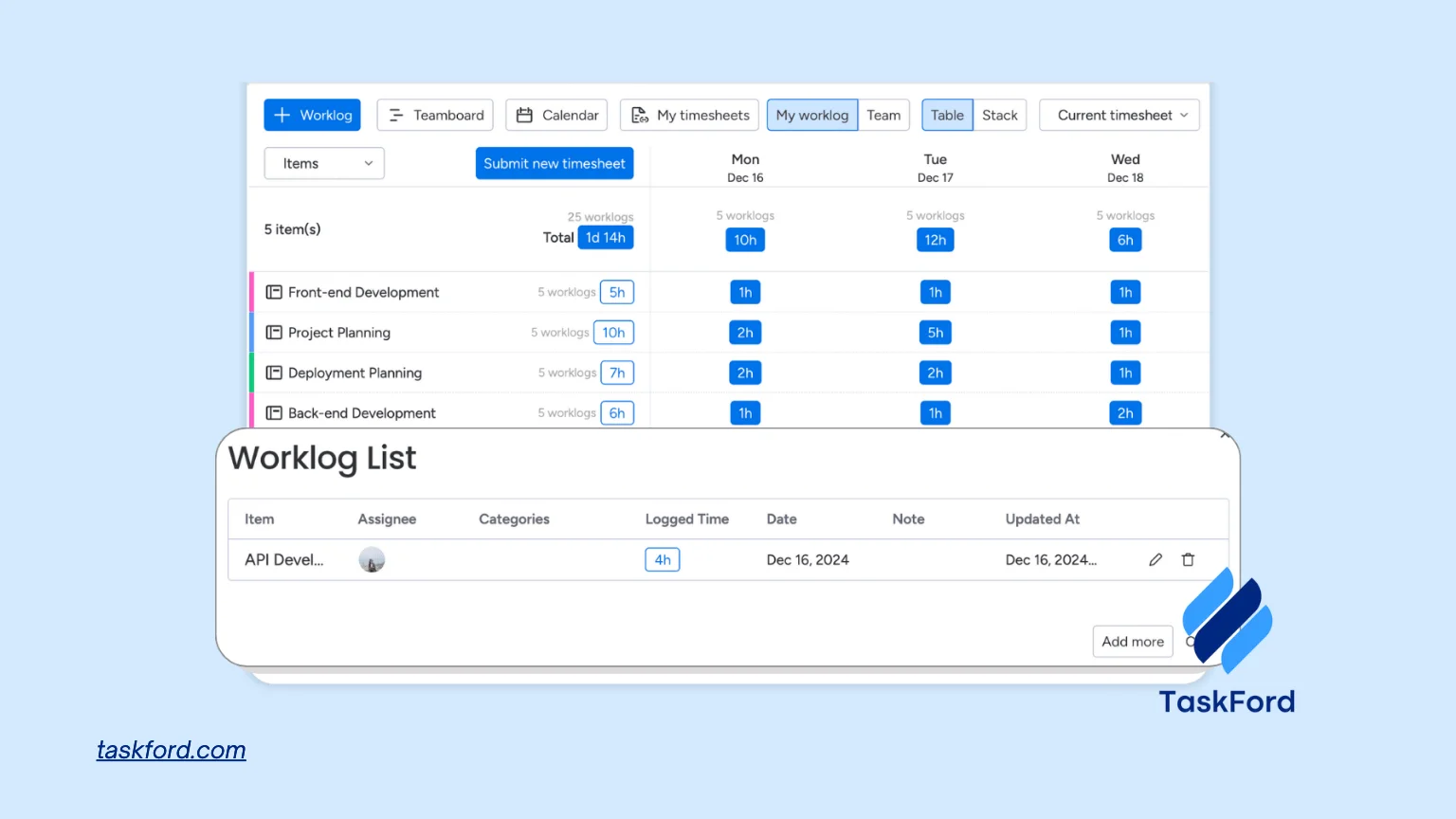
TaskFord is an integrated work delivery platform designed to help teams manage tasks, people, and time in one connected and easy to use system. Instead of treating time tracking as a standalone activity, TaskFord embeds time directly into how work is planned and executed.
What makes TaskFord different is its features, which are rated highly by many users. Time entries are tied to tasks, projects, and people, and viewed alongside capacity and workload. This allows managers to understand not only how much time is spent, but whether the right work is being done by the right people at the right time.
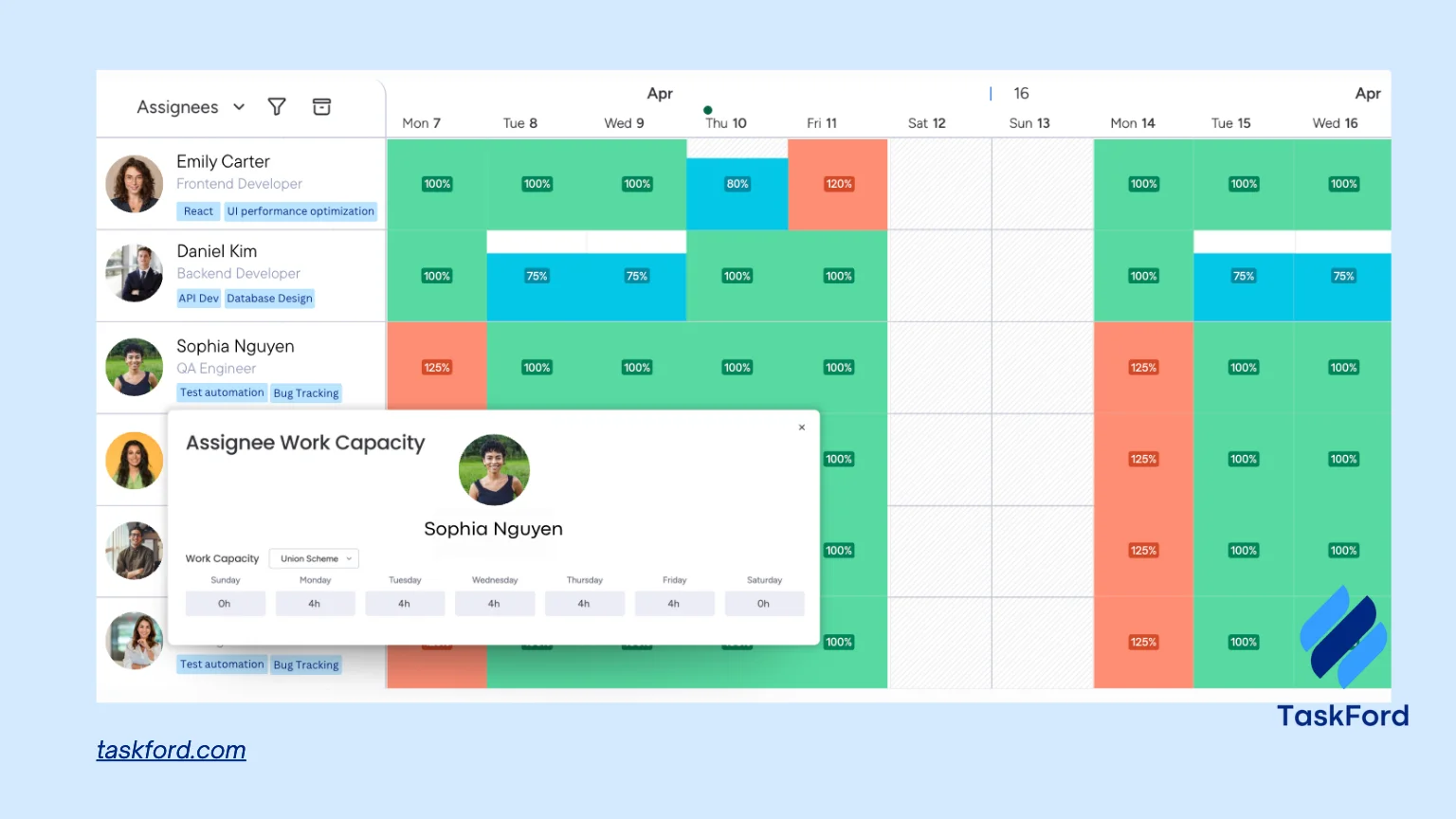
Moreover, before work is assigned, managers can see availability, current workload, and schedules across the team. This makes it easier to commit to work realistically, rebalance effort early, and avoid overloading individuals as projects progress.
Features Summary
TaskFord combines task management, resource planning, and employee time tracking in a single platform built around capacity and workload awareness. This gives managers a clearer understanding of how work is distributed, where capacity is stretched so they can make further adjustment and prevent overload.
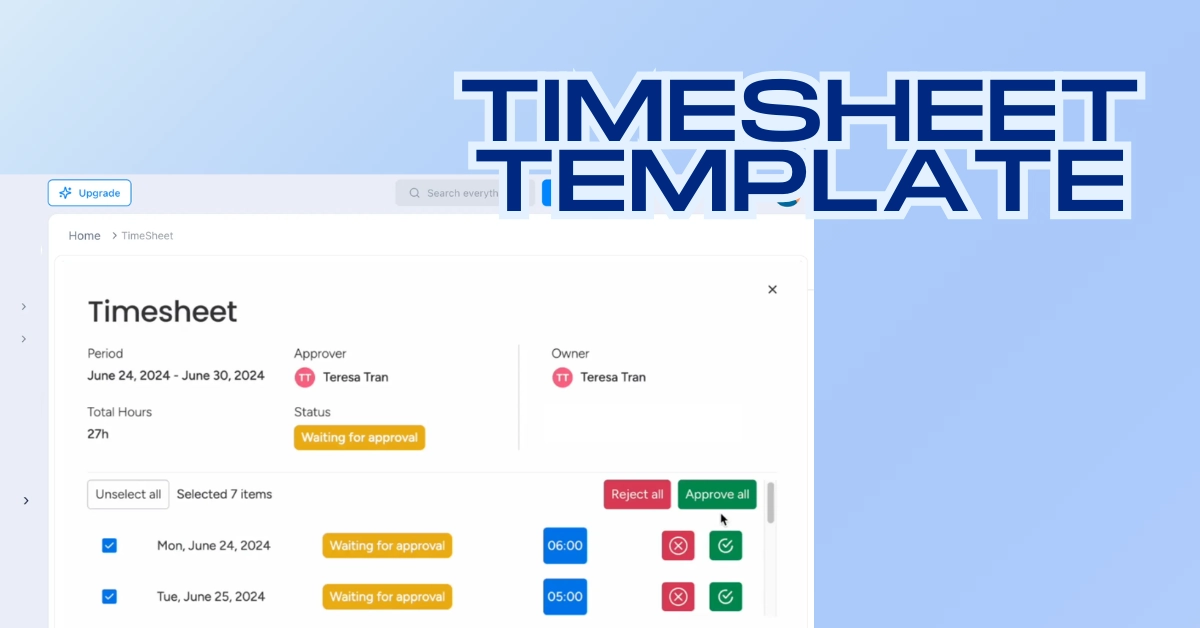
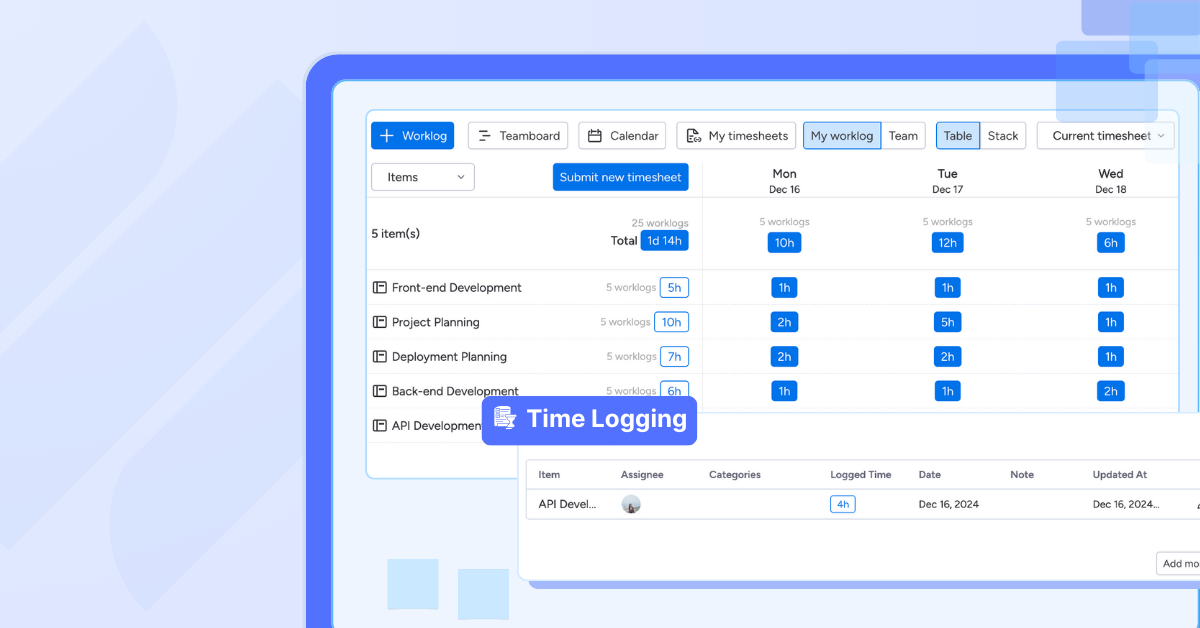
Employees log hours through a structured timelog or a real-time stopwatch, supporting both manual and live tracking. Time can be recorded and automatically rolls into timesheets that employees submit for approval. Managers can track submission and approval status in real time, reducing payroll errors and manual follow-ups.
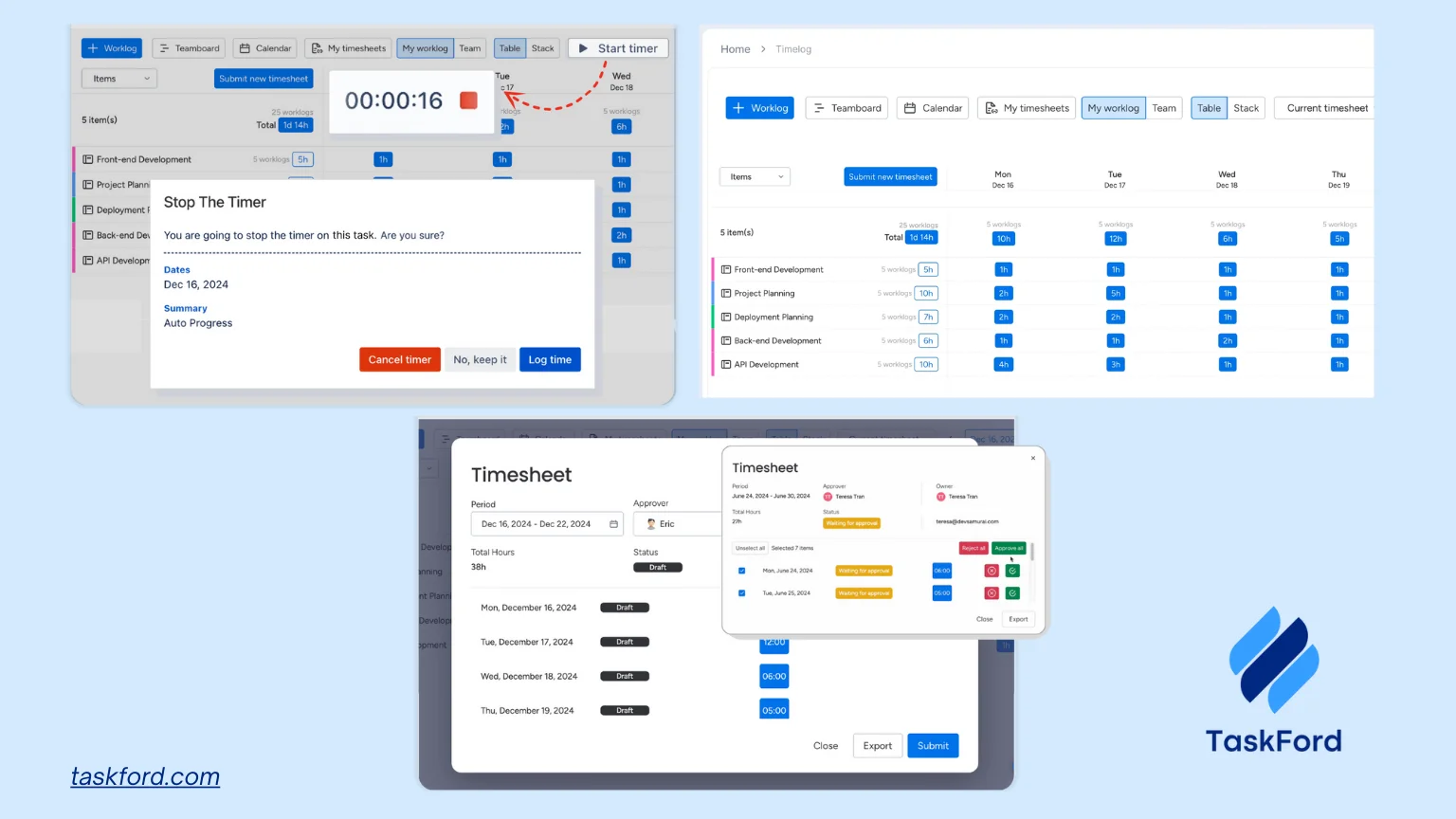
TaskFord also includes built-in reporting that turns time and workload data into clear summaries. Managers can review time spent by task, project, or person and use these insights to improve estimates, rebalance workloads, and make more informed delivery decisions.
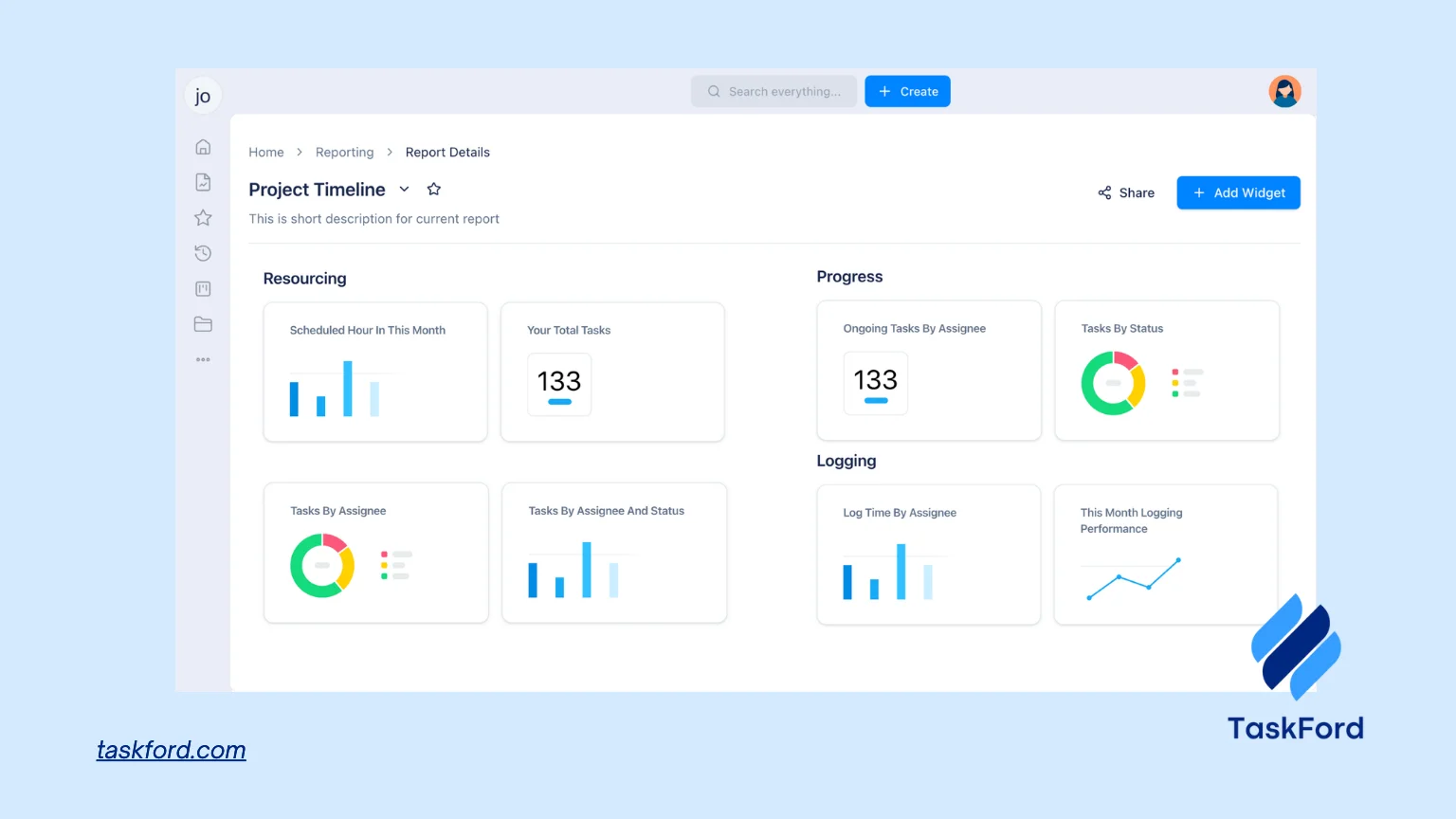
From a security and access perspective, time and workload data is controlled through role-based permissions, helping teams protect sensitive information while maintaining transparency.
Best For: Project managers and team leads managing multiple projects and shared resources who need time tracking that supports planning, not just reporting.
Pros
- Time tracking connected directly to tasks: Makes it clear how time spent aligns with planned work and available resources.
- Clear capacity and workload visibility: Helps managers spot overload and make better planning decisions early.
- Shared resource management support: Enables teams to allocate people across multiple projects without conflicts.
- Clean, approachable interface: Encourages consistent use without heavy onboarding.
- Great customer support: Has a dedicated team to answer questions and help you learn the app in the most comprehensive way.
Cons
- Growing integration ecosystem: The number of third-party integrations is still expanding compared to larger platforms.
- Advanced features still evolving: Some deeper capabilities are in active development and will be introduced progressively.
Pricing Plans
- Free trial: Available, no credit card required
- Standard: $3 per user per month
- Advanced: $5 per user per month
- Paid plans include a free trial, with workspaces reverting to the Free plan if no upgrade is selected.
For more information, contact TaskFord.
2. Ebility
Features Summary
Ebility is an employee time tracking and productivity analytics platform designed to help organizations understand how time is spent across applications, tasks, and teams. It combines automatic activity tracking with dashboards that translate usage data into actionable insights for managers.
Best For: Organizations that want detailed visibility into work patterns and productivity trends without relying entirely on manual timers.
Pros
- Automatic activity tracking: Records time spent on apps and systems without constant manual input.
- Productivity analytics: Dashboards highlight focus time, interruptions, and work patterns across teams.
- Manager-level visibility: Helps identify inefficiencies and support performance conversations.
Cons
- Limited task linkage: Time data is not deeply connected to task or project structures.
- Learning curve: Analytics features may require time to interpret correctly.
Pricing Plans
- Time Tracker: Pricing typically starts around $11.20 per user/month, billed annually
- Time Tracker Premium: $16.80 per user/month, billed annually
3. Gusto
Features Summary
Gusto is primarily a payroll and HR platform with built-in employee time tracking to support payroll accuracy, attendance management, and compliance. Time data feeds directly into payroll runs rather than project reporting.
Best For: Small businesses that want time tracking tightly connected to payroll and HR.
Pros
- Payroll integration: Time entries feed directly into payroll runs, reducing manual calculations.
- Compliance support: Gusto helps manage overtime rules, attendance records, and labor requirements.
- Simple employee tracking: Clock-in and clock-out workflows are easy for employees to use.
Cons
- Limited project visibility: The tool does not support task- or project-based time analysis.
- Basic reporting: Reports focus on payroll needs rather than workload or delivery insight.
Pricing Plans
- Simple: $49/month base + $6/user/month
- Plus: $80/month base + $12/user/month
4. Xero
Features Summary
Xero includes employee time tracking as part of its accounting and payroll ecosystem, allowing teams to track hours for payroll, job costing, and invoicing. The focus is financial accuracy rather than delivery insight.
Best For: Businesses already using Xero for accounting and payroll.
Pros
- Financial integration: Tracked time connects directly to payroll, invoicing, and job costing.
- Job costing support: Businesses can track labor costs by job or client.
- Compliance coverage: The platform supports payroll and tax-related requirements.
Cons
- Not project-focused: Time tracking lacks task- and delivery-level visibility.
- Basic interface: Time tracking features are functional but not very detailed.
Pricing Plans
- Starter: $2.90/month for the first 3 months, usually $29
- Standard: $5/month for the first 3 months, usually $50
5. ClickTime
Features Summary
ClickTime is a time tracking platform focused on project costing, utilization, and capacity reporting, commonly used by professional services teams.
Best For: Consulting and professional services teams tracking billable time.
Pros
- Utilization reporting: Managers can see how time is allocated across people and projects.
- Project cost visibility: The tool supports budgeting, forecasting, and cost control.
- Approval workflows: Timesheets include approval steps for financial oversight.
Cons
- Limited execution tools: ClickTime does not include task or work management features.
- Dated interface: The user experience may feel less modern compared to newer tools.
Pricing Plans
- Starter: $12/user/month billed annually
- Team: $15/user/month billed annually
- Free trial: Available
6. Time Doctor
Features Summary
Time Doctor focuses on employee productivity and time tracking, combining timers with activity tracking, website and app usage reporting, idle detection, and attendance summaries. It provides managers with insight into how time is spent during work hours rather than how work fits into project plans.
Best For: Teams that want productivity visibility and time accountability.
Pros
- Detailed productivity insights: Reports show which apps and websites consume working time.
- Strong attendance tracking: Helps managers monitor working hours and patterns across teams.
- Good compliance support: Useful for organizations that require time accountability documentation.
Cons
- Limited project delivery context: Time data is not deeply tied to tasks or project milestones.
- Employee pushback risk: Monitoring features may reduce trust if not implemented carefully.
Pricing Plans
- Basic: $6.67 per user per month billed annually, $8 per user per month billed monthly
- Free trial available
7. OnTheClock
Features Summary
OnTheClock focuses on attendance and payroll-ready time tracking, supporting clock-ins via web, mobile, or kiosk for hourly and on-site teams.
Best For: Hourly teams that need simple attendance tracking.
Pros
- Multiple clock-in methods: Employees can clock in using mobile apps, browsers, or kiosks.
- Overtime tracking: The system helps ensure payroll accuracy for hourly teams.
- Quick deployment: Setup is simple and requires minimal configuration.
Cons
- Minimal project context: The tool is not designed for task- or project-based tracking.
- Basic reporting: Reports focus on attendance rather than deeper analysis.
Pricing Plans
- Time & Scheduling: $4/user/month
- Add Payroll: $6/user/month
8. RescueTime
Features Summary
RescueTime is an automatic time tracking app that runs in the background to track time spent on applications and websites without manual timers. It is designed more for personal productivity insights than structured project tracking, but can still provide high-level visibility for teams.
Best For: Teams and individuals focused on productivity awareness rather than project reporting.
Pros
- Fully automatic tracking: No timers or manual input required.
- Clear productivity reports: Helps users understand focus patterns and distractions.
- Low effort adoption: Minimal setup and maintenance.
Cons
- Weak project alignment: Time is not naturally tied to tasks or deliverables.
- Limited team management features: Not designed for structured project environments.
Pricing Plans
- Free trial: Available with basic activity tracking
- Premium (Solo+): $12 per user per month billed annually, $15 per user per month billed monthly
9. Timeero
Features Summary
Timeero is a tracking app built for field teams, offering GPS tracking, mileage tracking, and geofencing to verify where work occurs.
Best For: Field teams and mobile workforces.
Pros
- GPS tracking: The app verifies where work takes place using location data.
- Mileage tracking: Teams can track travel distance for reimbursement or compliance.
- Geofencing: Clock-ins can be automated based on job site location.
Cons
- Limited planning insight: The tool is not built for workload or delivery tracking.
- Mobile-first design: It is less suitable for office-based or desk teams.
Pricing Plans
- Starter: $4/user/month billed annually
- Pro: $8/user/month billed annually
10. Paymo
Features Summary
Paymo combines employee time tracking with task management, project tracking, and basic resource scheduling. It aims to give small teams a single system for tracking work and time without the complexity of enterprise platforms.
Best For: Small teams that want time tracking bundled with task and project management.
Pros
- All-in-one approach: Tasks, projects, and time tracking live in one tool.
- Visual task tracking: Kanban and task lists help structure work.
- Good reporting coverage: Time reports support billing and performance reviews.
Cons
- Limited scalability: Not ideal for large teams or complex resource planning.
- Basic capacity insight: Resource views are less detailed than planning-focused tools.
Pricing Plans
- Free plan: Available with limited features
- Starter: $5.95 per user per month billed annually, $9.9 billed monthly
Why TaskFord Stands Out Compared To The Rest
While most employee time tracking apps excel in some fields, TaskFord becomes the better choice by satisfying every essential criteria that is used to rate these apps, especially its core features.
| Criteria | Most Time Tracking Apps | TaskFord |
|---|---|---|
| Ease of use | Separate timers and reports; extra steps to log time. | Time logging built directly into tasks with simple, consistent workflows. Easy onboarding process. |
| Core features | Timers and timesheets focused on hours logged. | Timelog, stopwatch, timesheets approval, reporting, Holiday and Leave Integration and workload views connected to work. |
| Pricing | Feature gating and unclear scaling costs. | ==Clear, affordable and flexible pricing that scales with team size.== |
| Security & privacy | Basic access controls. | Role-based permissions and structured access by team and project. |
| Customer support | Inconsistent response and onboarding quality. | Responsive support with onboarding and self-service resources. |
| User ratings | Mixed feedback on usability and insight. | Strong ratings for clarity, reliability, and practical value. |
Trends Shaping Employee Time Tracking Apps in 2026
Employee time tracking apps are no longer just about logging hours. In 2026, they are becoming planning tools that help teams work more predictably and sustainably.
Time data tied to planning
Modern tools are moving beyond standalone timesheets. Time entries are increasingly connected to tasks, projects, and capacity so managers can compare planned work against actual effort.
Focus on workload balance
Burnout is a real risk for project teams. Many tools now emphasize workload visibility, helping managers spot overload early instead of reacting after deadlines slip.
Automation and smarter insights
Automatic timers, idle detection, and smarter reporting reduce manual effort. The goal is cleaner data with less friction for employees.
Greater transparency, not surveillance
There is a clear shift away from aggressive monitoring. Teams prefer tools that build trust by showing how work flows, not policing behavior.
FAQ: Employee Time Tracking Apps
What is the difference between time tracking software and employee monitoring tools?
Time tracking apps focus on recording hours and effort. Monitoring tools focus on behavior such as screenshots or activity levels. Many teams prefer time tracking without intrusive monitoring.
Do employee time tracking apps work for remote teams?
Yes. Most modern tools are designed for distributed teams and support mobile tracking, flexible schedules, and asynchronous reporting.
Is a free employee time tracking app enough for teams?
Free plans can work for small teams or simple needs. As projects grow, teams usually need better reporting, workload visibility, and integration with project tools.
Should time tracking be tied to tasks and projects?
For project teams, yes. Task-level tracking provides context and makes time data far more useful for planning and estimation.
Which is the best employee time tracking app?
The best employee time tracking app depends on how your team works. Simple tools suit basic hour tracking, while project managers often need time connected to tasks and workloads. TaskFord stands out for teams that want time tracking tied directly to planning, capacity, and project execution while also satisfies other criteria like pricing and easy of use.
Conclusion
Employee time tracking apps are no longer just about recording hours. For project managers and team leads, they are tools for understanding how work actually unfolds, where effort is spent, and whether plans reflect reality. With so many options available, the challenge is choosing a tool that provides useful insight rather than more data to manage.
The right employee time tracking app supports better decisions, not just better reports. Tools that connect time to tasks, workloads, and capacity help teams stay balanced, deliver on time, and adapt as work changes. As teams grow and projects become more complex, this connection becomes essential for sustainable delivery.










![How to Fill Out a Weekly Timesheet [+ Free Template Download]](/marketing/blog/weekly-timesheet-thumbnails.webp)



Subscribe for Expert Tips
Unlock expert insights and stay ahead with TaskFord. Sign up now to receive valuable tips, strategies, and updates directly in your inbox.