Work Management Tools Smart Teams Are Exploring in 2026
Discover the work management tools modern teams are exploring in 2026 and why these emerging platforms are worth watching.
Managing multiple projects at once can quickly become overwhelming.
When deadlines are tight, priorities shift, and resources are spread across different initiatives, it’s easy to feel like you’re losing control. Suddenly, you’re asking questions like: Are we on track? Who has the capacity for more work? What’s falling behind?
To keep things moving, many teams rely on a mix of task tools, spreadsheets, and endless status meetings. Unfortunately, this only adds more coordination work without providing the clarity needed.
That’s why, as 2026 approaches, many project managers and team leaders are turning to a new generation of work management tools. These platforms are built to offer real-time visibility into progress and capacity across multiple projects. In this article, tools that are making waves will be explored, showing how they help teams stay on top of projects with less stress.
What Defines a Work Management Tool Today
A work management tool is no longer just a place to list tasks. It’s a system designed to help teams plan, coordinate, and deliver work across multiple projects and people simultaneously.
While traditional task management tools focus on individual tasks and what needs to be done, work management systems go a step further by connecting tasks with timelines, team capacity, and priorities. This allows teams to see the full picture and manage work in context, ensuring better alignment and smoother execution.
A modern work management tool typically brings together three things:
- Project visibility, so teams can track progress across multiple initiatives
- Team and capacity awareness, so leaders know who is available and who is overloaded
- Execution support, so daily work moves forward without constant manual coordination
As teams become more cross-functional and projects overlap, this broader view becomes essential. These tools exist to reduce guesswork and help teams make decisions based on what is really happening, not just what was planned. While the goal is the same, not all tools are built the same way. In practice, modern platforms tend to take very different approaches.
How Modern Work Management Tools Differ by Approach
Most work management tools aim to solve the same problems, but they go about it in different ways. Each approach focuses on a different priority, such as visibility, speed, or fit. Understanding these differences helps teams avoid tools that look good at first but fall short in daily use.
Integrated Work Delivery Platforms
Integrated work delivery platforms connect planning, execution, resources, and delivery in one system. Rather than focusing only on task management, they help teams understand how priorities, project plans, team capacity, and day-to-day work affect one another.
This approach works well for teams managing multiple projects, shared resources, and changing priorities. It provides a connected view of work from planning through delivery, helping managers make better decisions when plans change.
All-in-One Work Management Platforms
All-in-one platforms focus on bringing a broad range of work management capabilities into one product. They may combine task management, project planning, collaboration, documentation, reporting, and other tools that teams would otherwise manage separately.
This approach works well for teams that want to consolidate their work in fewer applications and reduce tool sprawl. The emphasis is on having a wide set of capabilities available in one place, rather than on connecting planning and delivery around resource capacity.
AI-First Work Management Tools
AI-first tools focus on reducing the effort spent on planning. They use automation to schedule tasks, adjust priorities, and react to changes as work moves forward.
This approach is useful for teams dealing with frequent changes and tight deadlines. The trade-off is that teams give up some manual control and rely more on automation to guide daily work.
Team-Specific Work Management Tools
Team-specific tools are designed around the needs of particular teams, such as product or engineering. They support familiar workflows and are usually easier to adopt.
This approach works best when work patterns are stable and clearly defined. It may be less flexible for teams whose work changes often or spans multiple functions.
With these approaches in mind, the next step is to look at how the tools featured in this article were evaluated.
Evaluation Criteria: How These Work Management Tools Were Reviewed
The tools in this article were reviewed based on how well they support real-world work, not just feature lists. We focused on the areas that matter most when teams manage multiple projects and shared resources.
- Project and work visibility: How clearly the tool shows progress across projects without relying on constant status updates.
- Team capacity and coordination: Whether the tool makes it easy to understand workloads, availability, and who is working on what.
- Workflow flexibility and ease of use: How well the tool adapts to different ways of working and how easy it is for teams to adopt.
- Scalability over time: Whether the tool continues to work as teams grow and work becomes more complex.
These criteria reflect how teams actually evaluate collaborative work management tools today. With this framework in place, it becomes easier to see why certain tools are gaining attention among modern teams.
6 Work Management Tools Smart Teams Are Exploring in 2026
Work management systems today are being built with different priorities in mind. Some focus on automation, others on flexibility or specialization. The tools below stand out because they address a common challenge teams face in 2026: managing multiple projects and shared resources without losing visibility or control.
Rather than ranking them, this list highlights tools that are gaining attention for how they approach work management and the types of teams they are best suited for.
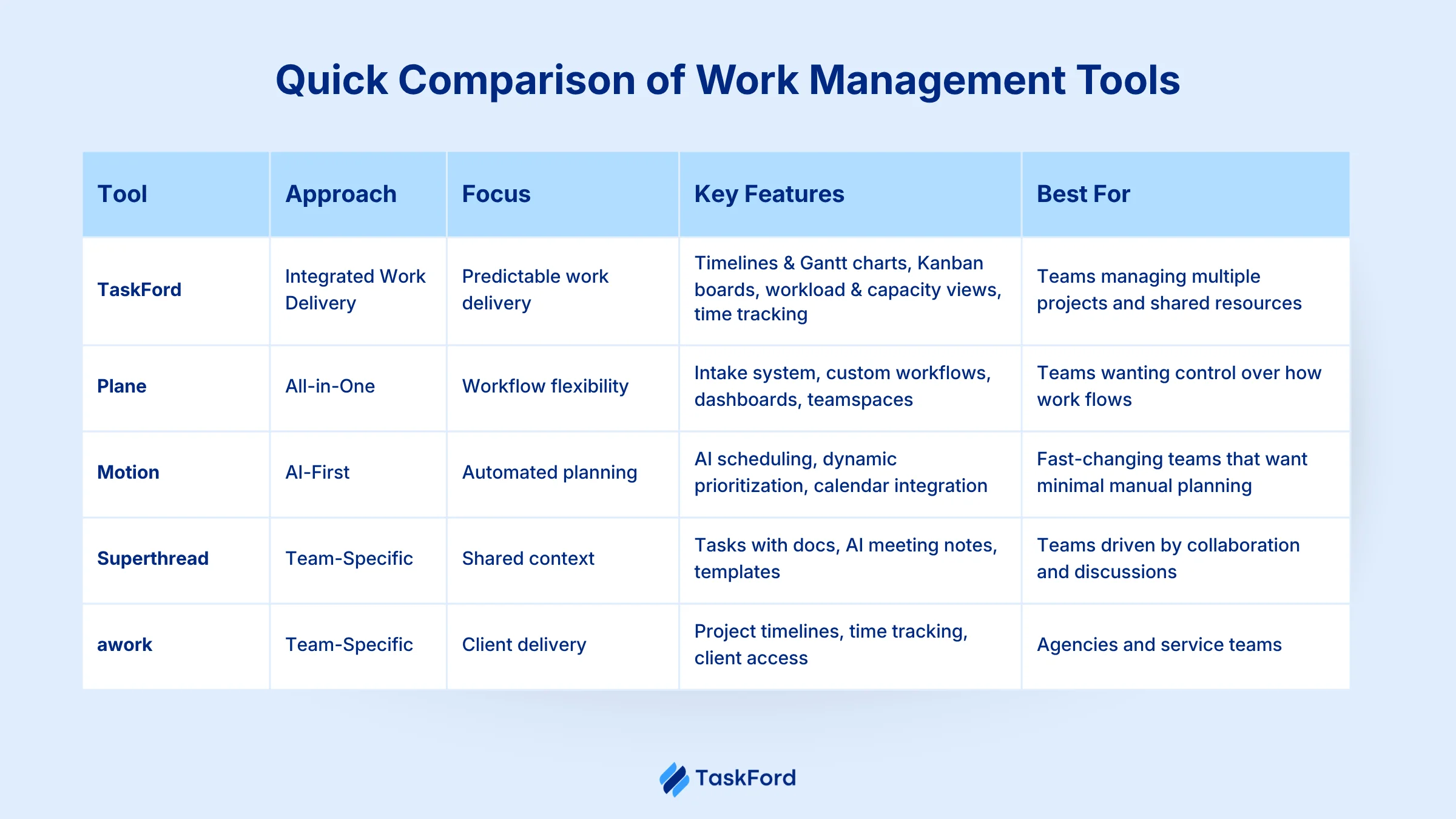
1. TaskFord: Integrated Work Management for Predictable Delivery
Approach: Integrated Work Delivery Platform
TaskFord is an integrated work delivery platform built to help teams plan, coordinate, and deliver work across multiple projects. It focuses on connecting tasks, timelines, and people in one system so teams can move from planning to execution with fewer gaps and less guesswork.
Instead of managing work as separate task lists, TaskFord structures work around projects and timelines. Teams plan tasks within projects, visualize work using boards and schedules, and track progress as tasks move forward. This makes it easier to see how daily work connects to overall project delivery, even when multiple projects are running at the same time.
Key features
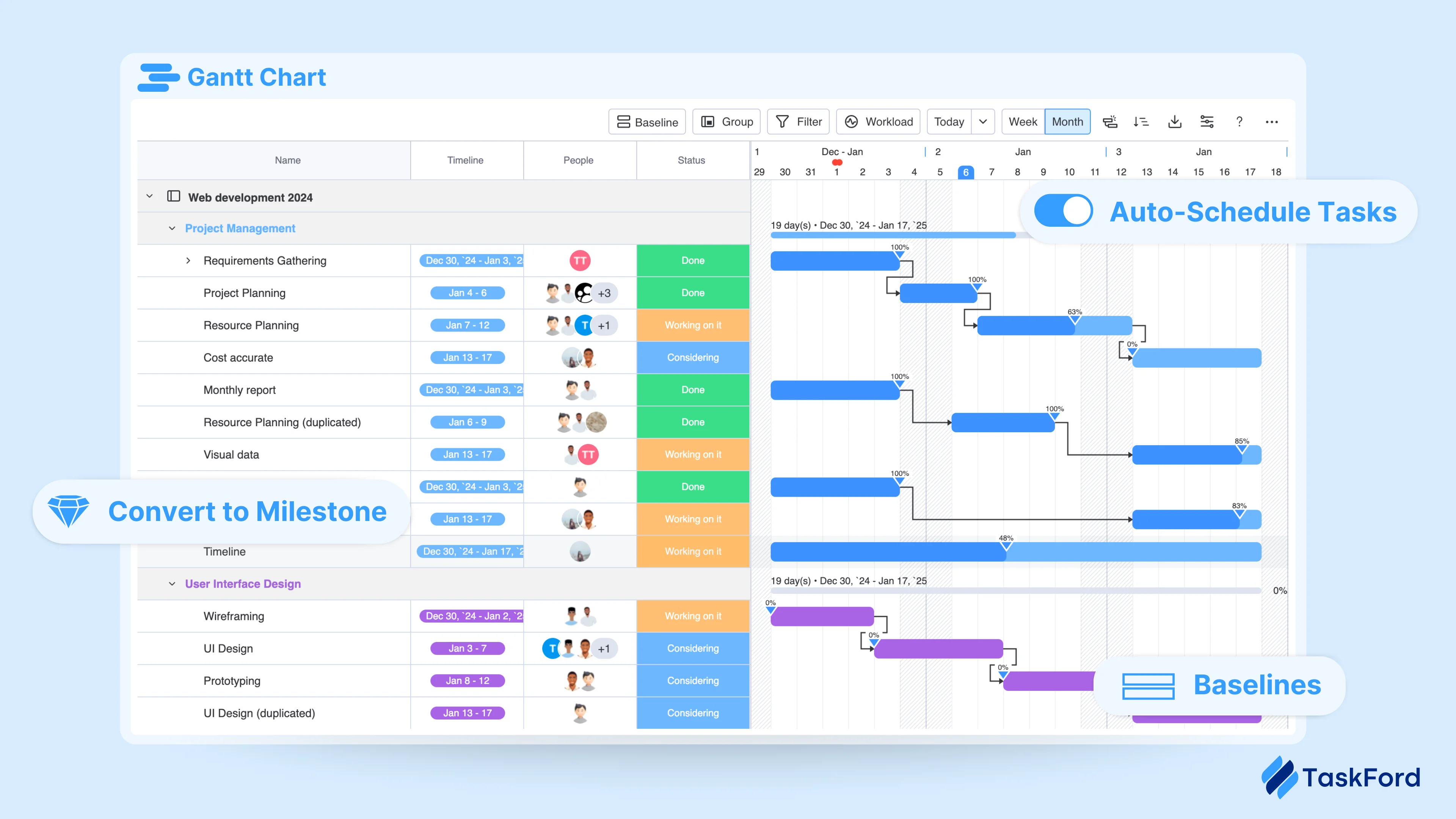
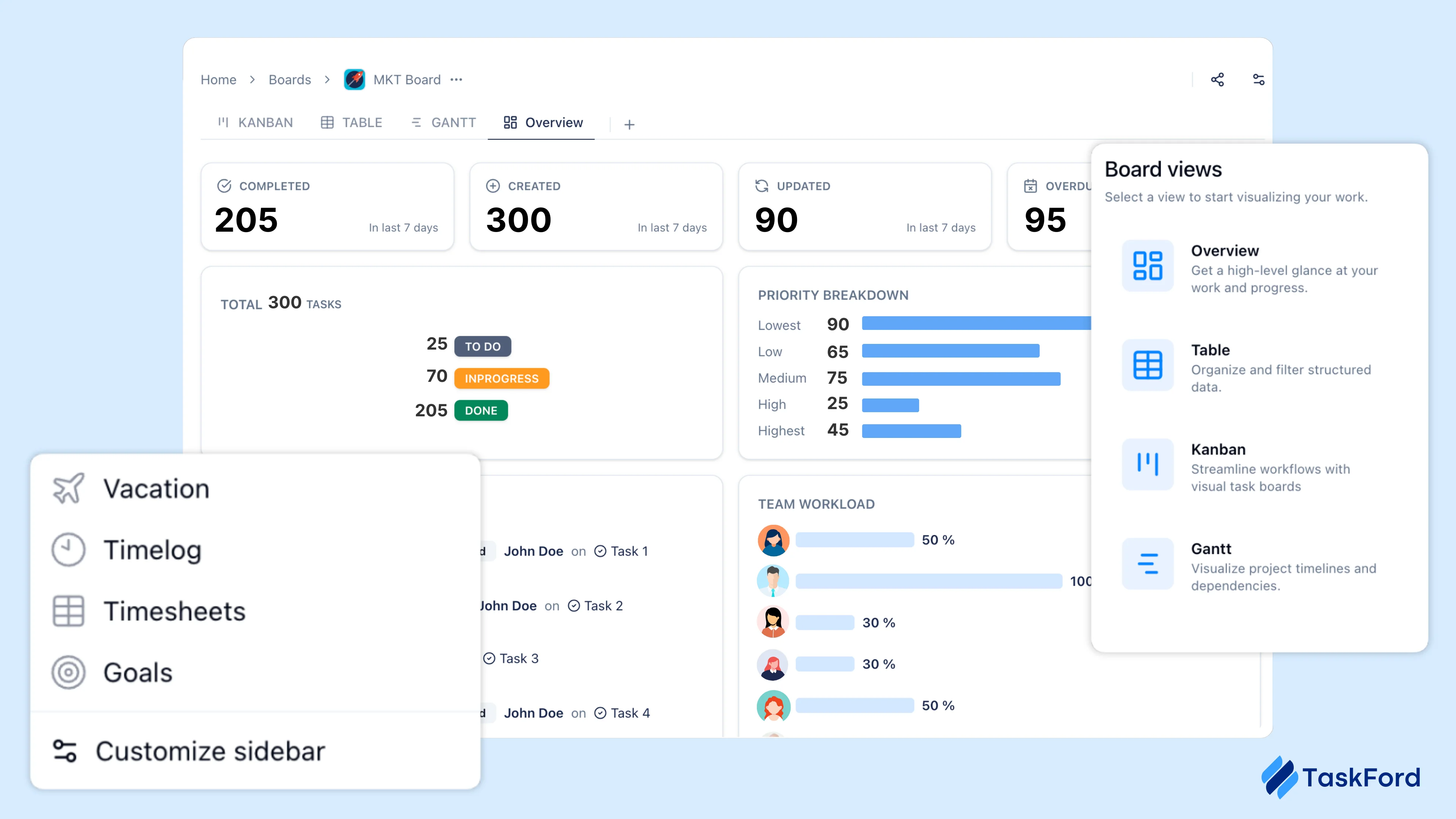
TaskFord brings together task management, project planning, and resource visibility in a single workspace designed for managing ongoing work. Teams organize tasks using Kanban boards and project views, while managers plan delivery with timelines and Gantt charts to understand progress and dependencies across projects.
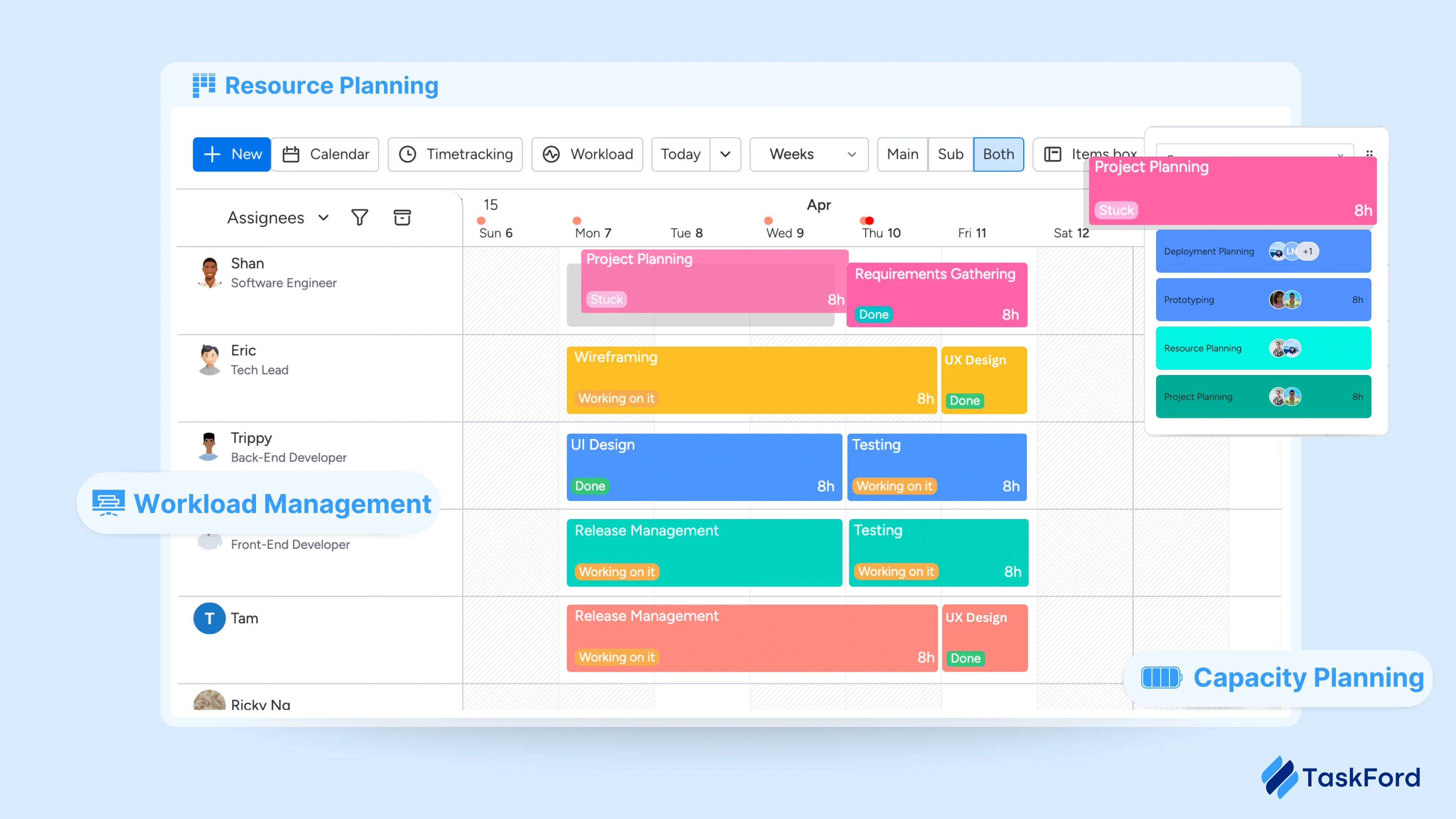
Workload and capacity are built into everyday planning. Before assigning work, managers can review team availability, current workload, and scheduled time off, making it easier to distribute work realistically and adjust plans early when priorities change.
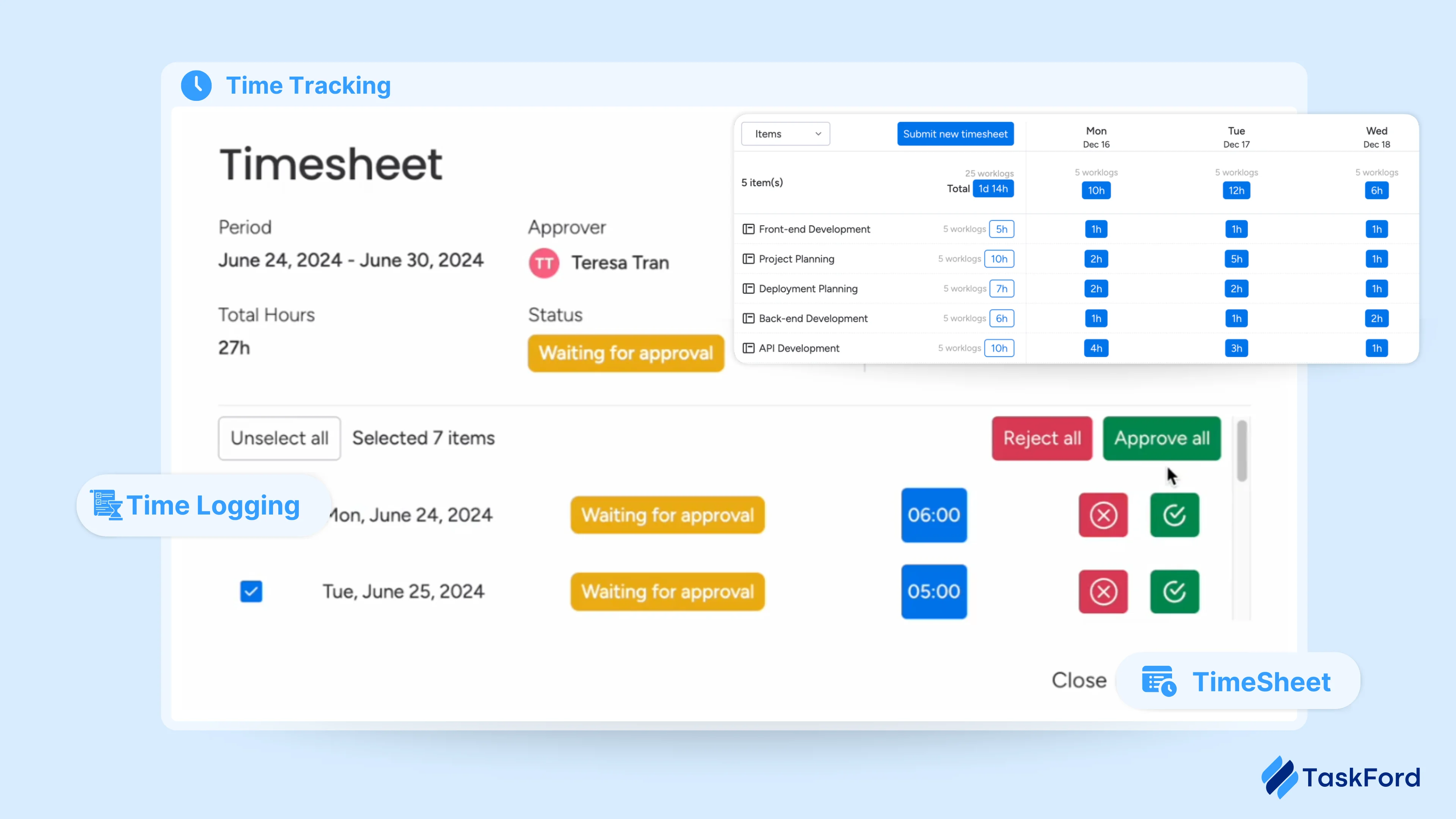
Time tracking is embedded directly into task execution. Team members log time manually or using a real-time timer, record billable and non-billable hours, and submit timesheets for approval. Managers can track submission and approval status in real time, reducing manual follow-ups.
Dashboards and reports bring task, time, and workload data together in clear summaries. Managers can review progress and effort by project, task, or person, helping improve estimates and make more informed delivery decisions based on actual work.
Pros
TaskFord provides a solid foundation for managing work across multiple projects. Its visual planning tools make it easy to track progress and dependencies, while integrated time and capacity features support more realistic planning. The platform works well for cross-functional teams and is approachable without heavy onboarding.
Cons
Compared to AI-first tools, TaskFord places less emphasis on automation and predictive features. Its integration ecosystem is still growing, and some advanced capabilities continue to evolve.
Pricing
- Free trial available, no credit card required
- Standard: $3 per user per month
- Advanced: $5 per user per month
Best for
Project managers and team leads managing multiple projects and shared resources who need a practical system that connects planning, execution, and visibility in one place.
2. Motion: AI-First Work Management for Automated Planning
Approach: AI-First Work Management Tool
Motion is an AI-powered work management system built around automation. It uses AI to plan, schedule, and continuously adjust work across tasks, projects, and calendars, reducing the need for manual coordination.
Instead of relying on fixed plans, Motion automatically prioritizes tasks and rebuilds schedules as deadlines, availability, and priorities change. This allows teams to respond quickly to shifting work without constant replanning.
Key features
Motion manages tasks and projects alongside calendars, using AI to automatically prioritize work and generate daily schedules. Tasks are reordered dynamically based on urgency, dependencies, and available working time.
Scheduling is handled automatically. Motion analyzes calendars, working hours, and deadlines to adjust plans in real time, reducing the need for manual rescheduling when priorities shift.
The platform includes predictive workload analysis to monitor how much work is assigned across individuals and teams. It highlights over- or under-utilization and adjusts schedules accordingly. Motion also provides AI-assisted features such as meeting notes, task creation, and deadline predictions.
Pros
Motion significantly reduces the effort required to plan and reprioritize work. Its automated scheduling works well for fast-changing environments, and tight calendar integration helps teams stay focused on immediate priorities.
Cons
Motion offers less manual control over timelines and workflows. Teams that prefer visual planning tools like Gantt charts or standardized processes may find the AI-driven approach restrictive. Its effectiveness depends heavily on accurate inputs and trust in automation.
Pricing
- Pro AI: $19 per user per month
- Business AI: $29 per user per month
- AI usage is credit-based; availability and trials may vary
Best for
Teams and individuals working in fast-moving environments who want AI to handle planning, scheduling, and prioritization with minimal manual effort.
3. Plane: Flexible Work Management with Customizable Workflows
Approach: All-in-One Work Management Platform
Plane is an open-source work management system that brings tasks, projects, and team spaces into a single workspace. It is designed for teams that want visibility into work while retaining control over how tasks are created, reviewed, and moved through different stages.
Plane does not impose a fixed workflow. Teams set their own work states, cycles, and project structures, allowing different projects or teams to follow different processes within the same workspace.
Key features
Plane includes an intake system that collects incoming work in a pre-approval queue, allowing teams to review and prioritize requests before adding them to active projects. Time tracking is built in, enabling teams to log effort against work items and generate reports, including client-facing views.
The platform offers dashboards with auto-refreshing widgets to monitor project progress and key work signals. Workflows and approvals allow teams to define states, rules, and responsibilities for how work moves forward, while teamspaces separate work by team or function to keep each workspace focused.
Pros
Plane provides a clear set of work management features, including intake, workflows, dashboards, and team spaces, within a single system. Its configurable structure and open-source option give teams flexibility in how the tool is set up and deployed.
Cons
Because many features are configurable, teams may need time to set up workflows and dashboards that fit their needs. Capabilities such as capacity planning and advanced automation are less central compared to other tools in this list.
Pricing
- Free plan available
- Pro: $6 per user per month
- Business: $13 per user per month
- Enterprise: Custom pricing
- Self-hosting available
Best for
Teams that want a flexible collaborative work management system with built-in intake, workflows, dashboards, and team spaces, and prefer configuring processes rather than following fixed methodologies.
4. Superthread: Team-Focused Work Management with Built-In Context
Approach: Team-Specific Work Management Tool
Superthread combines task tracking, project organization, documentation, and meeting notes in a single workspace. Teams use it to manage day-to-day work while keeping discussions, decisions, and reference material attached to the tasks they relate to.
Work in Superthread is organized into projects and boards. Tasks can be created directly from documents or meetings, and supporting notes stay linked to the work as it progresses. This makes it easier for team members to understand the background of tasks without switching between tools.
Key features
Superthread enables task and project management with customizable boards and structured views. Documents and notes can be linked directly to tasks within projects for easy access.
Meetings are integrated with an AI assistant that records discussions, generates summaries, and creates follow-up tasks from key points.
The platform supports multiple views, including boards and timelines, and includes global search and notifications to help teams stay on track. Additionally, templates are available for recurring tasks and common project types, simplifying workflows.
Pros
Superthread keeps tasks, documents, and meeting notes connected, which helps teams maintain shared understanding as work moves forward. The platform is easy to set up and does not require complex workflow configuration.
Cons
Superthread is less focused on capacity planning, resource forecasting, or detailed delivery metrics. Teams that require strict workload control or advanced automation may find the feature set limited.
Pricing
- Free plan available (limited usage)
- Pay What You Want pricing for full features (starting from $3 per user per month)
- Business: Annual plans for larger teams
- Enterprise: Custom pricing
Best for
Small to mid-sized teams that want a team-oriented tool where tasks, documents, and meetings stay closely connected.
5. awork: Work Management Built for Agency and Client Projects
Approach: Team-Specific Work Management Tool
awork is a collaborative work management system designed primarily for agencies and project-based teams that manage client work. It combines task tracking, project planning, time tracking, and client collaboration in a single system built around billable work and delivery timelines.
Work in awork is organized by projects, with tasks planned against schedules and assigned to specific team members. Time tracking is closely tied to tasks and projects, allowing teams to monitor effort, utilization, and progress as work moves forward.
Key features
awork includes task and project management with visual planning tools such as boards and timelines. Projects can be structured around client engagements, making it easier to track deliverables and deadlines.
Time tracking is built directly into daily work. Team members log hours against tasks, and time data feeds into reports for utilization, billable work, and project progress. External collaborators and clients can be invited into projects without additional cost.
The platform provides reporting focused on project status, workload, and time usage. These reports help teams review progress, assess capacity, and understand how effort is distributed across client work.
Pros
awork aligns well with agency-style workflows where time tracking, client access, and utilization matter. By combining planning, execution, and time tracking in one tool, it reduces the need for separate systems and manual reporting.
Cons
The feature set is tailored toward agencies and service teams, which may make it less suitable for product-focused or internal teams. Some teams may also find the emphasis on time tracking less relevant to their workflows.
Pricing
- Free trial available, no credit card required
- Basic: $6 per user per month
- Standard: $12 per user per month
- Professional: $22 per user per month
- Enterprise: Custom pricing for larger organizations
Best for
Agencies and project-based teams that manage client work and need integrated task management, time tracking, and project visibility in one system.
What Teams Should Get Right Before Adopting a Work Management Tool
Before choosing a new work management system, it’s worth stepping back and looking at how work actually happens today. Many adoption issues come from unclear expectations rather than the tool itself.
- Understand current workflows and pain points: Identify how work is planned, where it slows down, and where visibility breaks down. This helps ensure the tool addresses real problems, not assumed ones.
- Align on the main problem the tool should solve: Decide whether the priority is better planning, capacity visibility, coordination, or execution. A tool is most effective when it targets a clear need.
- Be ready for light standardization across teams: Agree on basic practices such as task structure, status updates, or review cadence. Some shared structure is necessary for a tool to work well across teams.
- Treat adoption as a change in how work is managed: Introducing a new tool often requires new habits around planning, updates, and accountability, not just a different interface.
- Start small with real work before scaling: Test the tool on active projects to see how it performs under real constraints, then adjust before rolling it out more broadly.
Getting these basics right creates a stronger foundation for adoption. When teams are aligned on how work flows and what needs to improve, a work management tool becomes a support system rather than another layer of complexity.
With that foundation in place, the next step is choosing a tool that fits how your team actually works, not just what looks good on a feature list.
How to Choose the Right Work Management Tool for Your Team
Choosing a work management tool means finding one that aligns with how your team works, helping to reduce friction and simplify processes rather than complicating them.
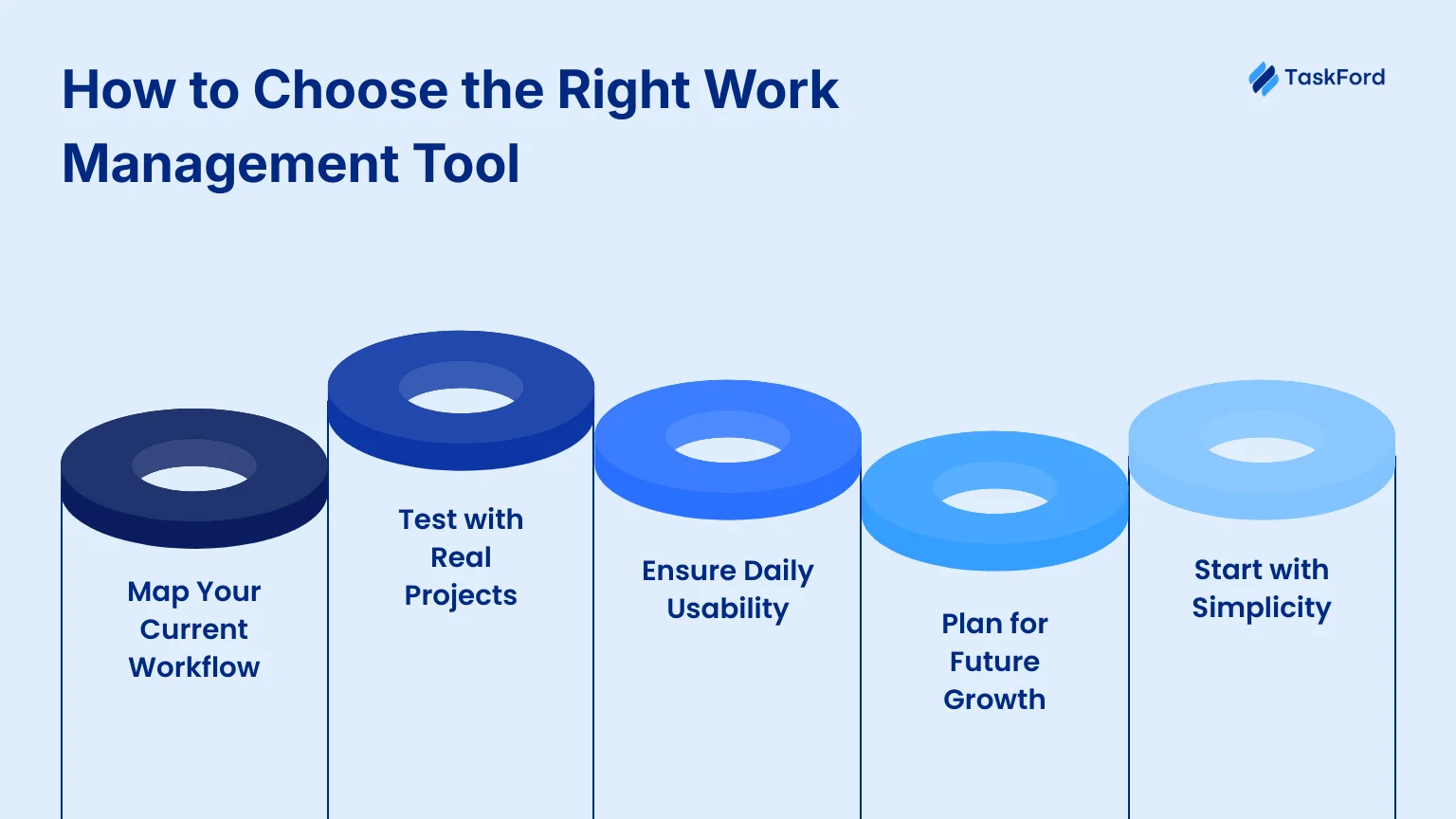
1. Start with How Work Flows Today
Begin by looking at how work actually moves through your team. How are projects planned? How do tasks get created and prioritized? How does everyone know what’s on track and what isn’t?
When you understand this flow, it becomes easier to spot where things break down. The right tool should support this flow or make it simpler. If a tool forces your team to completely change how they work just to get started, adoption will be harder.
2. Test Tools with Real Work
Trials are most useful when they reflect real conditions. Use active projects, real deadlines, and actual team members when testing a tool. Include overlapping work, time off, and shifting priorities.
This quickly shows whether a tool holds up in day-to-day use or only works well in demos. It also reveals how much effort is needed to keep work up to date.
3. Pay Attention to Everyday Use
A tool only works if people use it consistently. Notice how easy it is for team members to update tasks, check priorities, and understand what’s expected of them.
If the tool reduces the need for status meetings and follow-up messages, that’s a good sign. If it creates confusion or extra work, adoption will likely drop over time.
4. Think Beyond Immediate Needs
It’s also worth thinking about how your team might grow. As work scales, teams often manage more projects at once, share resources, and need better visibility across work.
As organizations grow, some teams also look beyond project execution and explore some of the best EOS software to improve accountability and leadership alignment alongside their work management processes.
A tool that works today should still make sense as complexity increases. Otherwise, you may find yourself switching tools again sooner than expected.
5. Keep It Simple at First
Advanced automation and complex workflows can be useful later, but they’re not always helpful at the start. Too much complexity too early can slow teams down and make the tool harder to adopt.
Focus first on clear planning, visible progress, and shared understanding. Once those basics are in place, more advanced features become much easier to introduce.
In the end, the best work management system is the one that fits naturally into how your team plans, executes, and reviews work, while giving you room to grow.
Conclusion
Work management is harder today because teams run more projects with shared people and changing priorities. Without clear visibility, even well-organized teams struggle to stay aligned.
In 2026, the right work management system is less about features and more about fit. Some teams need structure and predictable delivery. Others need flexibility, automation, or team-specific support. The tools in this list reflect those different approaches.
The key is to choose a tool that matches how your team plans, executes, and reviews work. When the fit is right, work stays clear, and delivery stays consistent as teams grow.







Subscribe for Expert Tips
Unlock expert insights and stay ahead with TaskFord. Sign up now to receive valuable tips, strategies, and updates directly in your inbox.