How to Keep Release Planning on Track in TaskFord
Learn how to use TaskFord for release planning, from defining goals and organizing phases to setting milestones, tracking dependencies, and reviewing progress before launch.
Release planning helps teams bring product updates, feature launches, and software versions to market with a clear plan.
With TaskFord, your team can organize release goals, tasks, owners, milestones, dependencies, documents, and status updates in one shared workspace. This guide walks you through how to plan, track, and review a release from the first task to launch day.
What is release planning?
Release planning is the process of organizing the work needed to deliver a product update, feature launch, or software version.
It helps your team answer important questions before release day: what needs to be done, who is responsible, when each task is due, and what could block the launch.
A good release plan gives every team a shared view of the release scope, schedule, priorities, risks, and progress. It also makes it easier to manage changes, resolve blockers early, and keep the release moving toward launch.
Key purposes of release planning
Release planning helps teams get ready for launch in a more organized way. It makes it clear what needs to be delivered, when it should happen, and how each team will help bring the release across the finish line.
A clear release plan helps teams:
- Align teams and stakeholders on goals, timelines, and responsibilities.
- Prioritize features, fixes, and improvements based on value, effort, and dependencies.
- Reduce launch risks by breaking work into clear tasks, milestones, and checkpoints.
- Improve predictability for customers, marketing, sales, and internal teams.
- Identify blockers early and adjust the plan before they affect the release.
With these pieces in place, teams can move toward launch with more confidence and fewer last-minute surprises.
How to Build a Release Planning Workflow in TaskFord
Once your release goal is clear, it’s time to turn it into a plan your team can follow.
This workflow shows how to organize the work in TaskFord, assign responsibilities, track key dates, and keep the release moving smoothly from planning to launch.
Step 1: Define release goals
Start by clarifying what your team wants to achieve with the release. This helps everyone understand the purpose of the work before tasks, timelines, and responsibilities are added.
Your release goals may include:
- What product update, feature, or version is being released
- The target release date
- The main customer or business outcome
- The scope of the release
- The success criteria for launch
For example, your goal could be to release a new customer portal version with improved onboarding, updated billing settings, and admin controls by the end of the quarter.
Step 2: Organize tasks and assign responsibilities
Switch to Table view and use Task Group to create release phases, such as Phase 1, Phase 2, and Phase 3. This helps you separate the release into clear stages so the team can easily see what work belongs in each phase.
To set this up:
- Open your release planning board in Table view.
- Select Add Group to create each release phase.
- Add tasks under the right phase.
- Assign each task to the responsible team member.
- Set start dates and due dates for each task.
- Use task details or checklists to break larger tasks into smaller action items.
For example, Phase 1 might focus on planning and requirements, Phase 2 on development and testing, and Phase 3 on launch preparation and post-release follow-up.
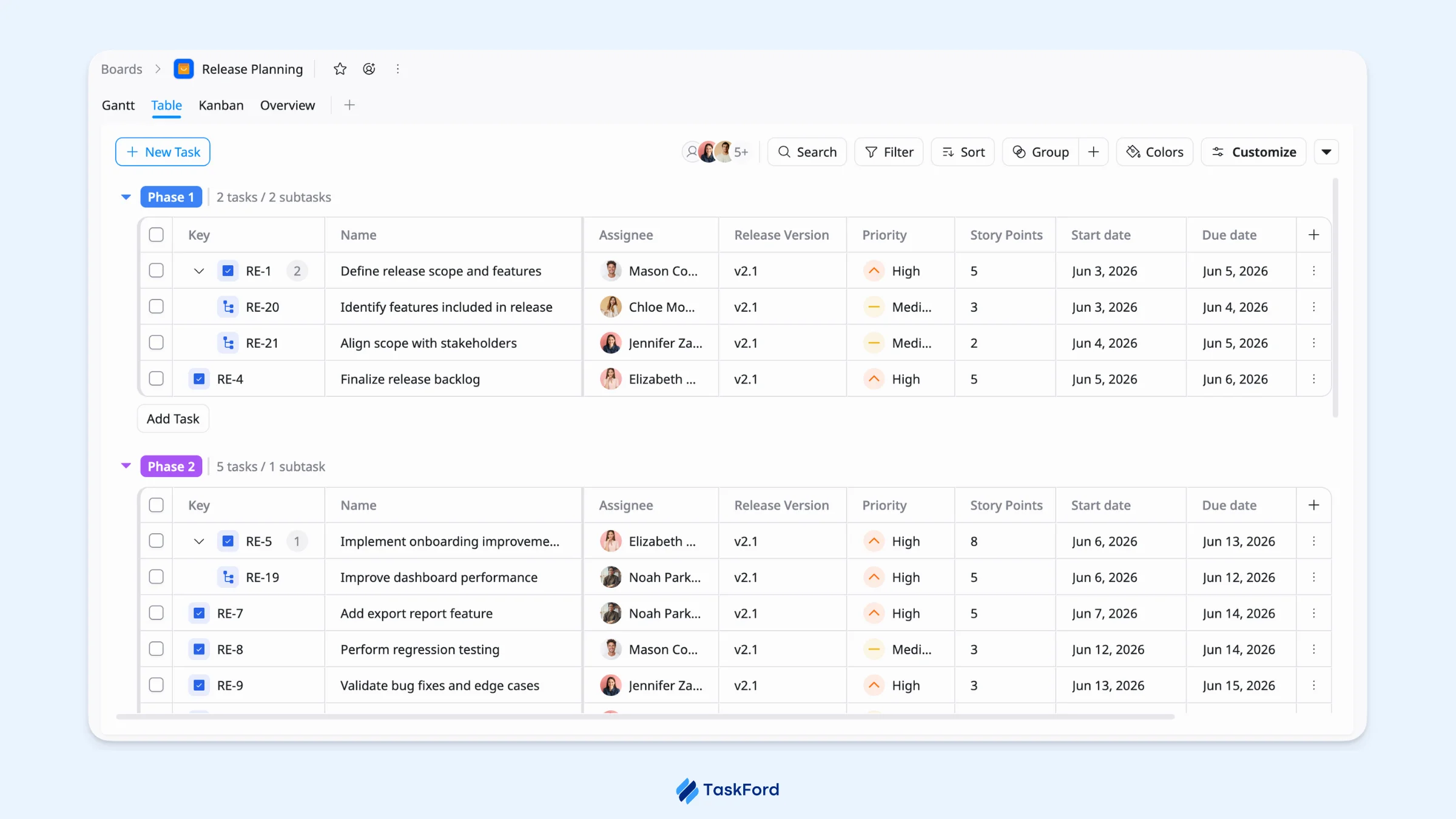
By organizing tasks this way, each phase has a clear structure, owner, and timeline, making it easier to keep the release moving forward.
Step 3: Add custom fields for story points and release version
After you have created release phases and added tasks, use custom fields to add more context to each task. This helps your team see key release details at a glance, such as the effort required and the product version each task belongs to.
Additional, customizable fields you can add to tasks to track project-specific information, such as story points, release version, risk level, or approval status.
For release planning, two helpful custom fields are:
- Story Points: estimate how much effort a task may require.
- Release Version: identify which product version a task, feature, or fix belongs to.
As you add these fields, think about what your team needs to see when reviewing the release:
- Use a Number field for Story Points.
- Use a Text field for Release Version.
- Make the fields required if every task needs this information.
- Show the fields as columns in Table view so the team can update them easily.
- Add other fields if needed, such as Risk Level, Component, QA Owner, or Approval Status.
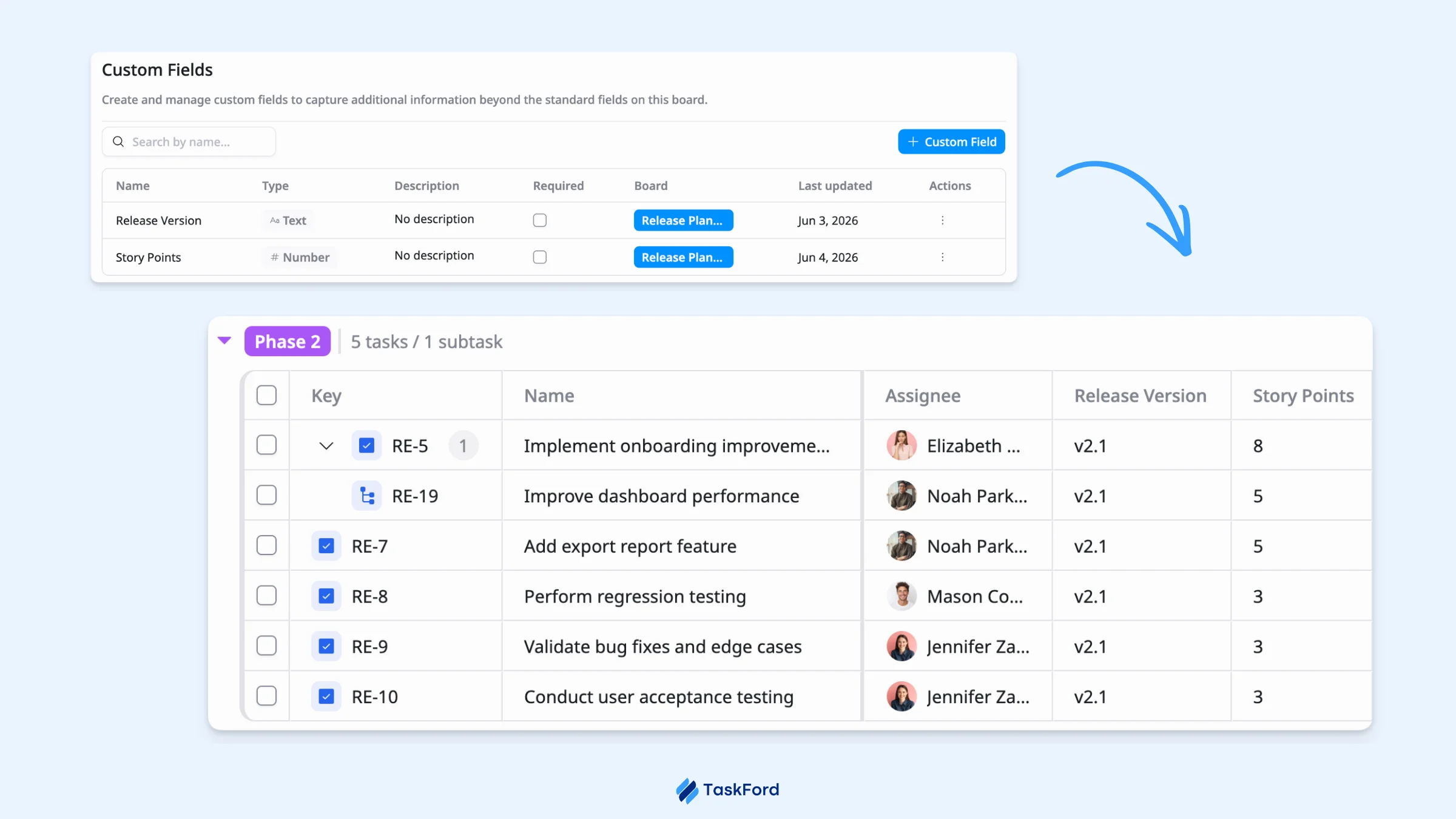
With these details in place, your release board becomes easier to filter, sort, and review as priorities, scope, or timelines change.
Step 4: Set milestones and deadlines
Once your tasks have the right details, add milestones to mark the key checkpoints in your release plan. Milestones help your team see what needs to be completed before the release can move to the next stage.
In TaskFord, you can create a milestone from a board view by creating a new task, then selecting Milestone in the Task type field from the task details view.
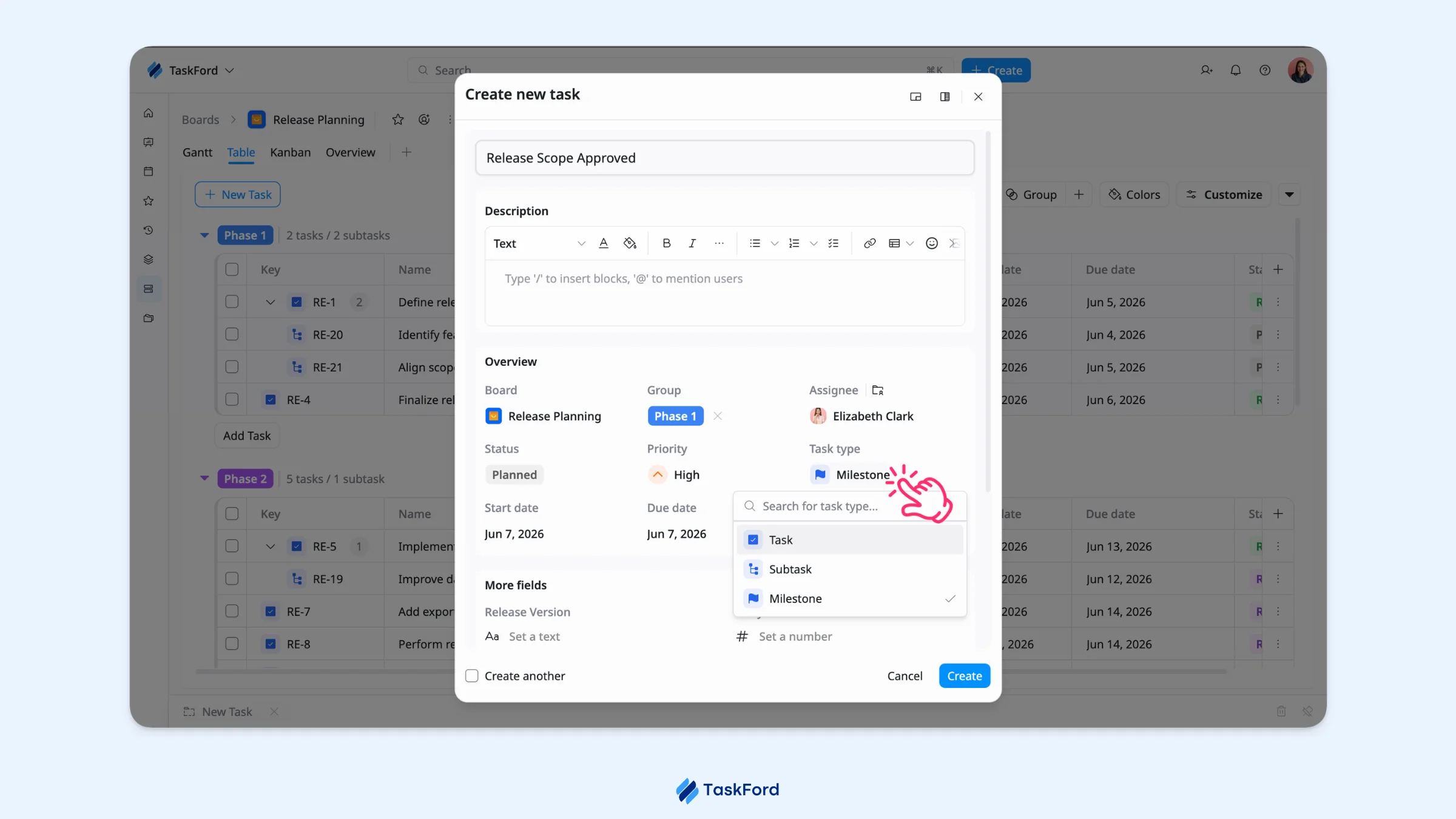
Use milestones for important release checkpoints, such as:
- Define release scope
- Finalize feature list
- Complete development
- Prepare release notes
- Start QA testing
- Approve release candidate
- Launch the release
- Review post-release feedback
For each milestone, set a clear due date that reflects when that checkpoint should be completed. This helps your team track release progress at a higher level and quickly see whether the launch is still on schedule.
Step 5: Track progress and monitor dependencies
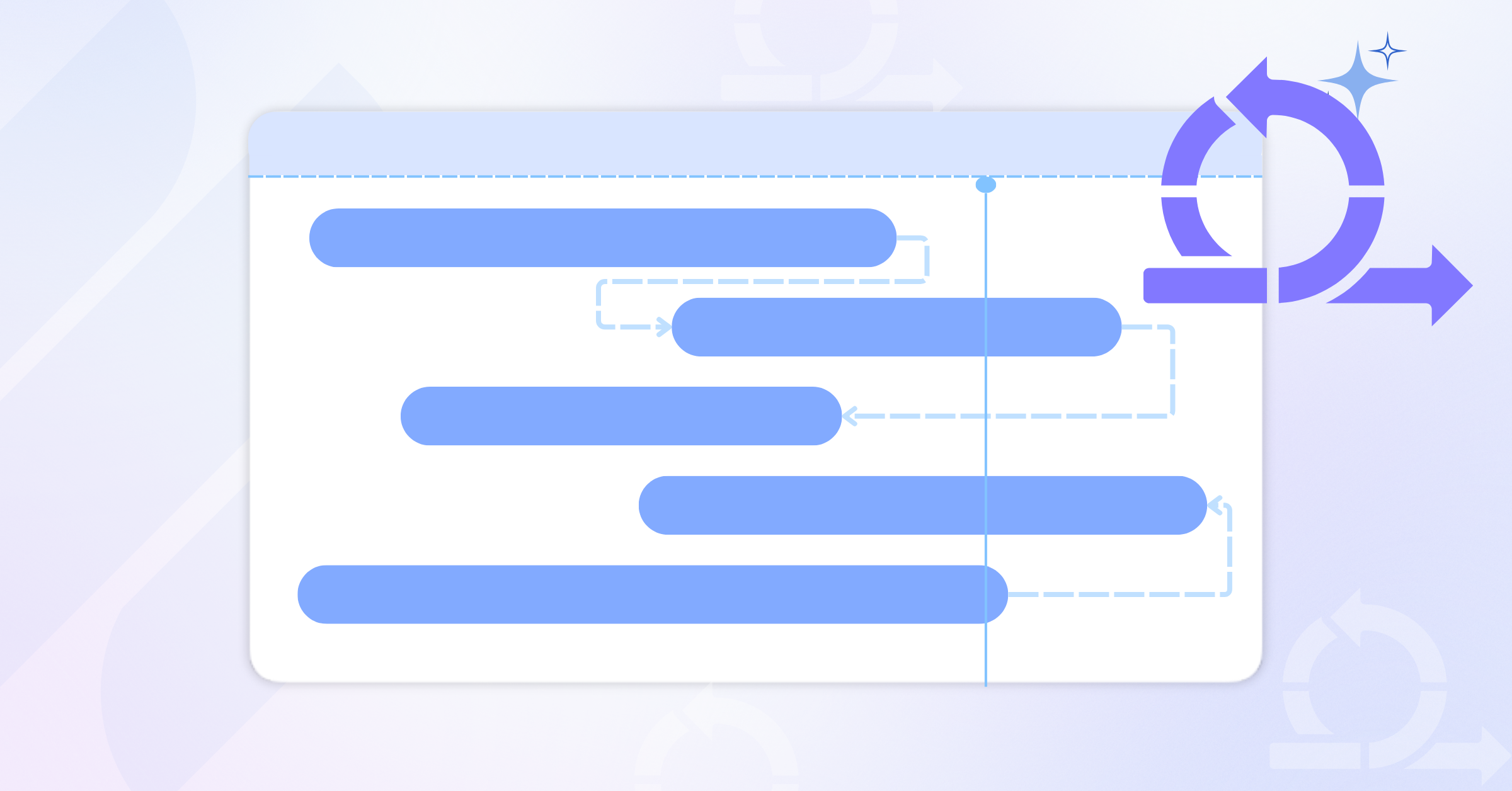
Use Gantt view to track your release timeline, milestones, and task dependencies in one place. This helps you see which tasks are on schedule, which ones are delayed, and how one delay may affect the rest of the release.
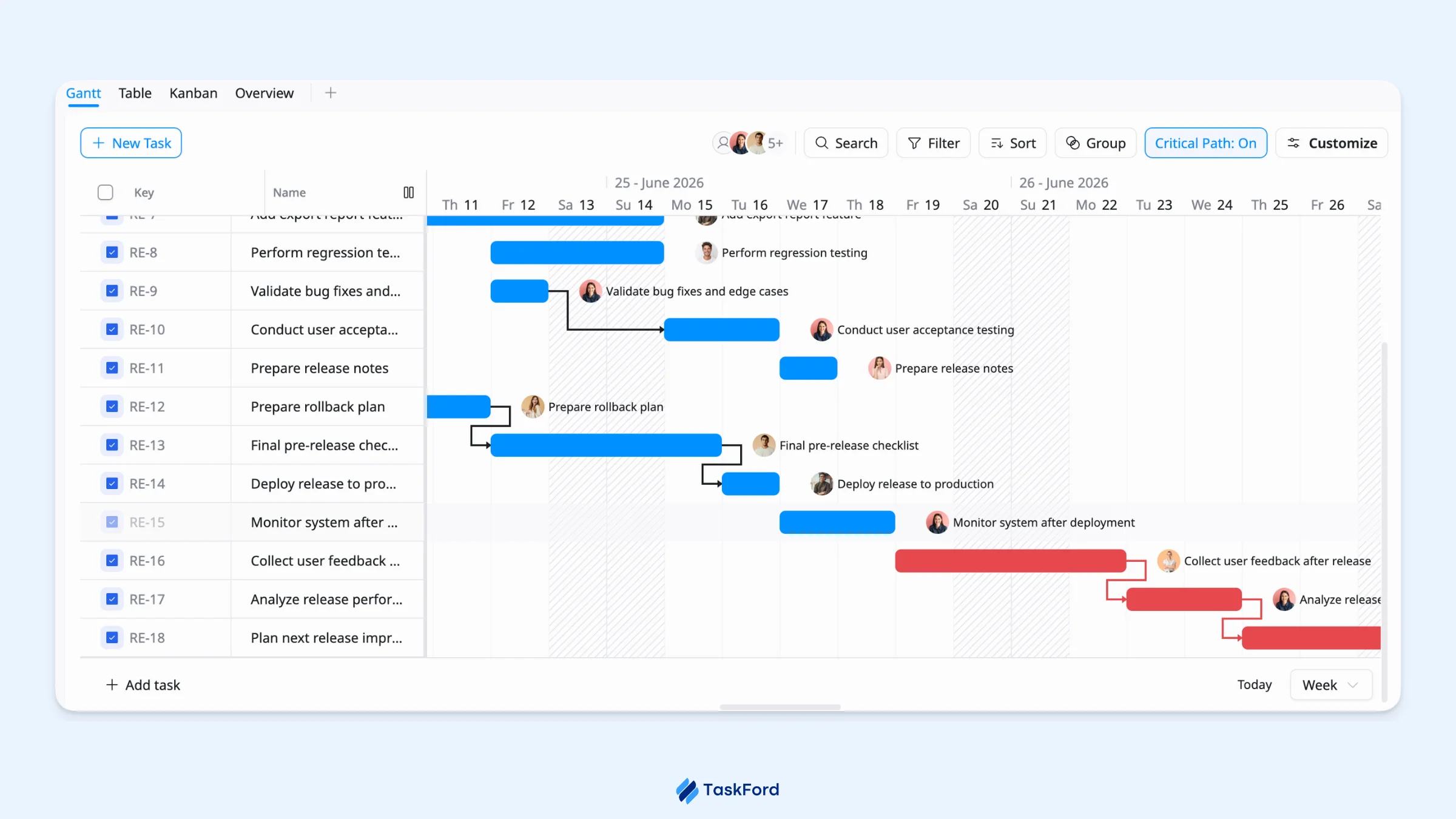
In the Gantt view, you can:
- Review tasks and milestones on the release timeline.
- Map dependencies between tasks so the team can see what needs to happen first and what may be affected if a task moves.
- Enable Auto-scheduling so dependent tasks update automatically when connected tasks move.
- Turn on Critical Path to highlight the tasks that can affect the release timeline the most.
For day-to-day tracking, switch to Kanban view to monitor task status across stages like Planned, Development, Testing, and Ready. You can also use the Table view to review task details such as owners, dates, priorities, story points, and release versions.
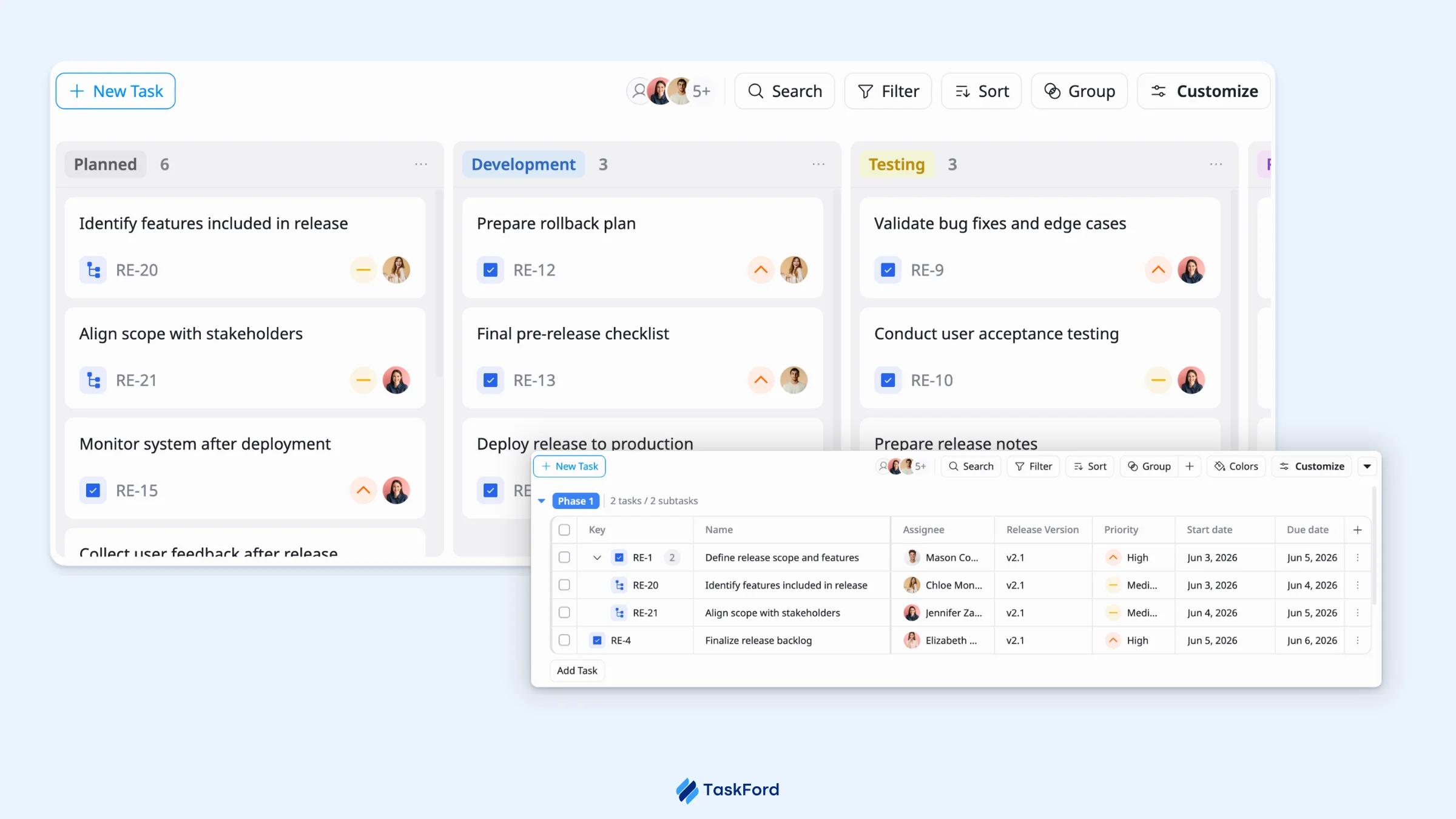
This gives your team both a timeline view of the release and a clear status view of daily progress.
Step 6: Review and adjust
Use the Overview view to review how the release is progressing in one place. It gives your team a quick way to spot what is moving forward, what needs attention, and where adjustments may be needed before launch.
In the Overview view, you can check:
- Task activity and overdue work
- Progress by status
- Priority breakdown
- Recent team updates
- Team workload
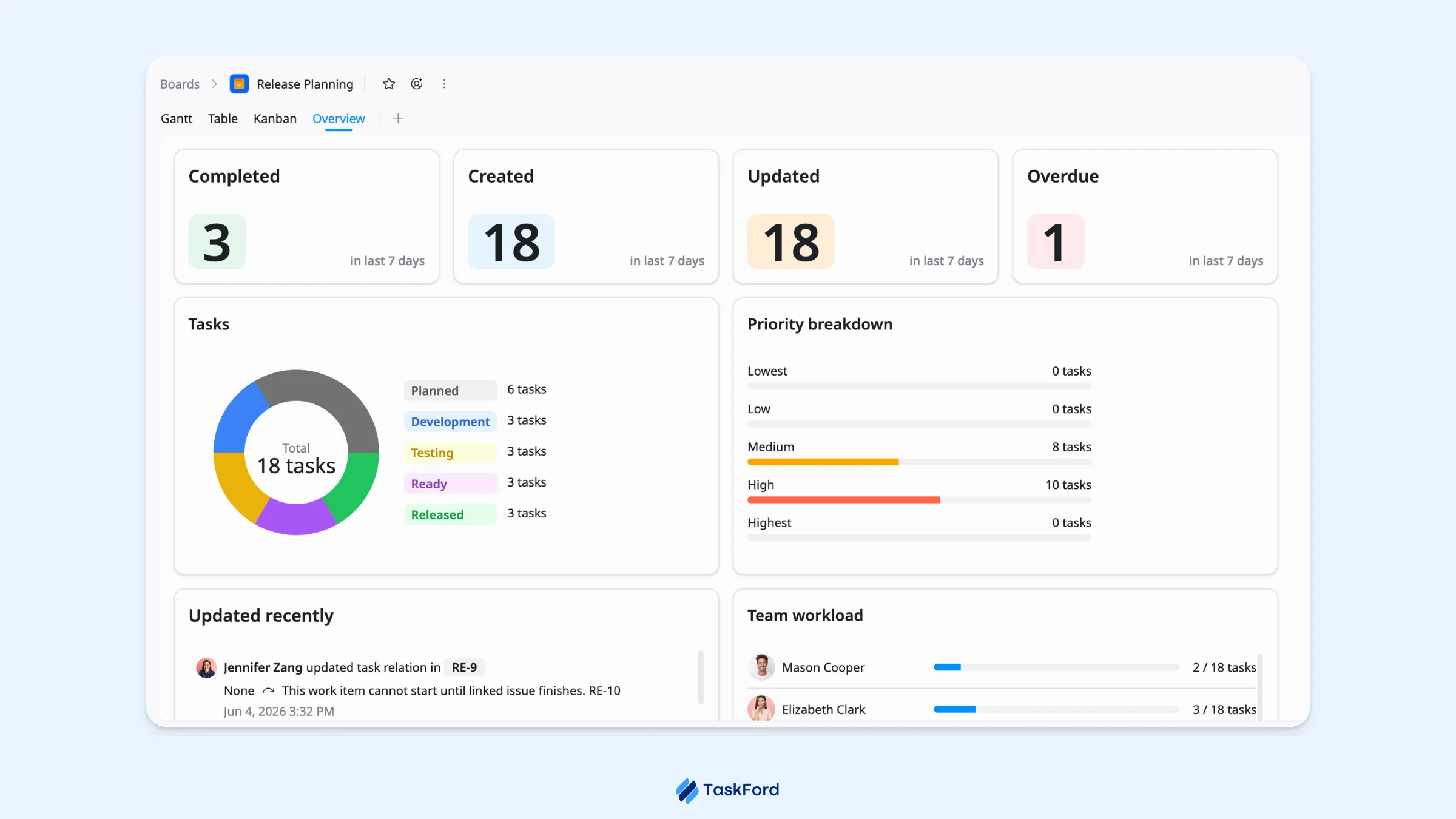
Use these insights to adjust timelines, rebalance work, update priorities, or resolve blockers. Regular reviews help your team keep the release on track and respond to issues before they become launch risks.
Tips for Better Release Planning in TaskFord
Use these simple habits to keep every release clear and on track:
- One board, one release.
- Keep phases and statuses easy to understand.
- Check dependencies before moving dates.
- Attach release notes, specs, QA plans, and approvals to tasks.
- Review the Overview often to catch delays early.
- Update the plan as priorities or timelines change.
- Capture lessons learned after launch.
The easier you plan to follow, the easier it is for your team to launch with confidence.
Outcome: A Smoother Path to Launch
By the end of this workflow, your team has a release plan that is easy to follow, simple to update, and clear enough to keep launch work moving.
Your team can:
- Track the release from planning to launch.
- Catch delays before they turn into bigger issues.
- Keep updates and documents close to the work.
- Review progress and adjust the plan as things change.
With a clear workflow, launch day feels less rushed, more organized, and much easier for the whole team to manage.
Related Articles
















How to Build and Manage a Product Roadmap with TaskFord

















How to Build a Connected Project Timeline in TaskFord















What Are the Best Jira Alternatives for Scrum Teams?




























How WBS Reveals Delivery Breakdown Before It’s Too Late










![How To Conduct a Profound Stakeholder Analysis [+ Free Template]](/marketing/blog/stakeholder-analysis.webp)



















What to Look for in Scrum Tools (Beyond Kanban Boards)



![Project Management Calendar for Teams and Managers [Free Templates]](/marketing/blog/project-management-calendar.webp)







How to Define Project Deliverables: A Step-by-Step Guide














![RACI Chart in Project Management: Rules & Examples [Free Download]](/marketing/blog/raci-chart.webp)




















![7 Must-Have Project Management Documents Every PO Should Know [Free Templates]](/marketing/blog/project-management-documents.webp)














![How to Create a Winning Project Plan for IT Projects [10 Steps Included]](/marketing/blog/how-to-create-a-project-plan.webp)




![Daily Standup Best Practices: Apply AI to Organize Meetings Successfully [2026 Trends]](/marketing/blog/daily-standup.webp)






![How to Create a Project Communication Plan: Step-by-Step Guide [+Free Template]](/marketing/blog/project-communication-plan.png)


![Master Project Procurement Management in 5 Steps [Download a free plan template]](/marketing/blog/project-procurement-management.webp)






































Subscribe for Expert Tips
Unlock expert insights and stay ahead with TaskFord. Sign up now to receive valuable tips, strategies, and updates directly in your inbox.