Public API
Learn to access the TaskFord Public API with Personal Access Tokens, manage permissions, make API requests, and secure your integrations.
This guide walks you through connecting your first script or integration to TaskFord: creating a Personal Access Token (PAT), making your first API call, and managing your tokens safely.
What is the Public API?
The TaskFord Public API lets you read and manage boards, tasks, comments, custom fields, task types, task links, and users from your own scripts and tools—the same data you work with in the TaskFord app.
Every request is authenticated with a Personal Access Token. A token:
- Acts on behalf of your user account. It can never see or change anything your account cannot.
- Is limited to the permissions, or scopes, you grant when you create it.
- Belongs to the site where you created it and only works against that site.
Step 1: Create a token
- In TaskFord, open Site settings and select Developer settings.
- Open the Personal access tokens tab, then select New token.
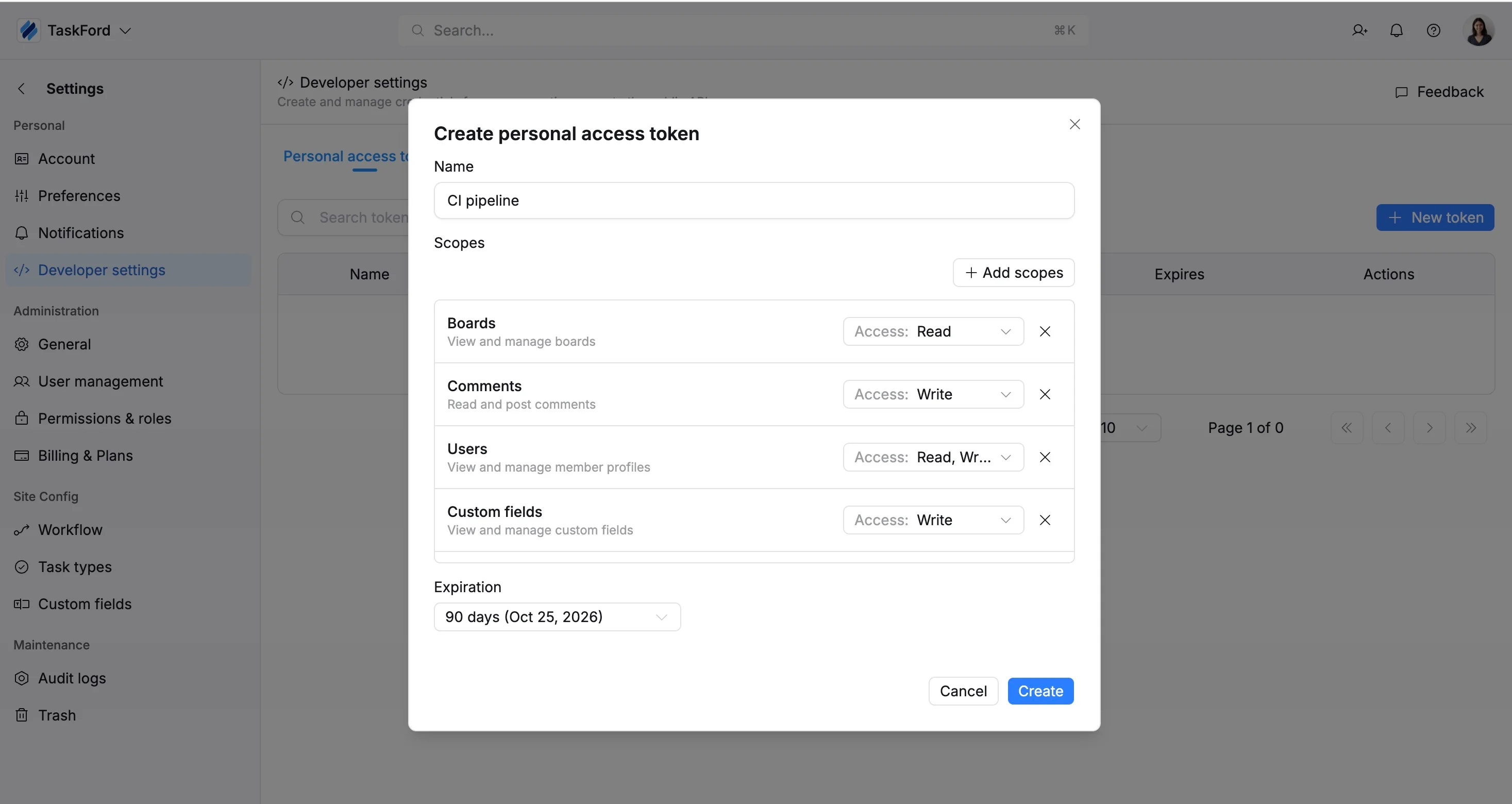
- In the window, enter a descriptive Name, such as
CI pipelineorreporting-script, so you can identify the token later. - Under Scopes, select Add scopes and choose the TaskFord entities your integration needs, such as tasks, boards, comments, or users.
- For each scope, use the Access dropdown to select the appropriate permission level, such as Read, Write, or Read & Write. Grant only the access your integration requires. You can remove an unnecessary scope by selecting the × beside it.
- Under Expiration, choose how long the token should remain valid. Available options include 7, 30, 60, or 90 days, a custom date, or no expiration. Expiring tokens are more secure, so choose an expiration date unless your integration requires a non-expiring token.
- Select Create.
- Copy the token immediately and store it securely. For security reasons, the full token is shown only once.
Your new token starts with the tf_ prefix, for example tf_xxxxxxxxx….
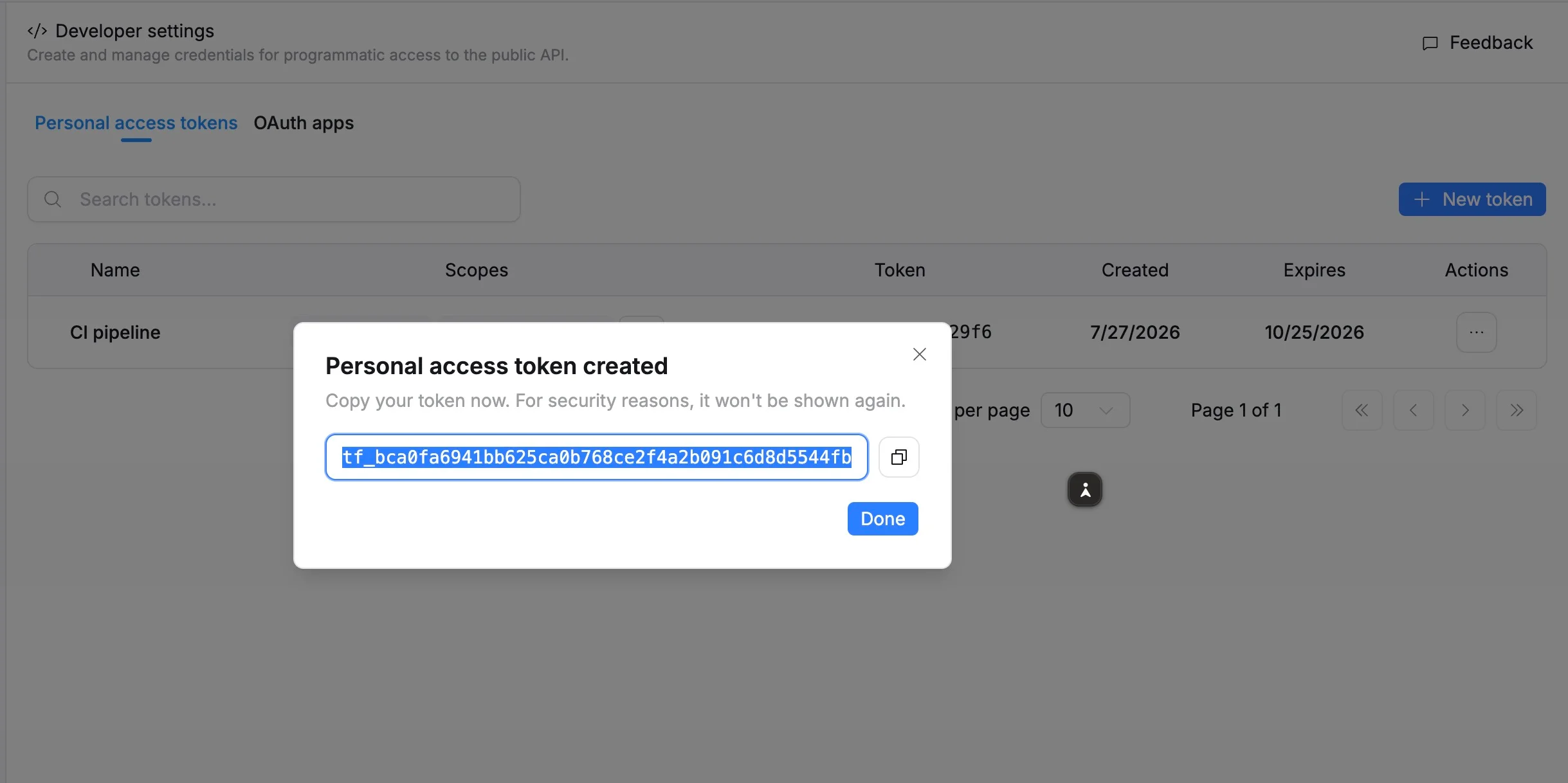
If you lose the token, you can regenerate it later, but the existing token value will stop working. Use a separate token for each integration so you can regenerate or revoke one without affecting the others.
You can create up to 50 tokens per site. Use a separate token for each integration so you can revoke or regenerate one without affecting the others.
Step 2: Make your first request
Send the token as a bearer token in the Authorization header. Store it in an environment variable or secret manager, never hard-code it.
List the boards you can access (requires the Boards → Read permission):
export TASKFORD_TOKEN="tf_xxxxxxxxx"

curl "https://<your-site>.taskford.app/api/public/v1/boards" \
  -H "Authorization: Bearer $TASKFORD_TOKEN"
Read a single task by its key (requires Tasks → Read):
curl "https://<your-site>.taskford.app/api/public/v1/tasks/TF-123" \
  -H "Authorization: Bearer $TASKFORD_TOKEN"
Create a task (requires Tasks → Read & write):
curl -X POST "https://<your-site>.taskford.app/api/public/v1/tasks" \
  -H "Authorization: Bearer $TASKFORD_TOKEN" \
  -H "Content-Type: application/json" \
  -d '{
    "boardId": "<board-uuid>",
    "summary": "Created via the API"
  '};
Replace <your-site> with your site’s subdomain. A token only works on the site where it was created.
See the Public API overview for pagination, addressing resources by ID or key, and the full endpoint list.
Step 3: Understand what a token can do
A request succeeds only when both of these are true:
- Your account can access the data. A token never grants more access than the user who created it. Board permissions, roles, and site membership still apply.
- The token holds the scope the endpoint requires. For example, creating a task requires the
write:taskscope (Tasks → Read & write in the UI).
Note that write does not imply read. Choosing Read & write in the UI grants both. However, if you manage scopes through the API directly, grant read:* and write:* together when your integration needs both.
Managing your tokens
Everything below happens in Site settings → Developer settings → Personal access tokens. Each token row shows its name, permissions, a masked token value with its last four characters, and its creation and expiry dates.
Edit
Change a token’s name, permissions, or expiration at any time. The token value itself stays the same. Scope changes take effect immediately, so you can tighten a token’s permissions without redeploying.
Regenerate
Generate a new token value while keeping the same name, permissions, and expiration. The current token stops working immediately, and you receive a new value to copy. The new value is shown only once.
Use this when you lose a token or suspect it has been exposed.
An expired token cannot be regenerated. Create a new token instead.
Revoke
Permanently delete a token. Any application or script using it immediately loses access. This action cannot be undone.
Troubleshooting
| Response | Meaning | What to do |
|---|---|---|
401 Unauthorized |
The token is missing, invalid, expired, or revoked, or it belongs to a different site. | Check the Authorization: Bearer tf_… header, the site subdomain in the URL, and the token’s expiry date in settings. |
403 Forbidden — insufficient scope |
The token does not hold the scope the endpoint requires. | Edit the token and add the missing permission, such as Read & write for requests that modify data. |
403 Forbidden — no permission |
The token has the correct scope, but your account lacks the underlying TaskFord permission. | Ask a site administrator to grant your account the required role or board permission. |
404 Not Found |
The resource does not exist, or your account cannot see it. | Verify the ID or key and your access to that board or entity. |
429 Too Many Requests |
The rate limit has been exceeded. Limits apply per token. | Slow down and retry using exponential backoff. |
Security best practices
- Grant the least privilege. Prefer read-only permissions and add write access only where needed.
- Use one token per integration. Revoking one token will not break another integration.
- Set an expiration date and rotate tokens regularly.
- Keep tokens out of code. Use environment variables or a secret manager. Never commit tokens to source control, embed them in client-side code, or write them to logs.
- Act quickly on leaks. If a token may have been exposed, Regenerate it to keep its configuration or Revoke it immediately.