Switch between monthly and yearly billing
Use this guide to understand how monthly and yearly billing work, how to switch billing cycles, and when the change takes effect.
Only the Site Owner or users with Billing Manager permission can change billing cycle settings.
TaskFord paid plans can be billed monthly or yearly. Site Owners and Billing Managers can switch billing cycles from the Subscription page when the subscription status allows it.
Use this guide to understand how monthly and yearly billing work, how to switch billing cycles, and when the change takes effect.
Monthly vs yearly billing
Monthly billing Monthly billing renews each month. This option is useful when your team wants more flexibility or expects seat changes more often.
Yearly billing Yearly billing is paid upfront for 12 months. It offers a lower per-seat rate than monthly billing, with estimated savings of about 28% depending on the plan.
Switch from monthly to yearly billing
You can switch from monthly to yearly billing from the Plans page. Switching to yearly billing is treated as an upgrade because yearly billing is paid upfront and uses a lower per-seat rate.
To switch from monthly to yearly billing
- Go to Billing & Plans.
- Select Plans in the left-hand menu.
- At the top of the plan page, switch the billing toggle from Monthly to Yearly.
- Find your current plan card.
- Click Upgrade to switch the same plan from monthly billing to yearly billing.
- Review the confirmation window.
- Check the new billing cycle, seat count, new billing period, and total charge.
- Click Upgrade now to confirm.
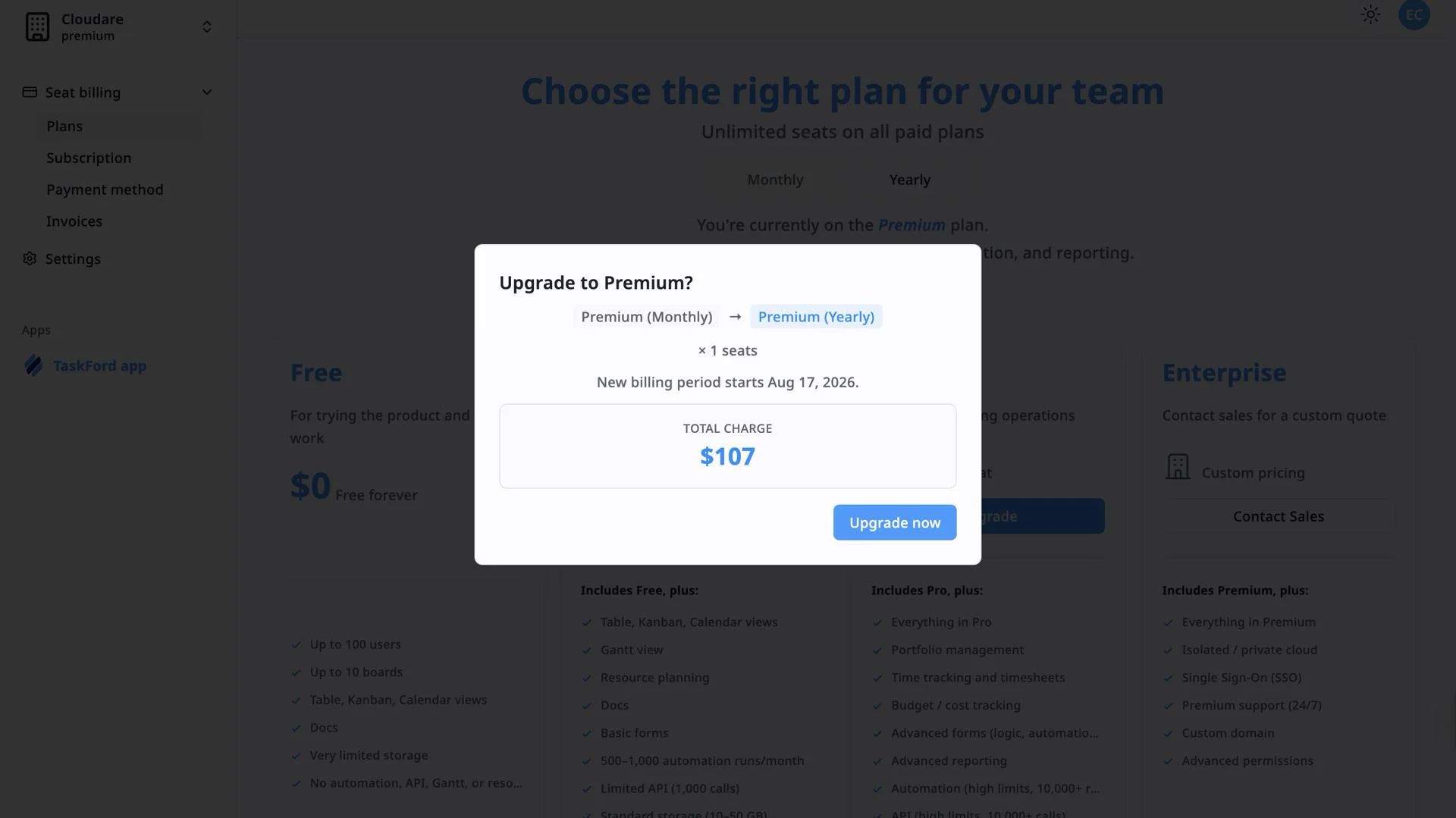
When you switch from monthly to yearly on an active paid plan:
- The change takes effect immediately after confirmation.
- TaskFord calculates a prorated charge for the remaining time in the current billing period.
- The yearly plan is billed upfront.
- Your next renewal follows the yearly billing cycle.
In simple terms, you move to yearly billing right away, and TaskFord charges the adjusted amount based on your current plan, seat count, and unused time in the current cycle.
Switch from yearly to monthly billing
Switching from yearly to monthly is treated as a downgrade in TaskFord.
When you switch from yearly to monthly:
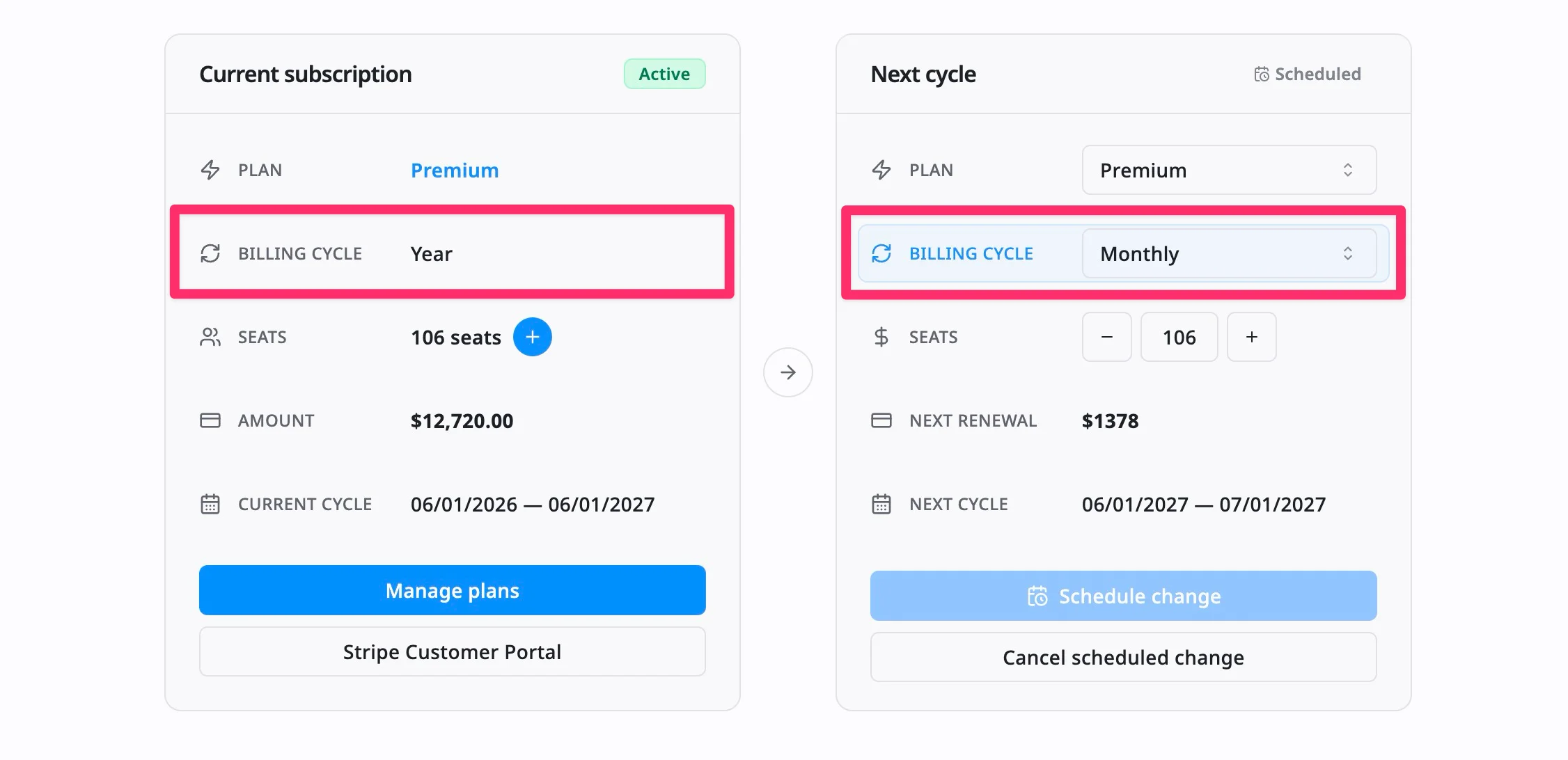
- The change is scheduled for the next billing cycle.
- Your current yearly billing cycle stays active until the current period ends.
- There is no immediate prorated refund or partial refund.
- At the next renewal, your subscription changes to monthly billing.
This means you continue using your current yearly subscription until the renewal date, then the monthly cycle starts.
Frequently Asked Questions (FAQs)
Can I switch from monthly to yearly billing?
Yes. Switching from monthly to yearly billing is treated as an upgrade and usually takes effect immediately after confirmation.
Will I be charged immediately when switching to yearly billing?
Yes. On an active paid plan, switching from monthly to yearly may create an immediate prorated charge. TaskFord shows a preview of the charge before you confirm.
Can I switch from yearly to monthly billing?
Yes. Switching from yearly to monthly is treated as a downgrade and is scheduled to take effect at the next billing cycle.
Will I get a refund if I switch from yearly to monthly?
No. Your yearly billing cycle remains active until the current period ends. Monthly billing will start at the next renewal, and no immediate refund is issued.