TaskFord v1.0.0: First Release
We’re excited to launch TaskFord — an integrated work delivery platform that helps teams plan, track, collaborate, and deliver with flexibility and clarity.
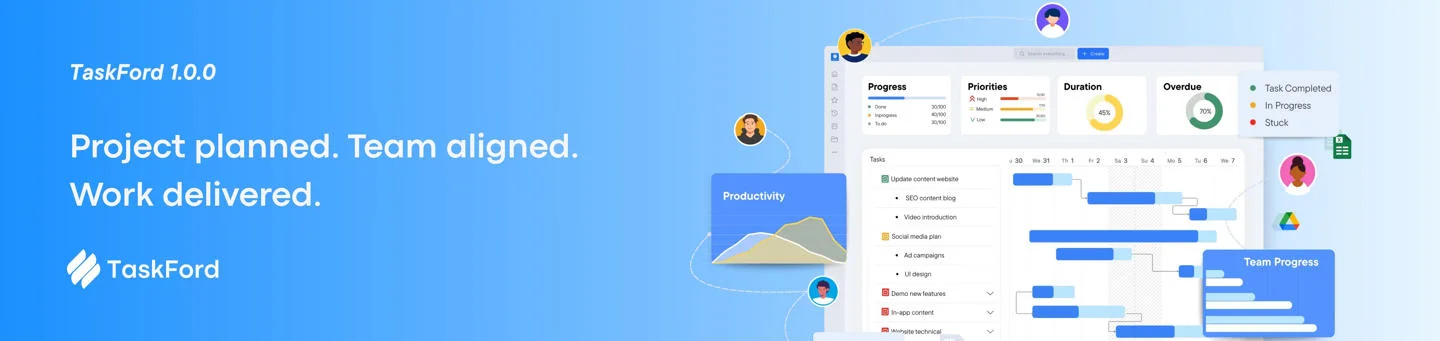
We’re shipping the first public release of TaskFord — an integrated work delivery platform built for teams who want flexibility without complexity. Everything you need to plan, track, and deliver work is here.
🎉 FIRST RELEASE
+ NEW
📐 Flexible Views for Every Workflow
5 VIEWS
CORE
Spreadsheet-style layout with full control
A clean, grid-based layout with inline editing across every field. Fully adjustable columns that you can show, hide, pin, or resize to match your data model.
Drag-and-drop cards to visualize flow
Move tasks between status columns with drag-and-drop. Get an instant picture of where work stands across your team with a glance.
Timeline planning with dependencies
Plan project timelines with task dependencies, critical path visualization, and nested task hierarchies, all on a single interactive timeline.
Balance workload across your team
See who’s over capacity and who has room. Reassign tasks directly from the scheduler to keep work evenly distributed.
Snapshot of progress and key metrics
Get a high-level summary of board activity, completion rates, and team progress at a glance — without diving into individual tasks.
🎨 View Customization
🔹 Save, rename, duplicate, and share views: Create custom view configurations and share them with your team so everyone works from the same setup.
🔹 Multi-level filter, group & sort: Combine multiple filter conditions, group by any field, and layer sort criteria to surface exactly the data you need.
🔹 Column control — show, hide, pin, resize: Tailor your table layout per view. Pin critical columns so they stay visible while you scroll horizontally.
🔹 Conditional highlighting rules: Set rules to highlight rows or cells based on field values — overdue dates turn red, high-priority tasks stand out automatically.
✅ Task Management
CORE
Everything needed to describe, organize, assign, and track work — from a single task to complex, multi-layered project structures.
🔹 Rich core fields out of the box: Every task comes with title, rich-text description, status, priority, assignees, start/due dates, time estimates, and groups — ready to use without any setup.
🔹 Subtasks and nested task structures: Break large tasks into subtasks and build multi-level hierarchies to represent complex work without losing clarity.
🔹 Task dependencies and cross-board relationships: Define blocking and blocked-by relationships between tasks — even across different boards. Spot what’s holding work up before it slips.
🔹 Flexible task privacy: Set tasks as public (visible to all board members), private (only you), or shareable via link — giving you control over who sees sensitive work.
🔹 Bulk actions: Select multiple tasks and edit, reassign, change status, or delete them all at once. Stop making the same change twenty times.
🏷️ Custom Fields
🔹 Text, Number, and Date field types: Add the metadata your team actually needs — from contract values and due dates to reference IDs and free-text notes.
🔹 Board-level and site-level fields: Create fields scoped to a single board or roll them out site-wide so every team works with consistent data.
⚙️ Workflow & Status
🔹 Default workflow: Start immediately with a sensible default workflow that works for most teams without any configuration.
🔹 Custom statuses within each category: Extend the default categories with custom statuses that match your team’s real process — “In Review”, “Blocked”, “QA”, and more.
🔹 Board-level workflows or inherit from site: Define a site-wide workflow standard or let individual boards override it. Flexibility at every level of your organization.
🔹 Smooth conflict handling when switching workflows: TaskFord gracefully maps existing task statuses when you change a workflow — no data loss, no broken states.
🗃️ Portfolio Management
CROSS-PROJECT
Stop context-switching between boards to get a read on program health. Portfolios bring all your projects into a single, structured view.
🔹 Group boards into portfolios: Organize related boards under a portfolio for cross-project visibility. Perfect for program managers tracking multiple initiatives.
🔹 Table, Scheduler, and Report views: View portfolio content as a consolidated table, a resource scheduler, or a progress report — all pulling live data from your boards.
🔹 Portfolio roles: Admin, Editor, Viewer, or custom: Fine-grained access control at the portfolio level. Share visibility with stakeholders without granting edit access to underlying boards.
🔹 Shared workflows across boards: Apply a consistent workflow to all boards within a portfolio so status reporting is uniform across the program.
🔹 Open or Private portfolio privacy: Control who can discover and view your portfolio — keep it open for org-wide transparency or private for sensitive strategic work.
📊 Dashboards
Build real-time dashboards that reflect what your team actually cares about — from task completion rates to workload distribution.
🔹 Start from scratch or use ready-made templates: Jump-start your dashboard with pre-built templates or build a fully custom layout from an empty canvas.
🔹 Chart widgets: Donut, Column, Area: Visualize tasks by priority, status, or assignee with three chart types. Each widget is independently configurable — data source, filters, chart type, and labels.
🔹 Key metric widgets: Surface numbers that matter: total tasks, completed work, estimated vs. actual hours — at a glance, without digging into reports.
🔹 Flexible sharing and access control: Share dashboards with specific members or open them to your whole workspace. Duplicate or remove dashboards with a single click.
🏠 Home
Your personal command center, configured to show what matters to you, not everyone else.
→ Assigned to me: All your open tasks in one place
→ Mentions: Tasks and comments where you’ve been @mentioned
→ Recent boards: Jump back to where you were working
→ Starred items: Quick access to your pinned boards, tasks, and views
💬 Collaboration
🔹 Rich-text comments on tasks: Full formatting support in comments — bold, bullets, code blocks, links. Keep context right where the work lives.
🔹 @mentions with instant notifications: Pull someone into a conversation with @mention. They’re notified immediately across all enabled channels.
🔹 Emoji reactions for quick feedback: React to comments with emoji to acknowledge, agree, or flag — without cluttering the thread with “+1” replies.
🔹 Edit or delete comments anytime: Fix a typo or remove a comment — full control over your contributions to a task thread.
🔹 Detailed activity logs: Every field change, status update, and assignment is recorded with timestamps and user attribution. Full audit trail for every task.
🔔 Notifications
🔹 Watch tasks to stay informed: Manually watch any task to receive updates. You’re automatically added as a watcher when assigned or when you comment.
🔹 4 notification channels: In-app, email, browser push, and Slack. Choose which events trigger which channels — per your own preferences.
🔹 Smart batching to reduce noise: Related notifications are intelligently grouped so your inbox doesn’t fill up every time someone makes a small change.
🔹 Inbox with 30-day history: All notifications land in your inbox with read/unread tracking. Scroll back up to 30 days to catch anything you missed.
📥 Import & Export
CSV IMPORT
🔹 Guided 5-step import flow: A step-by-step wizard walks you through uploading, mapping, validating, and importing your data — no guessing, no broken imports.
🔹 Column and value mapping: Map your CSV columns to TaskFord fields — status, priority, assignees, dates, and custom fields. Map status values to your workflow categories.
🔹 Task hierarchy via parent-child IDs: Import nested task structures by referencing parent task IDs in your CSV — no manual re-linking after import.
🔹 Flexible date formats and built-in validation: Import dates in a variety of formats. Errors are caught and reported before anything is written — download an error report to fix issues quickly.
🔹 Sample CSV template available: Download a pre-formatted sample CSV to understand the expected structure and start importing in minutes.
CSV EXPORT
🔹 Export any view directly from the toolbar: One click from the view toolbar to get a CSV of exactly what you’re looking at — filtered, sorted, and grouped as displayed.
🔐 Permissions & Access Control
ROLES
Account types define what someone can do across the entire site. Built-in roles cover most teams, and custom roles give you full control.
→ Account types: Site Owner, Site Admin, Billing Manager, Member
→ Built-in roles: Admin, Editor, Viewer — apply at site, board, or portfolio level
→ Custom roles: Build your own permission set at any level of the hierarchy
PERMISSION
🔹 Fine-grained control across all resources: Every action in TaskFord — creating tasks, managing workflows, exporting data — can be allowed or restricted per role.
🔹 Board privacy: Open, Private, Limited: Open boards are visible to all site members. Private boards are invite-only. Limited boards give read-only access to non-members.
INVITATION
🔹 Email invitations — single or bulk: Invite one person or paste a list. Assign roles during the invitation flow. Share invite links for self-service onboarding.
🔹 Invitation tracking
See who’s Pending, who’s Accepted, and who hasn’t responded. Re-send or revoke invitations at any time.
🏢 Site Administration
SETTINGS
🔹 Site name, URL, and branding: Customize your workspace identity — name, subdomain, and logo — to match your organization.
🔹 Working days, date/time formats, calendar: Define your team’s working week and regional date preferences so scheduling and deadlines work correctly for everyone.
USER MANAGEMENT
🔹 Invite, deactivate, and manage users: Full lifecycle management: Active, Pending, Inactive, and Awaiting Approval states. Search by name or email.
CUSTOMIZATION
🔹 Site-wide custom fields: Define custom fields once at the site level and they’re available across all boards — ensuring consistent data capture organization-wide.
🔹 Custom task types with icons, colors, and descriptions: Go beyond the default “Task” label. Create types like Bug, Feature, or Story — each with its own icon, color, and description.
AUDIT LOGS
🔹 Full audit trail with filters
Every change across your site is logged with timestamps and user attribution. Filter by user, resource type, event type, or date range.
🔍 Search & Trash Recovery
🔹 Global search across tasks, boards, and portfolios
Search by name or task key from anywhere in the app. Recent searches and smart suggestions make finding things faster over time.
🔹 Trash with 30-day recovery window
Deleted tasks, boards, and portfolios are held in Trash for 30 days. Restore anything with a click before it’s permanently removed.
👤 Account & Preferences
→ Manage profile settings: name, email, and avatar → Choose your theme: Light, Dark, or System → Customize per-channel: notification preferences → Update: security settings and password
This is v1.0.0 — the foundation. Try it out, push it to its limits, and tell us what you think. Your feedback will directly shape what we build next.
🙋 Contact Support
🌐 Visit www.taskford.com