What is TaskFord?
TaskFord is a work delivery platform for managing projects, tasks, and resources efficiently.
TaskFord is an integrated work delivery platform designed to help teams plan, track, and manage projects, tasks, and resources in one centralized system. It streamlines workflows by combining task management, Gantt charts, resource planning, and time tracking, aiming to improve team productivity and project profitability.
Key Features
- Task management: Create tasks, assign members, set deadlines, attach files, and collaborate through task comments to keep work organized and actionable.
- Board views: View and manage work in multiple formats, including Table, Kanban, Schedule, Gantt, and Calendar, depending on your workflow needs.
- Project management: Build project plans using the Gantt view. Define milestones, set dependencies between tasks, and use auto-scheduling to maintain a structured and realistic timeline.
- Resource Planning & Workload: Monitor team availability and workload. Assign and rebalance tasks to ensure work is distributed effectively and aligned with capacity.
- Time tracking: Record and monitor time spent on tasks to improve productivity and visibility. Use built-in timers or manual entries to capture work hours accurately.
- Project portfolio management: View multiple projects in one place to compare progress, align priorities, and manage resource conflicts across the portfolio.
- Reporting & Dashboard: Build dashboards with customizable widgets to track real-time progress, workload, and key performance metrics.
How TaskFord organizes work
TaskFord uses a clear and structured hierarchy to organize your projects, from the top-level Site down to individual Subtasks. This hierarchy helps teams stay organized, focused, and aligned across all levels of work.
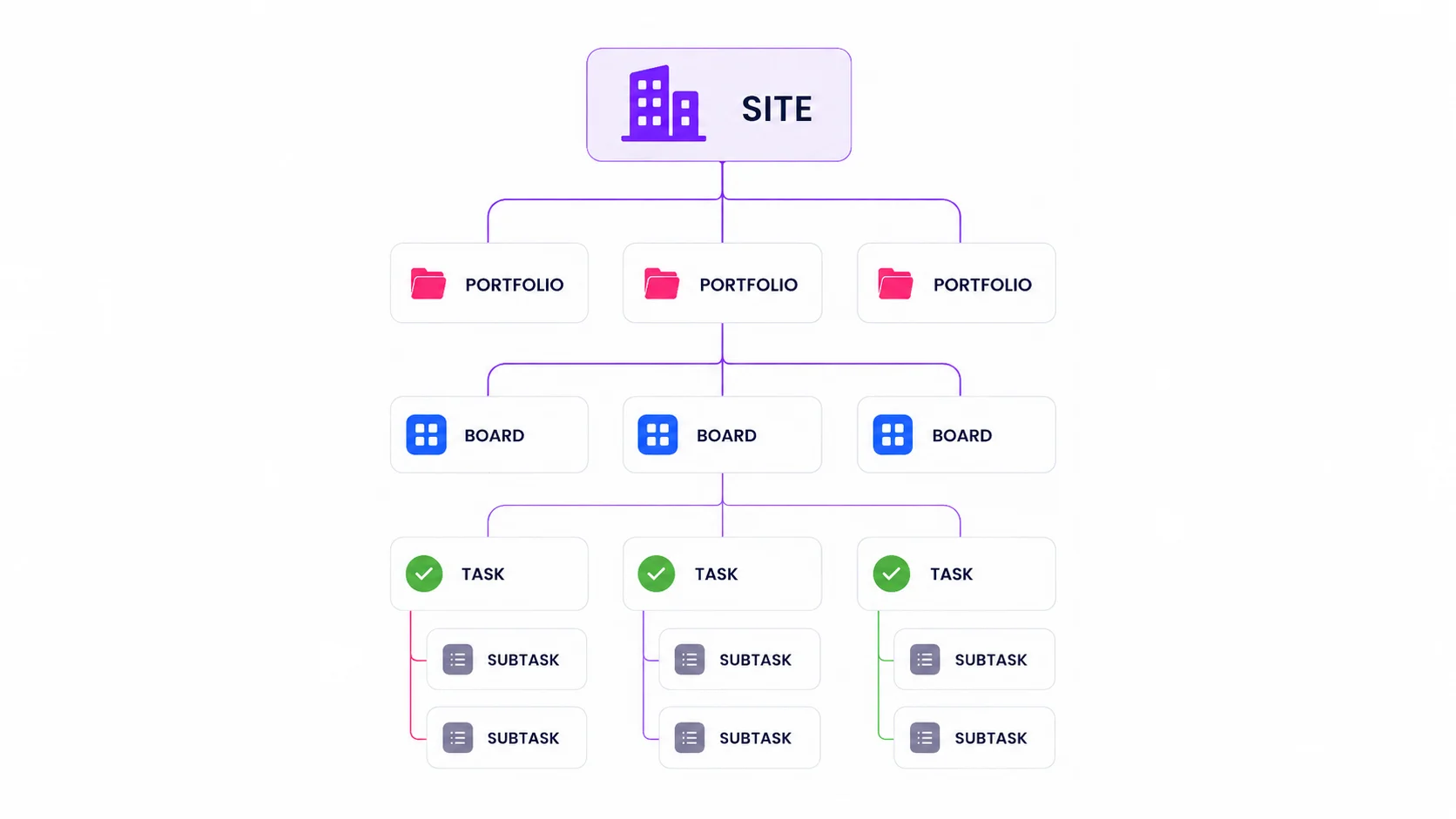
- Site: The Site is the top-level in TaskFord that contains all your projects, teams, and resources. Each site can include multiple portfolios and boards.
- Portfolios: Portfolios group related boards together, giving you a high-level overview of multiple projects.
- Boards: Boards are where you manage specific projects or team workflows. Each board contains tasks and offers different view options, such as Table, Kanban, Gantt, or Board, so you can visualize work in the way that best suits your team.
- Tasks: Tasks are the core units of work in TaskFord. They represent actionable work items that move through stages like To Do, In Progress, and Done.
- Subtasks: Subtasks break larger tasks into smaller, manageable actions, making it easier to track progress and assign responsibility for each step within the main task.