Client Approval Workflow: How to Get Sign-Off on Creative Deliverables Faster
Client approvals do not have to slow projects down. Learn how to build a clear approval workflow with defined owners, deadlines, feedback, and sign-off steps.
Let me tell you about the worst Tuesday of my professional life.
The campaign was done. Not “almost done,” actually done. The creative looked great, the copy was ready, and the launch was tomorrow. I sent it for approval thinking the hard part was over.
It wasn’t.
By Wednesday, five people had left feedback. Two disagreed on almost everything. Someone wanted the font changed because of “vibes.” Someone else had not even opened the file. Then a revised version landed in the wrong email thread, so we suddenly had two “final” files, and neither was final.
Sound familiar? If you work at an agency, you have probably seen some version of this.
According to the BetterIdeas Project, creative work now takes five rounds on average to reach sign-off, compared with three rounds in 2007.
Often, the delay starts before the client review itself: ownership is unclear, reviewers are overloaded, feedback is scattered, or nobody knows who has the final say.
The good news? This is fixable. Here’s how.
What Is a Client Approval Workflow?
Before we get back to the chaos, let’s define what a client approval workflow actually is.
A client approval workflow is a structured process for presenting deliverables, collecting feedback in one place, and getting an official yes from the client before the project moves forward.
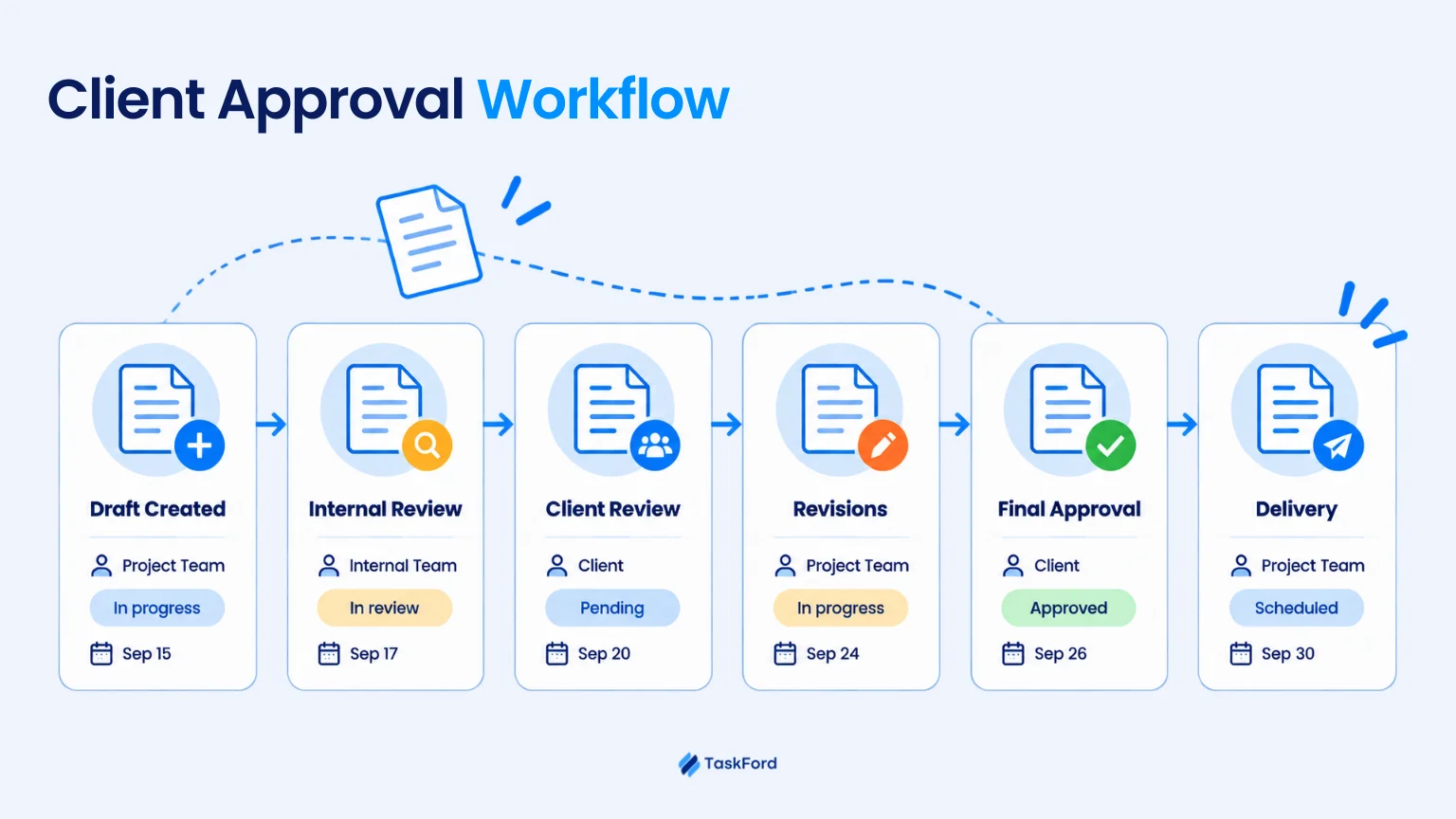
In practice, it is the path from internal review → client review → revisions → final approval. Someone checks the work first, the client reviews it, changes are made if needed, and eventually someone with actual authority says, “Approved. We can move on.”
Skip that structure and approvals still happen, technically. They just happen scattered across emails, chats, meetings, and a graveyard of file versions named “final,” “final_v2,” and “final_ACTUAL.”
A real workflow keeps the status visible, so the team always knows exactly where a deliverable stands and what needs to happen next, no detective work required.
Why Creative Approvals Take So Long
Here’s where approval starts to get messy.
Creative work rarely gets stuck because of one big problem. More often, several small issues pile up at the same time until a simple review turns into days of waiting.
1. Nobody Really Owns the Review
Several people can leave comments, but nobody is clearly responsible for moving the work forward.
That is how a deliverable ends up sitting in review while everyone assumes someone else is handling it. The problem gets worse when the team is not sure who actually has the authority to approve it.
2. Reviewers Are Already Overloaded
A review might only take 20 minutes. Finding those 20 minutes can take three days.
If review work is not planned into someone’s workload, it gets pushed behind meetings, deadlines, and other client work. Meanwhile, everyone waiting on that decision stays blocked.
3. Version Confusion
At some point, someone asks:
“Wait, is this V3 or V4?”
When several versions are moving around at once, stakeholders may comment on an old file or approve the wrong one. The team then has to stop and figure out which version is current and which feedback still matters.
4. Scattered Feedback Across Tools
One comment is in an email. Another is in Slack. Someone adds notes in the design file. Another stakeholder remembers something during a call.
Before revisions can even begin, the team has to collect everything and make sense of it.
The more places feedback lives, the harder it becomes to know what is final, what conflicts, and what still needs action.
5. Too Many Stakeholders
More reviewers means more opinions, more conflicting requests, and a decision that bounces from person to person like nobody wants to be the one holding it.
If everyone can weigh in but nobody has final say, “approved” becomes a moving target.
6. Revision Rounds Are Not Clearly Defined
Without clear review criteria or revision limits, each round can introduce new ideas or reopen earlier decisions.
What should have been a small adjustment can quickly turn into repeated back-and-forth.
In many cases, slow approval is less about one slow client and more about a workflow that makes it difficult to reach a clear decision.
The Hidden Cost of Creative Approval Delays
For agencies, a slow approval does more than push a deadline back. It can throw off the delivery plan for the whole account.
If a campaign is stuck waiting for a yes, designers may have to pause, developers cannot start, and account managers spend more time chasing feedback than moving the work forward. One week capacity sits unused. The next, everyone is overloaded. All because one approval got stuck in the middle.
The cost adds up too. Extra review rounds mean more coordination, more revisions, and more time reopening work that was already close to finished. For agencies and service teams, that extra effort can gradually reduce project margins.
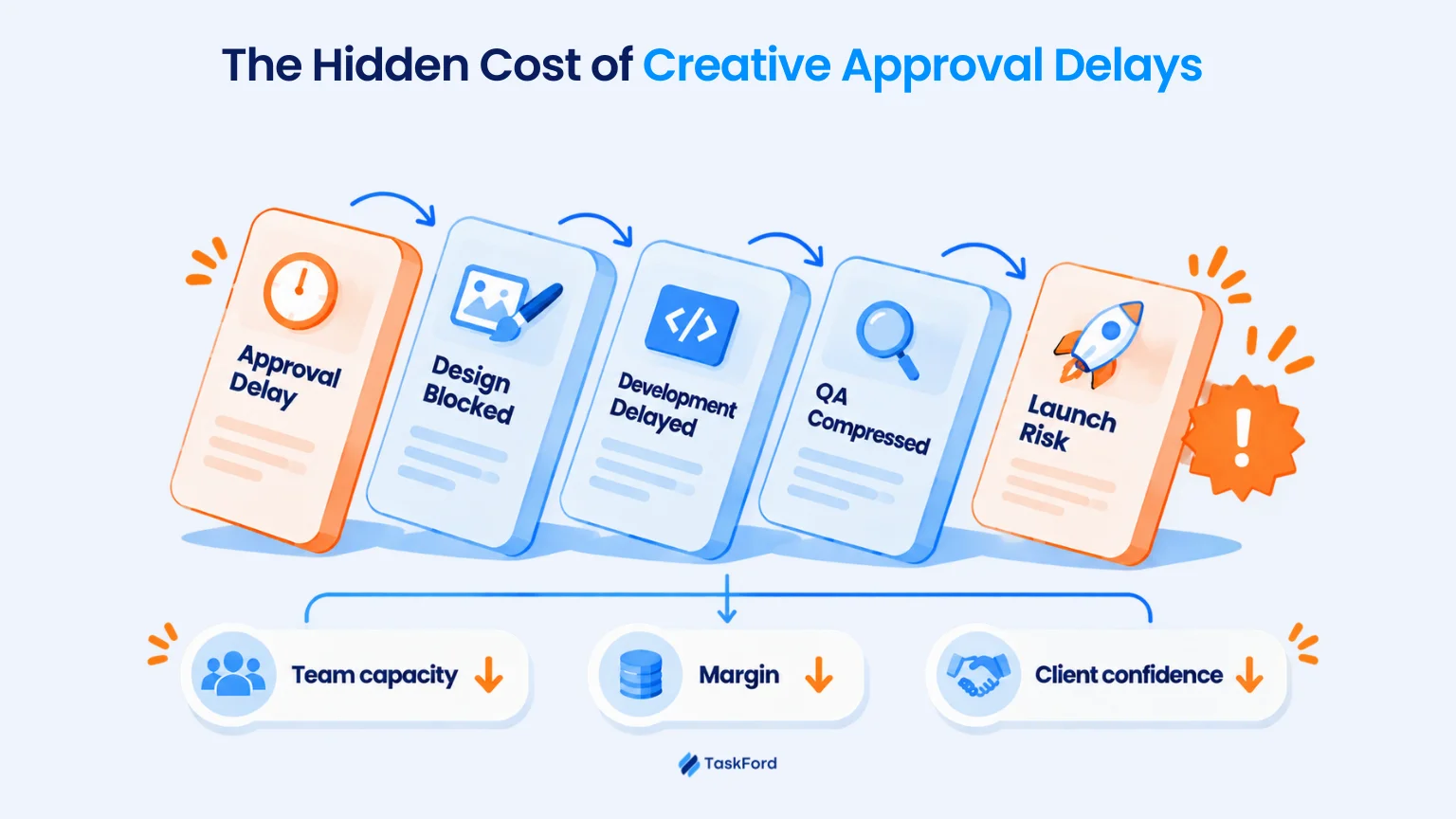
There is also a client impact. When approvals feel messy or deadlines keep moving, clients may start to lose confidence in how the project is being managed.
The real cost of slow approval is not just waiting. It can affect team capacity, project margin, delivery dates, and client confidence. Managing these impacts requires a clear approach to client delivery management vs project management, not just task tracking.
How Long Should Approvals Take?
Honestly? There’s no magic number. A quick social post might need a day. A full campaign, or anything needing legal sign-off, needs a lot more time. Trying to force everything into the same timeline can slow down simple work and rush important decisions.
The right review time depends on how complex the work is, how important the decision is, and how many people need to approve it.
Here’s a simple starting point, not a strict rule:
| Deliverable | Example review time |
|---|---|
| Social asset | 1 business day |
| Landing page | 1–2 business days |
| Campaign concept | 2–3 business days |
| Legal or compliance-heavy asset | Agree on a timeline in advance |
In my view, the exact number of days matters less than having a clear expectation. A two-day review with the right person assigned is much better than a one-day review where nobody knows who should respond.
You will know the process is getting better when there are fewer revision rounds, shorter review times, fewer late approvals, and fewer projects delayed by client sign-off.
Set the Approval Rules Before Creative Work Starts
Many approval problems happen because the rules are not clear from the beginning. Setting these expectations early during client onboarding helps avoid confusion later.
Before the team starts creating, make sure both sides agree on who gives feedback, who gives final approval, when feedback is due, how many revision rounds are included, and what counts as extra work.
A simple checklist can look like this:
| Question | What to decide |
|---|---|
| What needs approval? | The deliverable or project stage |
| Who can give feedback? | Reviewers |
| Who gives the final approval? | One decision owner |
| What should they review? | Clear review criteria |
| Where should feedback be shared? | One agreed place |
| When is feedback due? | A review deadline |
| How many revision rounds are included? | Revision limit |
| What counts as extra work? | Scope-change rules |
For example, a campaign project might have one marketing manager as the final approver, a two-day review deadline, and two revision rounds included. Other people can still comment, but one person should make the final decision.
When these rules are clear from the start, it is much easier to avoid late feedback, conflicting comments, and endless revisions.
A 6-Step Client Approval Workflow for Creative Deliverables
Here’s what it actually looks like when the rules from the last section get put into practice, start to finish.
Step 1. Create the Deliverable With a Clear Brief
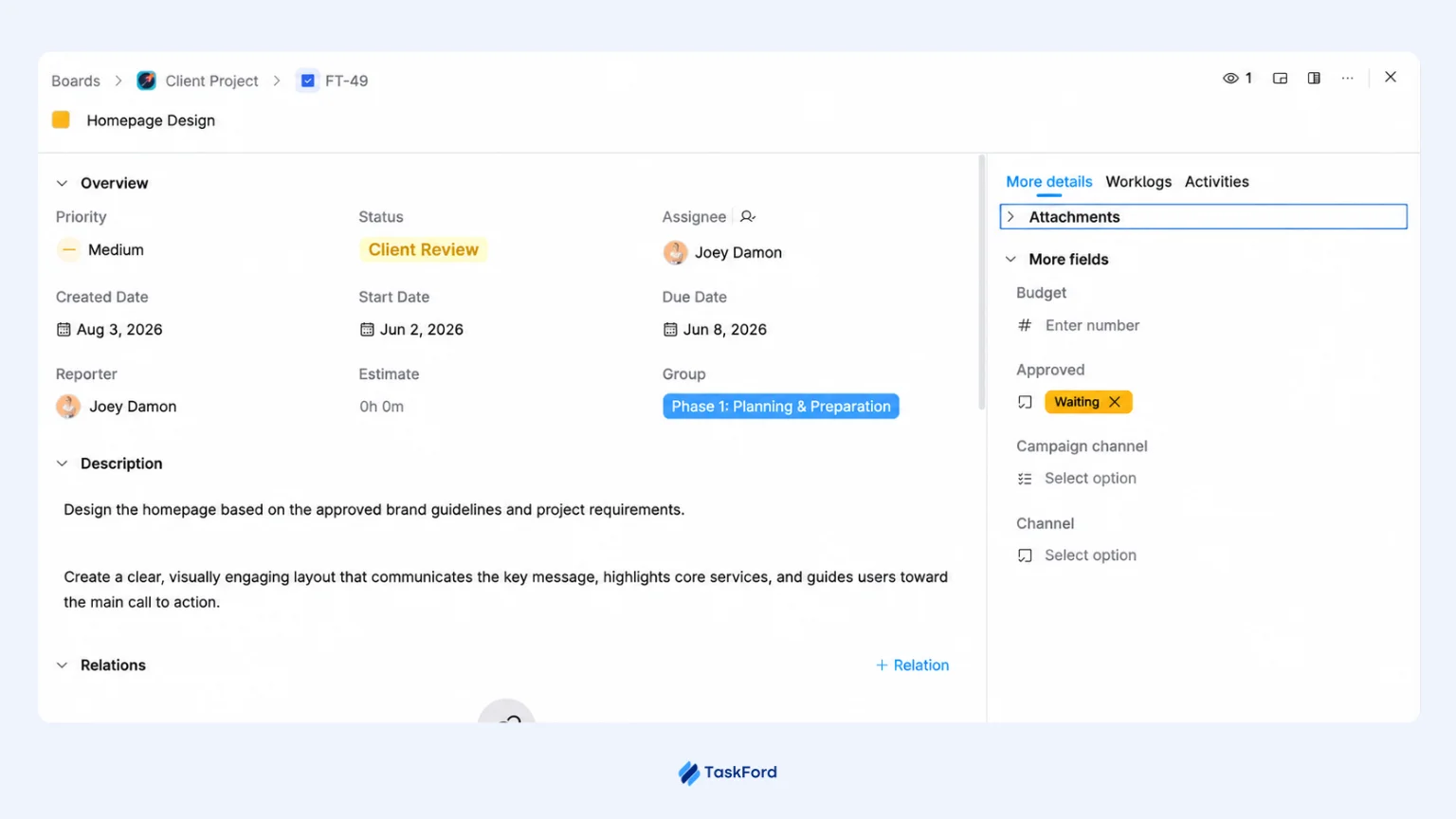
Keep the important details attached to the work itself, not just in someone’s head. Decide who owns it, when it’s due, what it needs to include, and how it will be checked, before anyone starts designing.
For example, a landing page task might include the campaign goal, target audience, required sections, due date, and person responsible.
This gives the team one clear place to understand what needs to be delivered and what “done” should look like before the work reaches review.
Step 2. Move the Work Into Internal Review
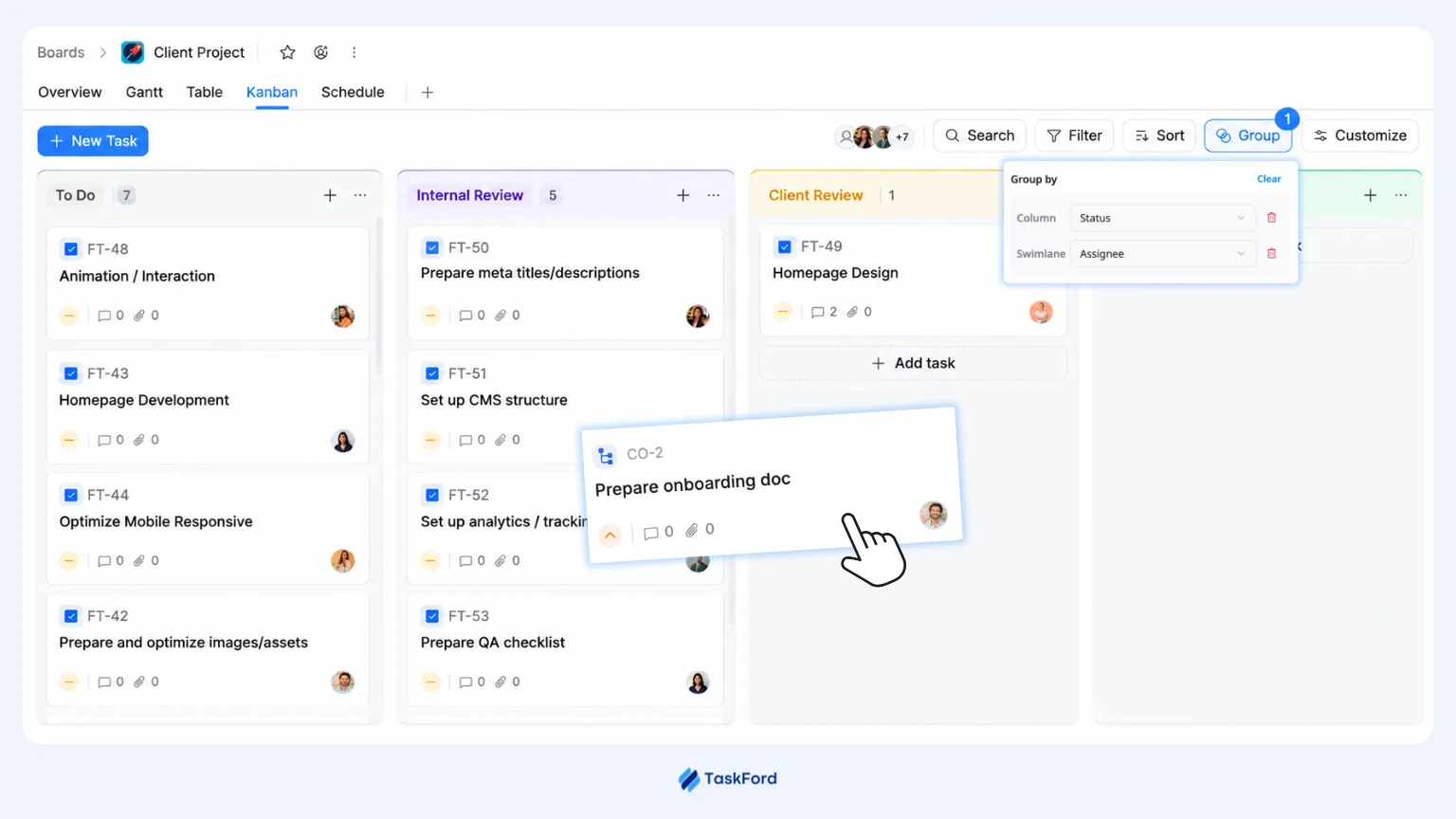
When the first draft is ready, move it into an internal review stage instead of sending it straight to the client.
The reviewer can check whether the work follows the brief, matches brand requirements, and is ready for external feedback. Any obvious errors or missing details can be fixed before the client sees them.
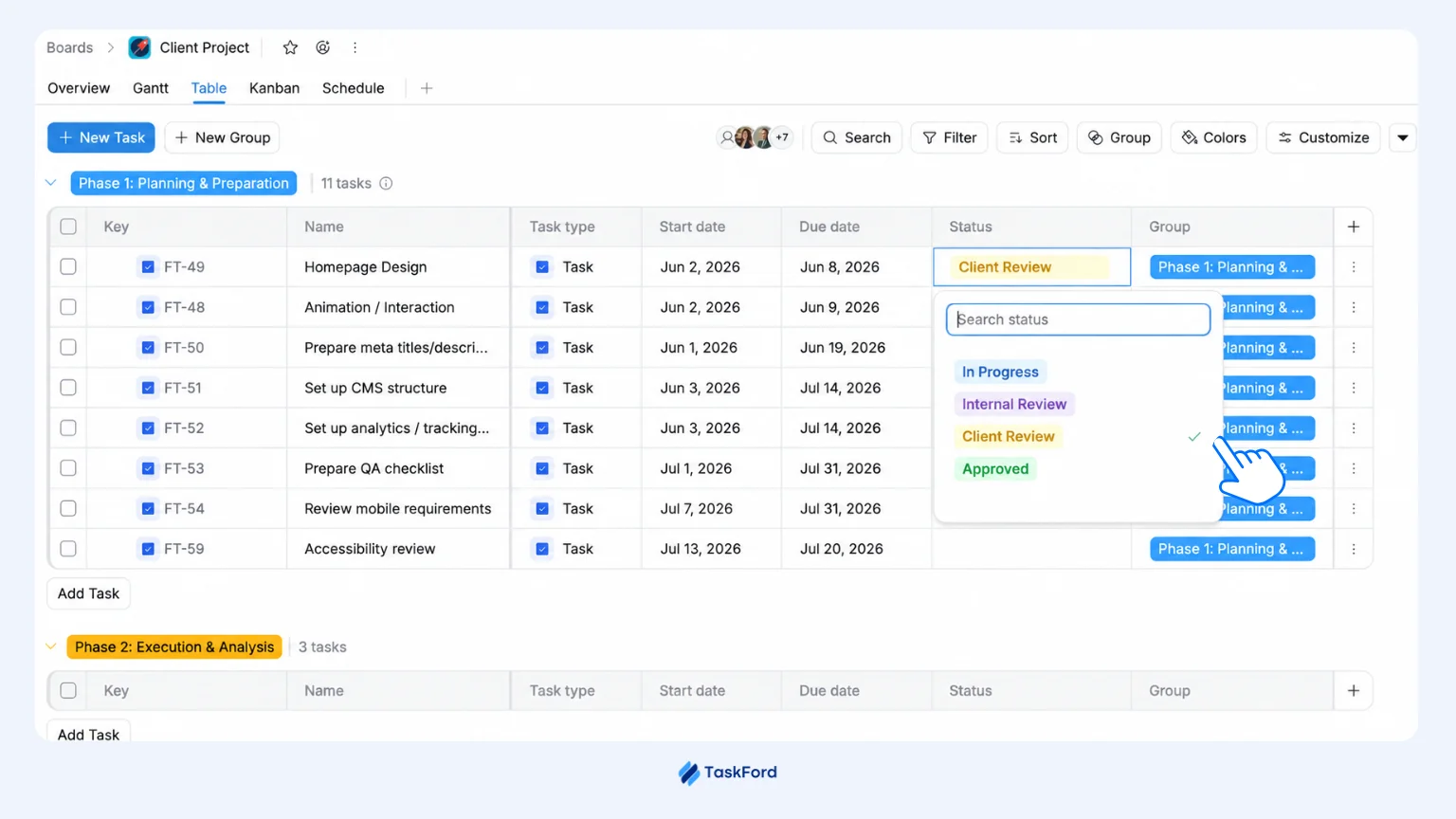
Using a clear status such as Internal Review also helps the wider team understand where each deliverable stands without having to ask for an update.
Step 3. Send the Current Version for Client Review
Once it passes internal review, it goes to the client with a clear deadline, not a vague “let us know when you can.”
The client knows exactly which version they’re looking at and what to check.
For example:
Landing Page V2
- Review: Messaging and visual direction
- Feedback due: Friday
- Decision: Approve or request changes
This reduces confusion about which version is current and what decision is needed.
Step 4. Keep Feedback in One Place
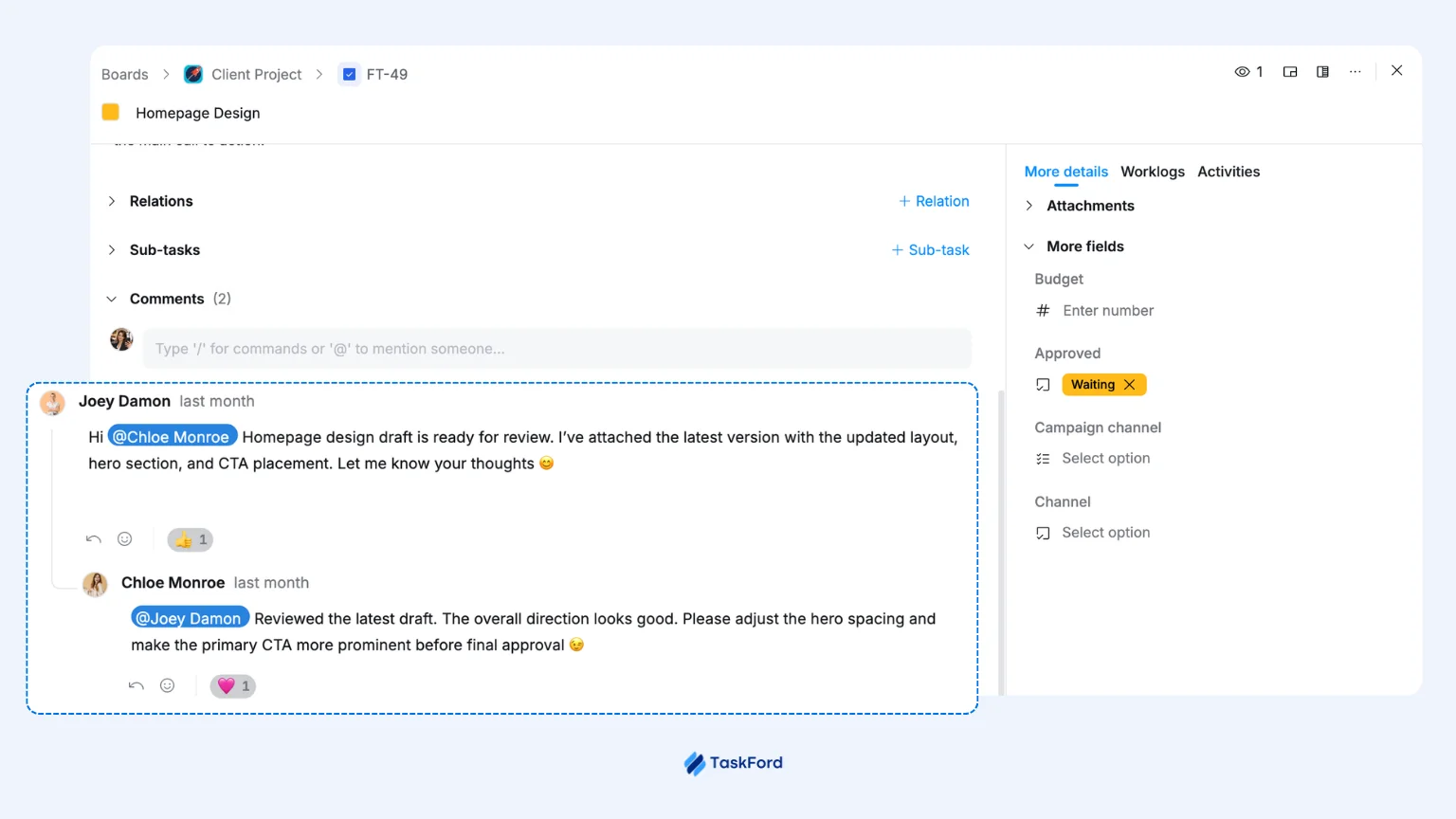
Comments, questions, and requested changes should stay connected to the deliverable instead of being spread across email, chat, and meetings.
When several people are involved, keeping the discussion together makes it easier to see what was requested, what’s been answered, and what still needs action. It also gives the team a clear history to refer back to during the next revision.
Step 5. Turn Feedback Into Clear Next Actions
Once feedback is agreed, turn it into work the team can act on.
Small changes may stay within the same deliverable, while larger requests, such as another landing page or a new creative direction, may need to become separate tasks.
Making those actions visible helps the team understand what needs to change, who will do it, and whether the request affects workload or scope.
Step 6. Record Approval and Release the Next Work
When the client gives final sign-off, update the deliverable to Approved so any work waiting on that decision can move forward.
For example: Landing Page Approved → Development → QA → Launch
Connecting these stages makes it easier to see whether an approval delay will affect the rest of the project, and which tasks are ready to start once approval is received.
Once approval becomes part of the delivery workflow, the next challenge is keeping the rest of the project connected.
Tools like TaskFord help teams manage approvals alongside tasks, timelines, dependencies, and workload, giving managers a clearer view of what is waiting, what is blocked, and what needs to happen next.
If you are comparing options, our guide to the top client delivery management tools covers the key features teams should look for when choosing a platform.
Example: Creative Agency Approval Workflow
Imagine an agency is building a landing page for a SaaS product launch.
- On Monday, Jordan, the account manager, confirms the scope, deadline, reviewers, and final approver.
- Sarah, the client’s marketing lead, is given a two-day review window.
- Priya, the designer, finishes the first draft on Tuesday.
- Tom, the creative lead, reviews it internally on Wednesday morning and spots a CTA color issue. It is fixed within the hour.
The updated version goes to Sarah on Wednesday afternoon, with feedback due Friday. When the review does not move, Jordan follows up and learns Sarah is out of office. She confirms she will review it Friday morning.
On Friday, Sarah asks for a shorter headline and a new hero image. Priya handles the headline quickly, while the image request becomes a separate task because it needs a new client asset.
Sarah gives final approval the following Monday, and development starts the same day.
A simple approval workflow could look like this:
| Day | Stage | Owner | What happened |
|---|---|---|---|
| Monday | Brief confirmed | Jordan, Account Manager | Scope, deadline, and approver agreed |
| Tuesday | Design in progress | Priya, Designer | First draft completed |
| Wednesday AM | Internal review | Tom, Creative Lead | CTA color issue caught and fixed |
| Wednesday PM | Client review | Sarah, Client Approver | Feedback due Friday |
| Friday | Feedback received | Sarah, Client Approver | Requested a shorter headline and new hero image |
| Monday | Final approval | Sarah, Client Approver | Signed off; development started |
The delay was not a surprise. The team could see the review was stuck early, adjust the schedule, and avoid a last-minute scramble during launch week.
What to Do When Client Approvals Gets Stuck
Even with a good process, approval sometimes just… stalls. Here’s what to actually do about it, instead of sending a fourth “just checking in” message and hoping.
- Follow up once, with a real deadline attached. Instead of asking, “Any update?”, say what you need: “We need feedback by Thursday to keep the launch on schedule.”
- Find out if the reviewer is actually the bottleneck. Sometimes the client contact isn’t stalling, they’re just buried, or waiting on someone else internally. A quick check-in (“is there anything blocking you from reviewing this?”) often uncovers the real holdup faster than another polite nudge.
- Loop in someone with more authority, early. If the project is at risk, involve the person who owns the client relationship early, while there is still time to adjust.
- Flag it against the schedule, not just the inbox. If approval is three days late, make the consequence clear: development moves, QA gets tighter, or launch may need to shift.
- Watch for scope creep. If each review brings new requests instead of a decision, the problem may no longer be approval. It may be a new scope disguised as another revision.
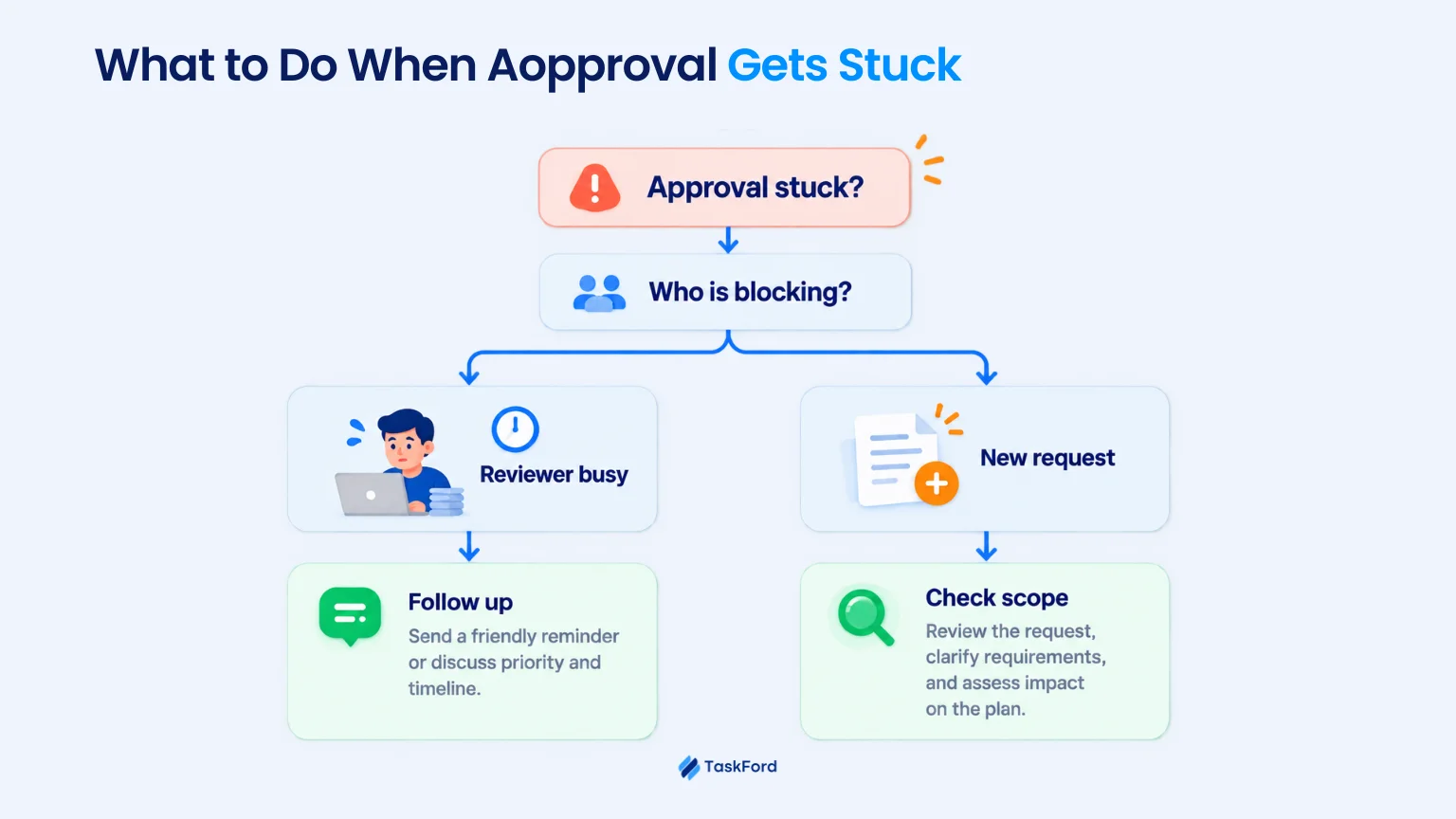
Most stuck approvals are not a mystery once you look closely. They usually come down to an unclear ask, a blocked reviewer, or a deadline nobody clearly agreed on. Strong client management helps teams handle these situations before they affect delivery.
But approval is only one part of delivery. Agencies and professional services teams also need visibility into resources, timelines, budgets, and project performance across multiple client projects.
👉🏻 Explore the key capabilities to look for in our guide to the Top Professional Services Automation Software.
Client Approval Workflow Checklist
A practical checklist to apply the approval workflow on your next project.
Before work starts
✓ Choose one final approver on the client side
✓ Agree on the number of revision rounds
✓ Make clear what counts as one revision round
✓ Set a feedback deadline
✓ Agree on what happens if feedback is late
While work is happening
✓ Give each deliverable an owner, deadline, and clear brief
✓ Review the work internally before sending it to the client
✓ Send the client the correct version with a clear deadline
✓ Keep feedback in one place
✓ Turn feedback into clear tasks
When something gets stuck
✓ Follow up with a clear ask and deadline
✓ Check what is actually blocking the reviewer
✓ Escalate early if the project is at risk
✓ Show how the delay affects the schedule
✓ Flag new requests that may be outside the original scope
After sign-off
✓ Save the final approved version
✓ Record the approval
✓ Update the status to Approved
✓ Start the next stage of work
✓ Update the schedule if needed
If most boxes are already checked on your projects, approval probably isn’t slowing you down. If several are empty, that’s likely where your next delay will come from.
Conclusion
Client approval doesn’t have to be the part of the project where everything suddenly slows down.
Most delays come from simple things: unclear ownership, scattered feedback, too many reviewers, or no clear deadline. Fix those early, and the whole process gets easier to manage.
The goal isn’t to remove feedback. It’s to make the path to a decision clear.
When everyone knows who reviews, who approves, when feedback is due, and what happens next, approvals become less of a guessing game and more of a normal part of delivery.
That’s the real win: fewer “just checking in” messages, fewer surprise delays, and a lot less confusion over which file is actually final.
FAQs
What is a Client Approval Workflow?
A client approval workflow is a structured process for reviewing deliverables, collecting feedback, making revisions, and getting final sign-off before work moves forward.
How can I make client approvals faster?
Assign one final approver, set review deadlines, limit revision rounds, keep feedback in one place, and make the current version easy to identify.
How long should client approval take?
There is no fixed timeline. Simple work may take a day, while larger projects may need more time depending on complexity, risk, and the number of reviewers.
How many approval rounds should a creative project have?
There is no universal number. Agree on the expected revision rounds upfront and define what counts as a revision to avoid endless back-and-forth.
Related Articles














![Professional Services Project Plan Template [Free Excel Download]](/marketing/blog/professional-services-project-plan-template-free-excel-download.webp)




Subscribe for Expert Tips
Unlock expert insights and stay ahead with TaskFord. Sign up now to receive valuable tips, strategies, and updates directly in your inbox.