Can Excel Manage Resource Allocation at Scale? The Limits of Spreadsheet Forecasting
Can Excel manage resource allocation at scale? Explore the limits of spreadsheet forecasting and when dedicated resource allocation software makes more sense.
Excel is one of the first tools many teams turn to when they need to plan resources. In fact, 58% organizations still choose to use it. It is familiar, flexible, and already available in many businesses. A simple spreadsheet can show who is working on which project, how many hours they have available, and whether planned work fits within that capacity. For a small team with a limited number of projects, this can be enough.
The challenge starts when resource planning becomes more complex. More projects mean more assignments to track, while changing deadlines, shared team members, leave, and shifting priorities can quickly affect capacity. A spreadsheet can still handle the calculations, but keeping the information accurate and useful becomes harder. So, can Excel continue to manage resource allocation effectively as a business grows?
Can Excel Spreadsheets Manage Resource Allocation?
In short, yes. Excel can manage basic resource allocation, and it can do so effectively when the planning requirements are straightforward. A basic resource allocation spreadsheet might contain a list of team members, their available working hours, and the hours planned for each project.
The calculation is simple. Subtract planned hours from available hours to see how much capacity remains.
| Team Member | Available Hours | Project A | Project B | Project C | Remaining Capacity |
|---|---|---|---|---|---|
| Sarah | 40h | 20h | 10h | 5h | 5h |
| James | 40h | 25h | 15h | 10h | -10h |
| Maria | 40h | 10h | 10h | 10h | 10h |
In this example, Sarah has 5 hours available. Maria has 10 hours available. James is allocated 10 hours beyond his available capacity, which signals a potential workload issue.
Excel can also support more detailed planning. Teams can add project dates, hourly rates, task categories, formulas, filters, conditional formatting, and other fields to build a resource planning model around their process.
The Pros: Why Teams Still Use Spreadsheets For Resource Allocation
- Nearly Everyone Is Familiar With It: Most knowledge workers have some experience with Excel, so teams can start planning resources without much onboarding.
- You May Already Be Paying for It: Many businesses already have Excel through Microsoft 365, so basic resource planning may not require another software subscription.
- It Is Flexible and Quick to Set Up: A simple spreadsheet can be created quickly with team members, project assignments, planned hours, and availability.
- It Is Easy to Customize: Teams can add formulas, filters, conditional formatting, and custom fields to fit their resource planning process.
- It Works Well as a Starting Point: For small teams with a few projects and stable assignments, Excel can provide enough visibility for basic resource allocation.
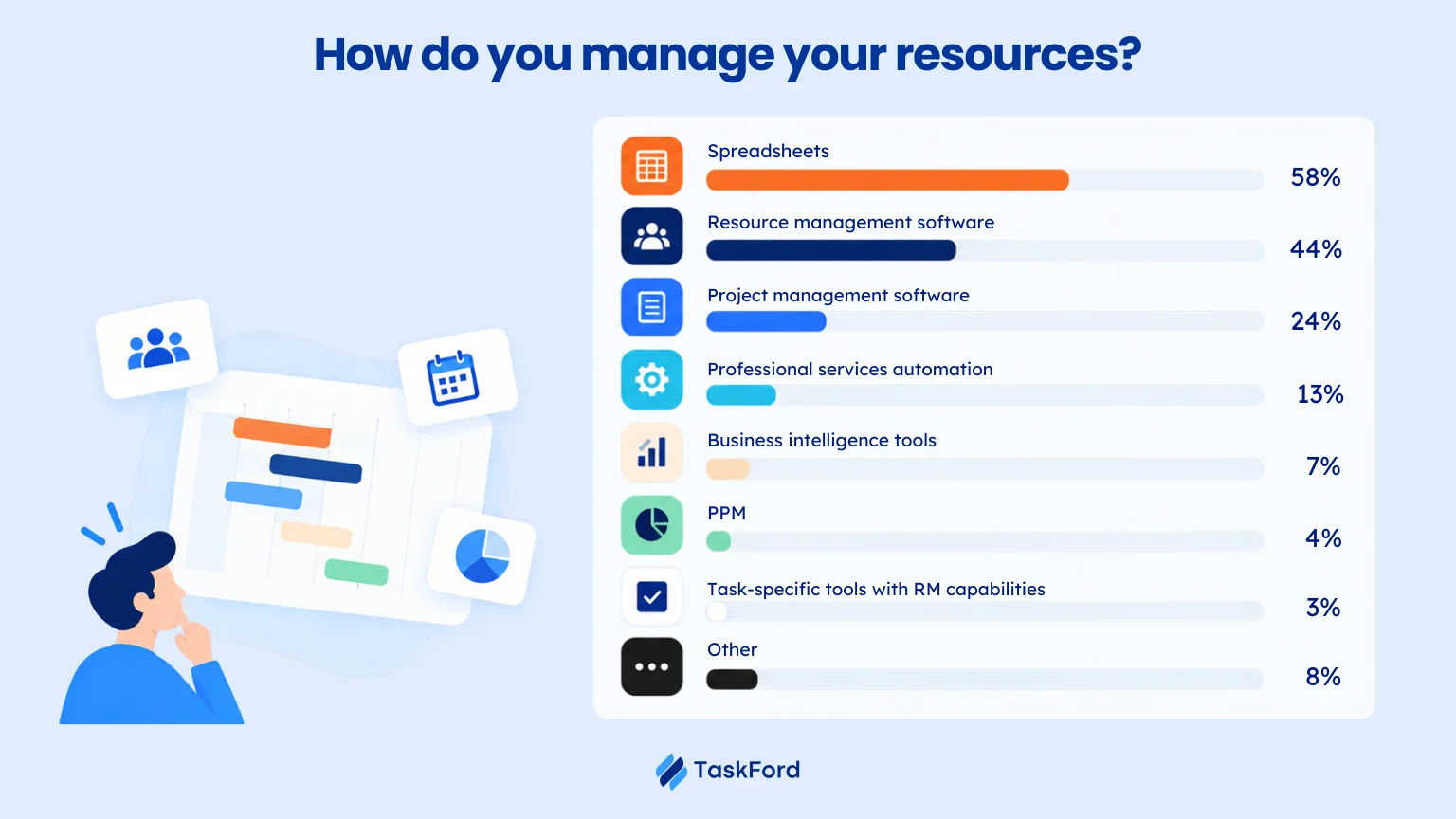
According to Runn’s research, more than half of organizations (58%) still rely on spreadsheets in some way for resource management, using them to track availability, skills, or forecast capacity, even as purpose-built resource management tools become more widely available.
The Cons: Limits of Spreadsheet-Based Resource Allocation
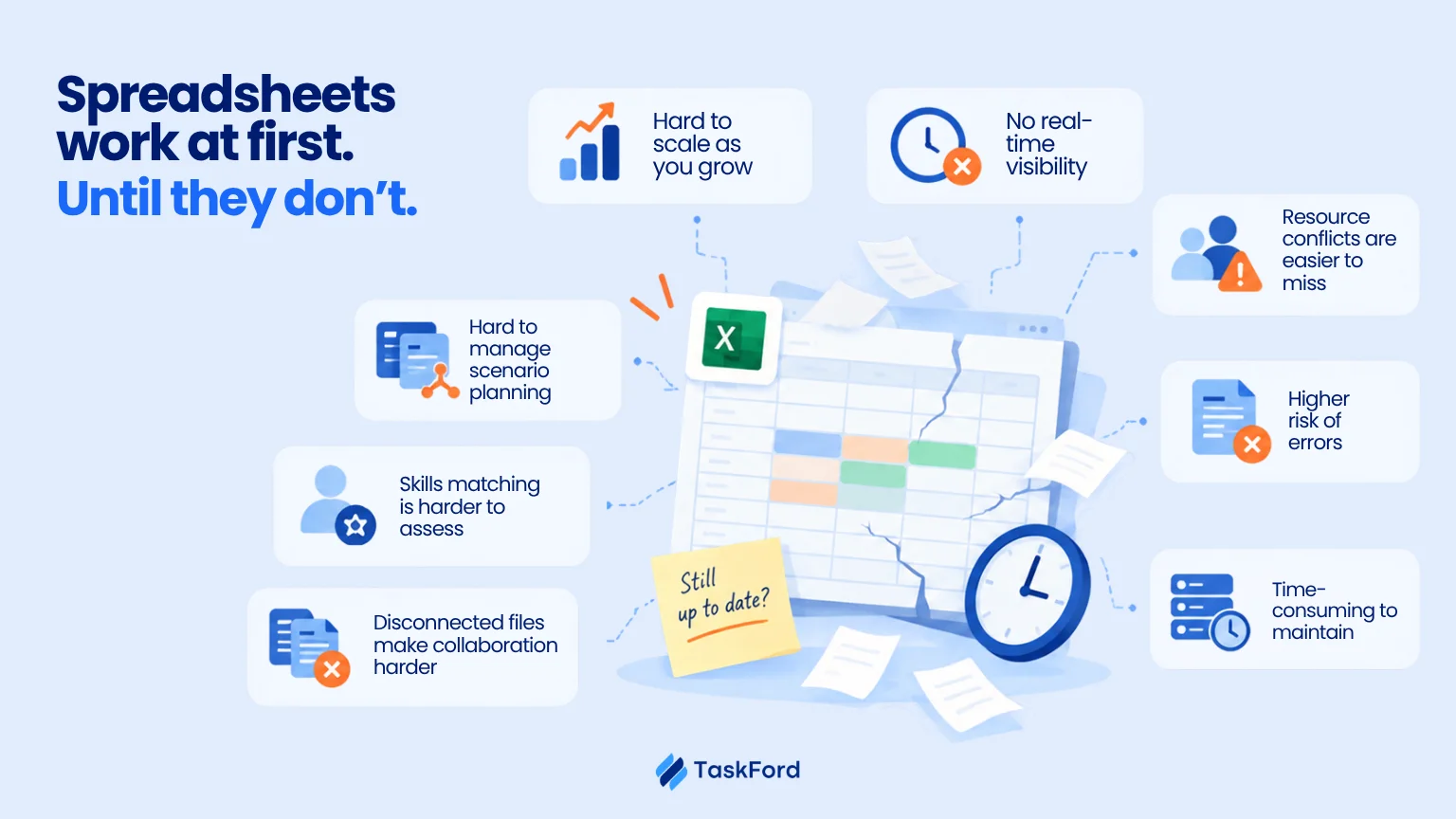
1. Limited Scalability as Resource Planning Grows
A spreadsheet can work well when there are only a few projects and resources to manage. As the business grows, the workbook can become larger, slower, and more difficult to maintain. Complex resource planning often means adding:
- More projects and team members
- More formulas and calculations
- More conditional formatting
- More sheets and dependencies
- More resource data to maintain
The spreadsheet may still function, but keeping it organized and responsive becomes increasingly difficult.
2. No Automatic Real-Time Visibility
A spreadsheet only reflects the information that has been entered into it. If assignments, leave, availability, or project schedules change, someone needs to update the resource plan.
For example:
| Change | What the spreadsheet may still show |
|---|---|
| A team member takes leave | Their previous availability |
| A project deadline moves | The original allocation |
| A new project is added | No allocation for the new work |
| An employee is reassigned | Their previous project workload |
This creates a gap between what the spreadsheet shows and what is actually happening.
3. Resource Conflicts Are Harder to Track
When people work across several projects, tracking total workload becomes more difficult. A team member might have:
- 15 hours on Project A
- 12 hours on Project B
- 10 hours on Project C
- 8 hours of internal work
That adds up to 45 hours, even if each project appears manageable on its own.
Excel can calculate these totals, but managers need the right data in the right place to identify the conflict. When assignments are spread across multiple sheets or workbooks, overlapping workloads can be easier to miss.
4. Manual Steps Increase The Risk of Human Errors
Resource planning in Excel often involves entering hours, copying assignments, updating dates, and maintaining formulas across multiple sheets.
Each manual step creates an opportunity for error. A mistyped leave date, an overwritten formula, or an inconsistent employee name can distort capacity calculations without being immediately noticed.
5. Scenario Planning Is Difficult to Maintain
Resource planning often involves testing different possibilities before making an allocation decision. For example:
What happens if a new project starts two weeks earlier?
What happens if a team member is reassigned?
What happens if an existing project needs 20 additional hours?
Excel can model these scenarios, but each version needs to be built and maintained manually.
Teams may end up with separate worksheets for different staffing scenarios. As the number of scenarios grows, comparing assumptions and keeping each version current becomes more difficult.
6. Skills Matching and Future Demand Are Harder to Assess
Knowing who has available hours is only part of resource allocation. Managers also need to know whether a person has the right skills, experience, certifications, and availability for a particular assignment.
A spreadsheet can store these details, but keeping them current and connecting them with project requirements takes additional effort. As the number of employees and projects grows, identifying the right person for upcoming work becomes more complicated.
7. Disconnected Files Make Collaboration and Reporting Harder
Resource planning often involves several people. Project managers, team leads, and resource managers may all need to update or review the same information. When teams maintain separate files, common problems include:
- Conflicting versions
- Missed updates
- Overwritten changes
- Different naming conventions
- Uncertainty about which file is current
Shared cloud spreadsheets improve collaboration, but they do not automatically create a consistent resource planning process. What they need is a more connected view for their project.
8. It’s Time-Consuming
Resource planning in Excel requires frequent manual updates. Managers may need to adjust assignments, availability, planned hours, project dates, and capacity whenever something changes.
As the number of projects and resources grows, these small tasks add up. More time goes into maintaining the spreadsheet and checking the data, leaving less time for actual resource planning and project management.
Signs to Move On From Spreadsheets
Spreadsheets don’t become unsuitable overnight. The turning point usually comes when resource planning becomes too complex to manage reliably in a spreadsheet. Consider moving to resource allocation software when:
- You manage many projects at once
- People work across multiple projects
- Resource assignments change frequently
- Managers regularly ask who has capacity
- Overallocations are discovered too late
- You spend too much time maintaining the plan
- Planned and actual hours are separated
- You need a shared view across projects
Tim Russel of Lumos Inc. explained that Excel was sufficient for resource allocation when the company had around 30 people. As the firm grew, the spreadsheet became harder to maintain, update, and share, creating a need for a more scalable approach to resource planning.
Spreadsheets vs. Resource Allocation Software
Spreadsheets can work well for basic resource planning, but dedicated resource allocation software is designed to handle more complex planning across projects, people, and changing workloads.
| Area | Spreadsheet | Resource Allocation Software |
|---|---|---|
| Resource planning | Manual setup and updates | Purpose-built resource planning |
| Capacity & workload | Requires formulas and manual review | Built-in capacity and workload views |
| Scheduling | Custom templates or separate tools | Dedicated resource scheduling |
| Time tracking | Often managed separately | Can connect planned and actual hours |
| Reporting | Manually built with formulas and charts | Built-in dashboards and reports |
| Scalability | Best for smaller or simpler teams | Designed for multiple projects and resources |
| Setup & support | Quick to start, but maintenance is manual | Requires setup, with product support available |
How TaskFord Supports Resource Allocation
TaskFord connects resource planning with project and work management, so resource allocation does not have to sit in a separate spreadsheet. The goal is to give managers a clearer view of planned work, available capacity, and actual time within the same workspace.
Resource Scheduler and Workload View
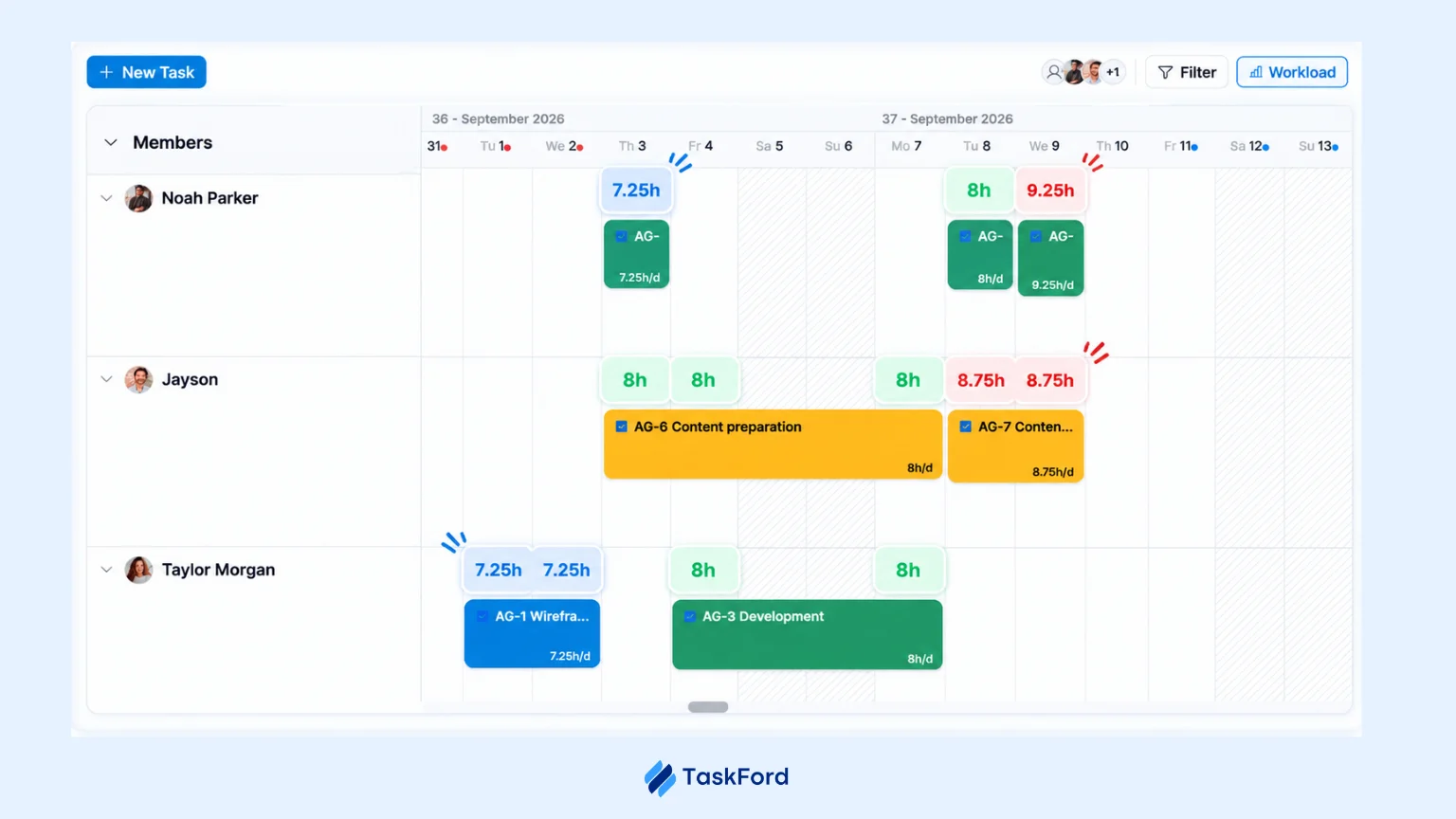
Resource Scheduler helps managers allocate team members across projects and timelines, making it easier to plan resources alongside the work they are expected to deliver. This is particularly useful when people are shared across multiple projects and assignments need to be reviewed together.
The Workload View helps teams compare assigned work with available capacity. Managers can see where resources are overallocated or where additional capacity is available, making it easier to review workloads before assigning new work.
Work Capacity
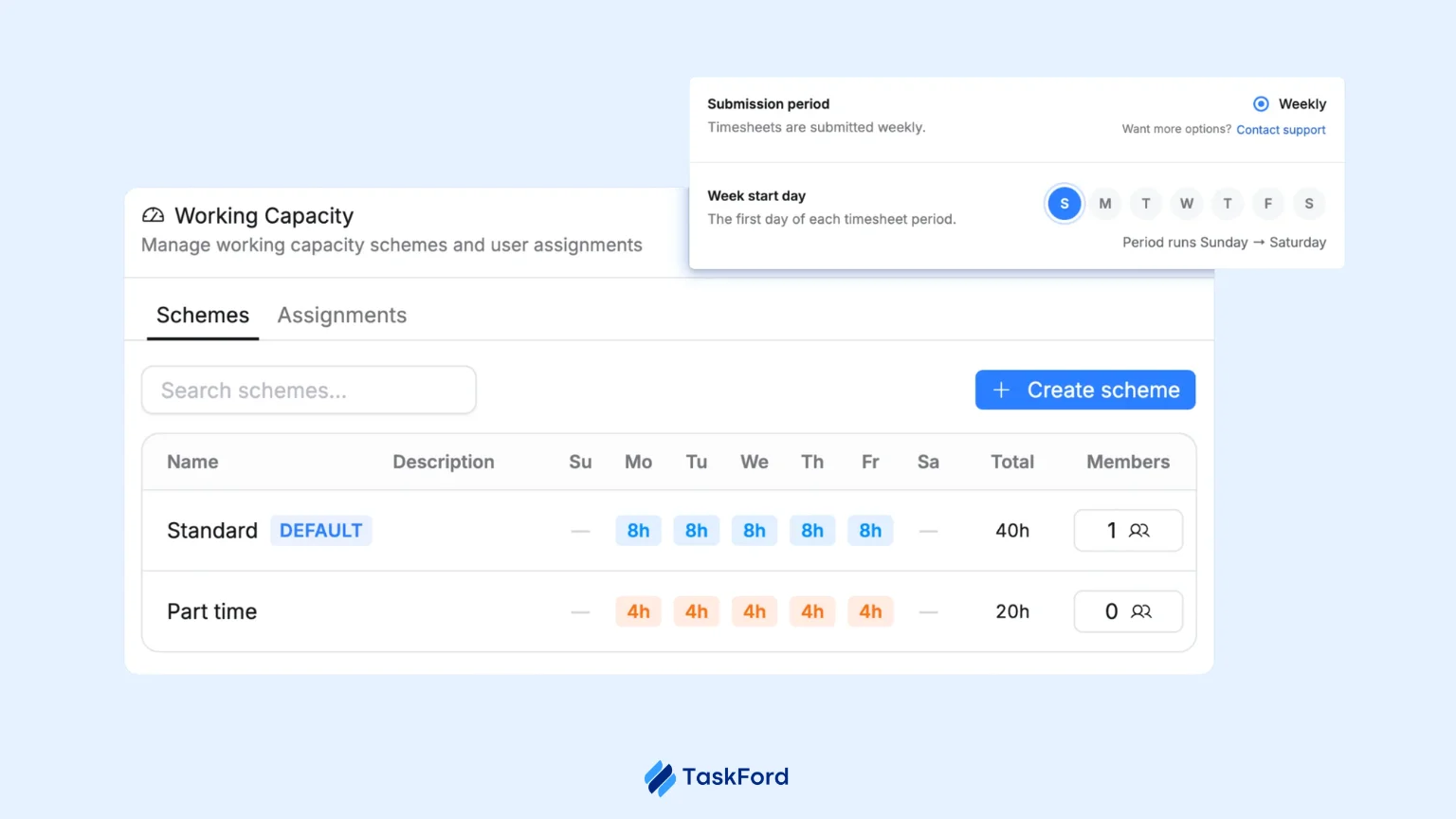
TaskFord lets teams define work capacity in hours per day, such as an 8-hour daily capacity for a team member. This gives managers a defined capacity baseline when planning assignments rather than relying only on a list of tasks.
Time Tracking
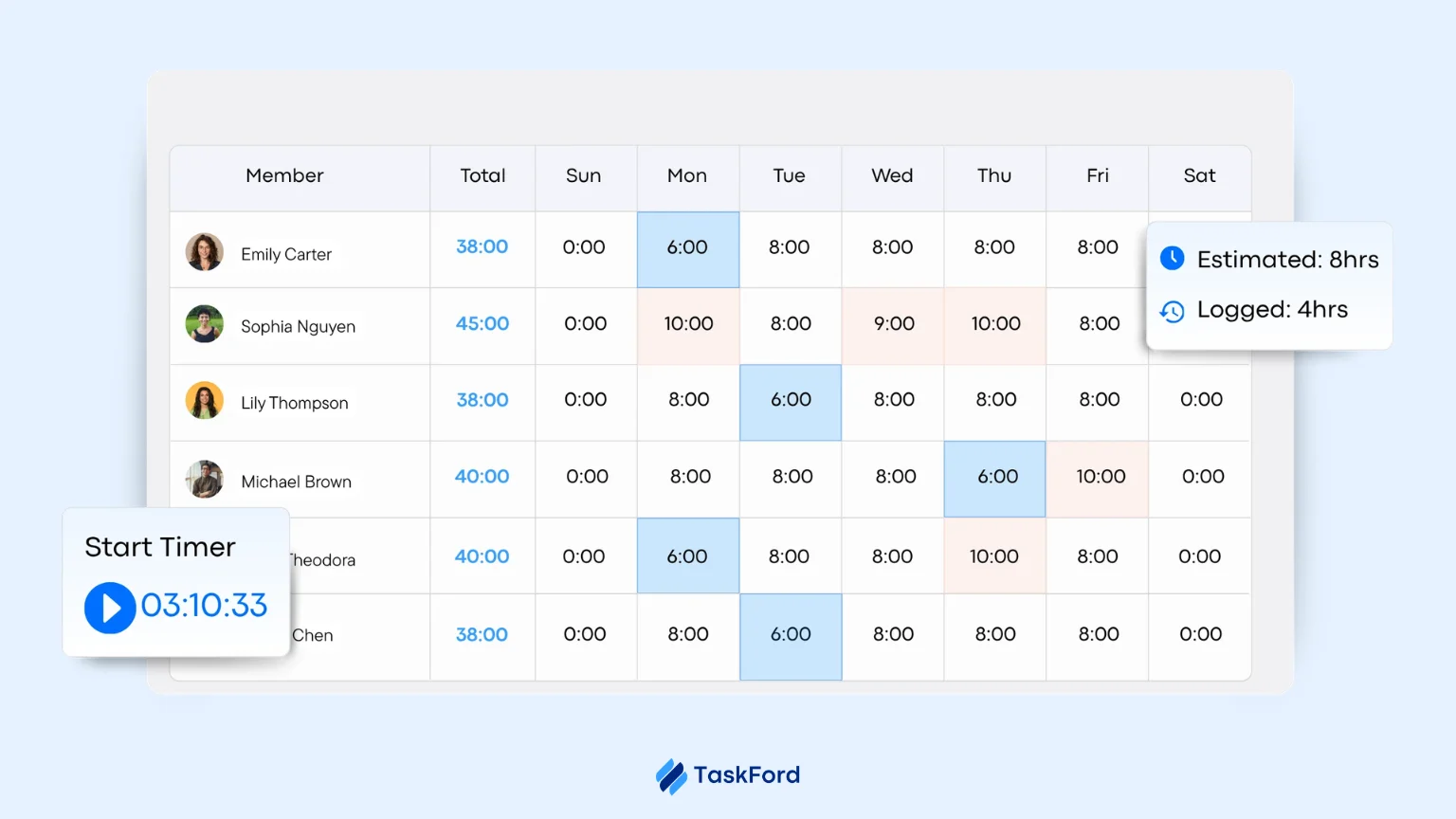
TaskFord supports time tracking so teams can record the time spent on work and compare actual hours with planned hours. This gives managers useful information for reviewing estimates and improving future resource planning.
Overview and Reporting
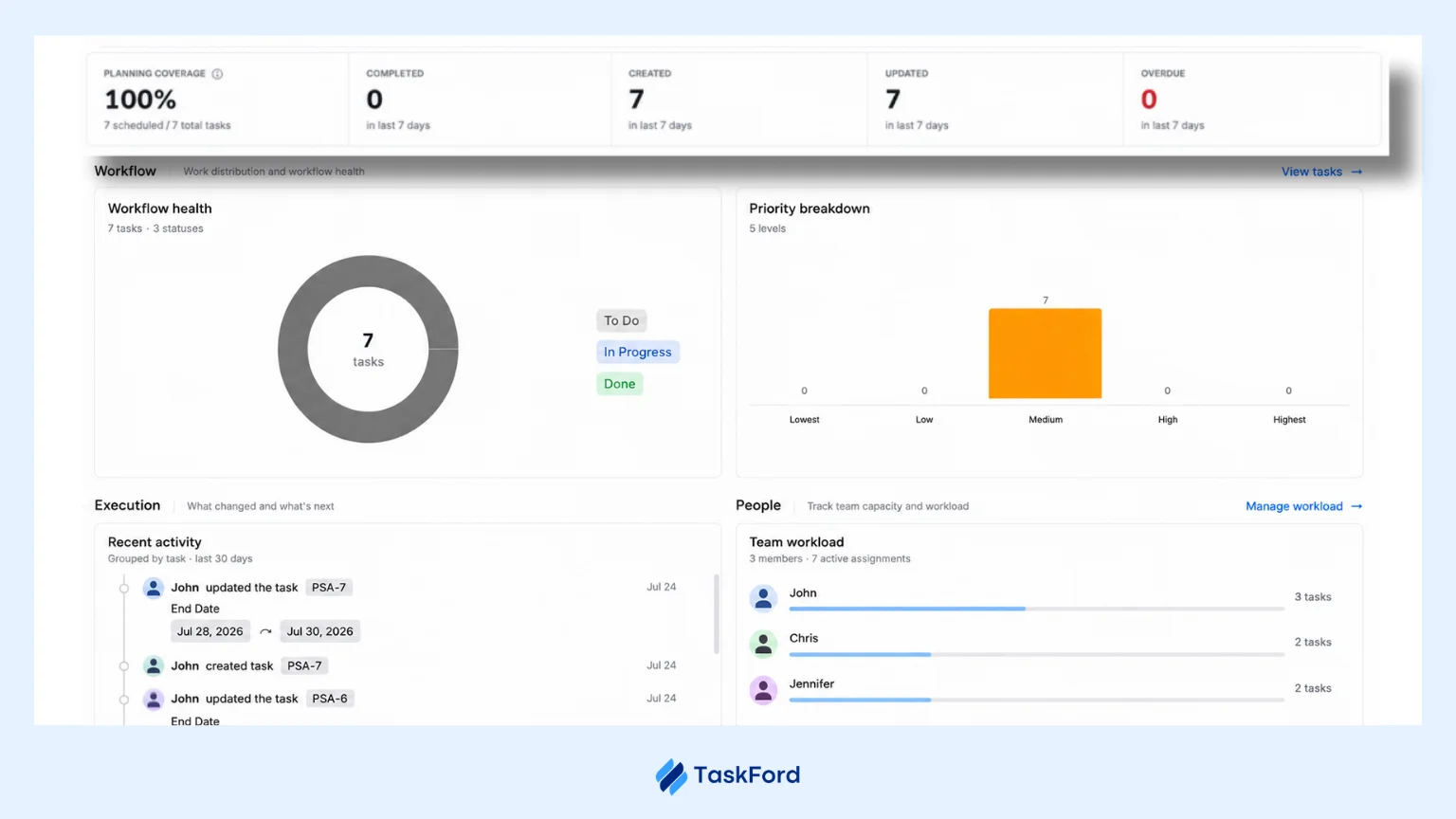
TaskFord’s Overview Board provides visibility into project progress, time spent, capacity, workload, and utilization. This connects resource information with project performance rather than treating resource allocation as an isolated spreadsheet. Managers can use this information when reviewing current workloads and planning upcoming work.
Frequently Asked Questions
Why do businesses still use Excel for resource allocation despite its limitations?
Excel is familiar, flexible, and already available in many businesses. For smaller teams with fewer projects and relatively stable assignments, a spreadsheet can still provide enough visibility into resource capacity and workload without requiring additional software.
How can you convince a team to move from spreadsheets to resource allocation software?
Start by identifying the problems the team is already experiencing, such as manual updates, hidden overallocations, outdated information, or time spent maintaining multiple files. Showing how a dedicated tool can reduce these issues makes the case for change more practical than simply pointing out Excel’s limitations.
How long does it take to transition from Excel to resource management software?
The timeline depends on the size of the team, the amount of existing data, and how complex the resource planning process is. A small team with a simple spreadsheet may transition quickly, while larger organizations may need additional time for data migration, setup, testing, and user adoption.
What should you look for when replacing a resource allocation spreadsheet?
Look for features that support the way your team plans resources, including capacity tracking, workload visibility, resource scheduling, project assignments, and reporting. It should also provide a shared view of resource information and be easy for managers and team members to use.
Can resource allocation software replace Excel completely?
Not necessarily. Excel can still be useful for ad hoc calculations, analysis, and data that does not require ongoing resource planning. Dedicated resource allocation software is more useful for managing recurring activities such as capacity planning, workload management, scheduling, and resource assignments.
Conclusion
Excel can be a practical option for resource allocation when teams are small, projects are limited, and assignments are relatively stable. It is familiar, flexible, and easy to customize, but maintaining accurate resource data becomes more difficult as the number of projects, resources, and changes increases. At that point, manual updates, limited visibility, allocation conflicts, and disconnected data can make resource planning more time-consuming.
For teams that have outgrown spreadsheets, resource allocation software can provide a more connected way to manage capacity, workloads, assignments, and project schedules. TaskFord brings resource scheduling, workload management, work capacity, time tracking, and project reporting into one workspace, helping teams manage resource allocation alongside the work itself.
Related Articles












![Professional Services Project Plan Template [Free Excel Download]](/marketing/blog/professional-services-project-plan-template-free-excel-download.webp)




Subscribe for Expert Tips
Unlock expert insights and stay ahead with TaskFord. Sign up now to receive valuable tips, strategies, and updates directly in your inbox.