How Consulting Firms Can Cut Bench Time Without Sacrificing Delivery Readiness
Learn how consulting firms can reduce bench time, improve staffing, balance workloads, and plan capacity while keeping teams ready for new projects.
Many consulting firms know this awkward situation: a consultant is sitting on the bench while a project manager is hunting for someone with the right skills. One person has time. Another has too much work. And somehow, everyone ends up checking the same spreadsheet.
Bench time is normal, sure. However, the problem starts when those gaps last too long or happen without a clear plan. It can hurt utilization, raise staffing costs, and make it harder to get projects moving when new work comes in.
Good bench management helps firms keep track of who is available, what projects are coming up, and where capacity is needed. The goal is simple: keep people ready for the next project without leaving them parked on the bench for longer than necessary.
What Is Bench Time in Consulting?

Think of a football team. A player might be fit, ready to play, and still spend the afternoon on the bench because they haven’t been called onto the pitch yet.
Consultants can be in the same situation. Bench time is when a consultant is available and ready to work but isn’t assigned to a billable client project.
For example, a consultant finishes a six-month project on June 30, but their next project doesn’t kick off until July 15. Those two weeks are their bench time. They’re still part of the team and ready for the next game, but they’re not currently on the pitch generating billable work.
When Bench Time Becomes a Problem
A few days between projects is nothing to panic about.
The trouble starts when those gaps keep coming back or stretch longer than expected. By then, the issue may be bigger than a few empty calendars. Poor forecasting, slow staffing decisions, or limited visibility into upcoming work may already be affecting the business.
- Utilization starts to drop: Long bench periods mean fewer billable hours while salaries and other costs keep running.
- Revenue takes a hit: Consultants still need to be paid, even when they aren’t generating project revenue.
- Forecasts stop matching reality: Recurring bench time can be a sign that expected demand and actual demand aren’t lining up.
- Specialists sit idle: Having a highly skilled consultant waiting for work is especially costly when their expertise is needed elsewhere.
- Staffing becomes a last-minute scramble: Teams may start assigning whoever is available instead of finding the right person for the job.
An Equiteq report found that consultants spent an average of 30% of their time on the bench. That means a lot of working time can go unassigned between client projects.
Seriously, Why Is There So Much Bench Time?
Project Gaps and Delays
Bench time can happen for simple timing reasons. A client project ends before the next assignment starts, a new project gets delayed, a contract is waiting for approval, or a project gets canceled. These gaps may only last a few days, but repeated delays can leave consultants unassigned for much longer.
Poor Demand Forecasting
Staffing plans often depend on work that looks likely to happen. Then the deal gets pushed back, the project gets smaller, or it never closes. If the staffing plan doesn’t change with it, someone can end up waiting for work that isn’t coming yet.
This gets harder when sales forecasts and resource plans are updated separately. One team sees potential work while the other is already planning around it.
Limited Visibility Into Upcoming Work
Resource managers usually know who is available. Sales teams usually know what might be coming. The problem is when those two pieces of information don’t meet until the last minute.
It can also lead to uneven workloads. Some consultants may be overloaded while others have plenty of capacity, simply because managers can’t see the full picture early enough.
Disconnected Planning Tools
Spreadsheets have a habit of multiplying. One for sales forecasts, another for staffing, another for project schedules, and suddenly nobody is quite sure which one is up to date.
Even when a company uses project management software, it may not cover resource availability or capacity planning. When this information is scattered across different tools, it’s harder to spot uneven workloads, upcoming capacity, or skill gaps before they turn into bench time.
What Is Bench Management?
Bench management is the process of tracking and managing consultants who are between projects. It helps firms understand who is available, what work is coming up, and where each consultant could fit next.
The goal isn’t to eliminate every gap. It’s to reduce unnecessary bench time while keeping the right people available for upcoming projects.
How to Cut Bench Time Without Sacrificing Delivery Readiness
1. Forecast Demand and Plan Availability Early
Don’t only look at the projects happening right now. Keep an eye on what’s coming next, too.
Check upcoming projects, expected start dates, required skills, and who will be available soon. For example, if three consultants are finishing their projects in two weeks, start looking at their next assignments now.
That gives you time to line things up before their calendars suddenly go empty.
2. Match People to Work Based on Skills and Capacity
Availability alone isn’t enough. A consultant also needs the right skills, experience, role, and capacity for the assignment.
For example, a new client needs a project manager for 30 hours per week. Instead of looking only for someone who is free, compare the people available:
| Consultant | Relevant experience | Available capacity | Fit |
|---|---|---|---|
| Alex | Project management | 30 hrs/week | Strong fit |
| Jamie | Project management | 10 hrs/week | Partial fit |
| Sam | Software development | 30 hrs/week | Not a fit |
Looking at skills and workload together also helps prevent uneven allocation. One consultant may be overloaded while someone with the right skills and capacity is sitting on the bench.
3. Know When People Will Be Available
Project end dates can tell you a lot. Keep track of when consultants are expected to finish their current work and how much time they will have afterward.
Someone becoming available next month gives you plenty of time to plan. Someone becoming available tomorrow is a much harder problem.
The earlier you know, the more options you have.
4. Use Short Bench Periods Productively
Not every gap between projects can be avoided. If a consultant has a few free days before their next assignment, don’t create a new project just to keep them busy.
Instead, use that time for small tasks that are already useful and easy to pause, such as:
- Helping with a proposal
- Finishing documentation
- Sharing knowledge with the team
- Completing short training
- Doing research for an upcoming project
- Preparing for their next assignment
The idea is simple: make good use of the time without creating work that wouldn’t otherwise need to be done.
5. Create a Few Staffing Scenarios
Projects rarely go exactly as planned. Instead of relying on one staffing plan, think through a few possible situations:
- Project starts on time: Who will be needed, and when?
- Project gets delayed: Who could end up with less work than expected?
- Two projects start together: Which consultants could become overloaded?
- Demand is lower than expected: Who may have spare capacity?
- Demand is higher than expected: Where might the team need extra capacity?
You don’t need a complicated model. A few simple scenarios can help you spot potential bench time or staffing gaps before they become a problem.
6. Balance Workloads and Capacity
Before leaving someone unassigned, look at the wider team workload. A consultant with spare capacity may be able to help another project, especially if another team is already stretched.
At the same time, don’t try to keep everyone busy 100% of the time. Some available capacity is useful when new work comes in or plans suddenly change.
| Situation | What to consider |
|---|---|
| Someone has spare capacity | Check if they can help another project |
| Another team is overloaded | Move suitable work to someone with available capacity |
| A new project may start soon | Keep enough capacity available for it |
| An urgent client request comes in | Avoid having everyone fully booked |
| Someone takes unexpected leave | Keep some room to cover the gap |
The goal is to use spare capacity where it makes sense while keeping enough room for new work. It’s about making capacity intentional, not simply filling every empty hour.
7. Plan Future Capacity Before You Need It
Don’t wait until someone is already sitting on the bench to figure out what happens next. Look at future project demand alongside your team’s available capacity.
For example:
| Period | Project demand | Team capacity | What to consider |
|---|---|---|---|
| This month | 400 hrs | 420 hrs | Small amount of spare capacity |
| Next month | 350 hrs | 500 hrs | Potential bench time |
| Month after | 550 hrs | 500 hrs | Potential capacity gap |
If you can see that you’ll have more people than work next month, you have time to plan training, move assignments, or bring project work forward.
If demand is likely to exceed capacity, you can consider contractors, hiring, or adjusting project dates.
Capacity planning gives you more options because you’re dealing with the problem before it becomes urgent.
Bench Management Metrics to Track
| Metric | What it tells you | Why care? |
|---|---|---|
| Bench utilization rate | How much available consultant time is currently unassigned | Shows whether too much capacity is sitting idle |
| Average bench duration | How long consultants typically wait between projects | Helps spot gaps that are getting too long |
| Billable utilization | How much available time goes to client work | Shows how much of the team’s time is generating revenue |
| Time-to-assignment | How long it takes to move someone from one project to the next | Shows whether staffing moves quickly or gets stuck |
| Forecasted vs. actual demand | How close expected project demand is to what actually happens | Helps catch forecasts that look great on paper but miss the mark |
| Skills coverage | Whether the team has the skills needed for upcoming projects | Helps spot potential staffing problems before they become urgent |
How TaskFord Can Help With Bench Management
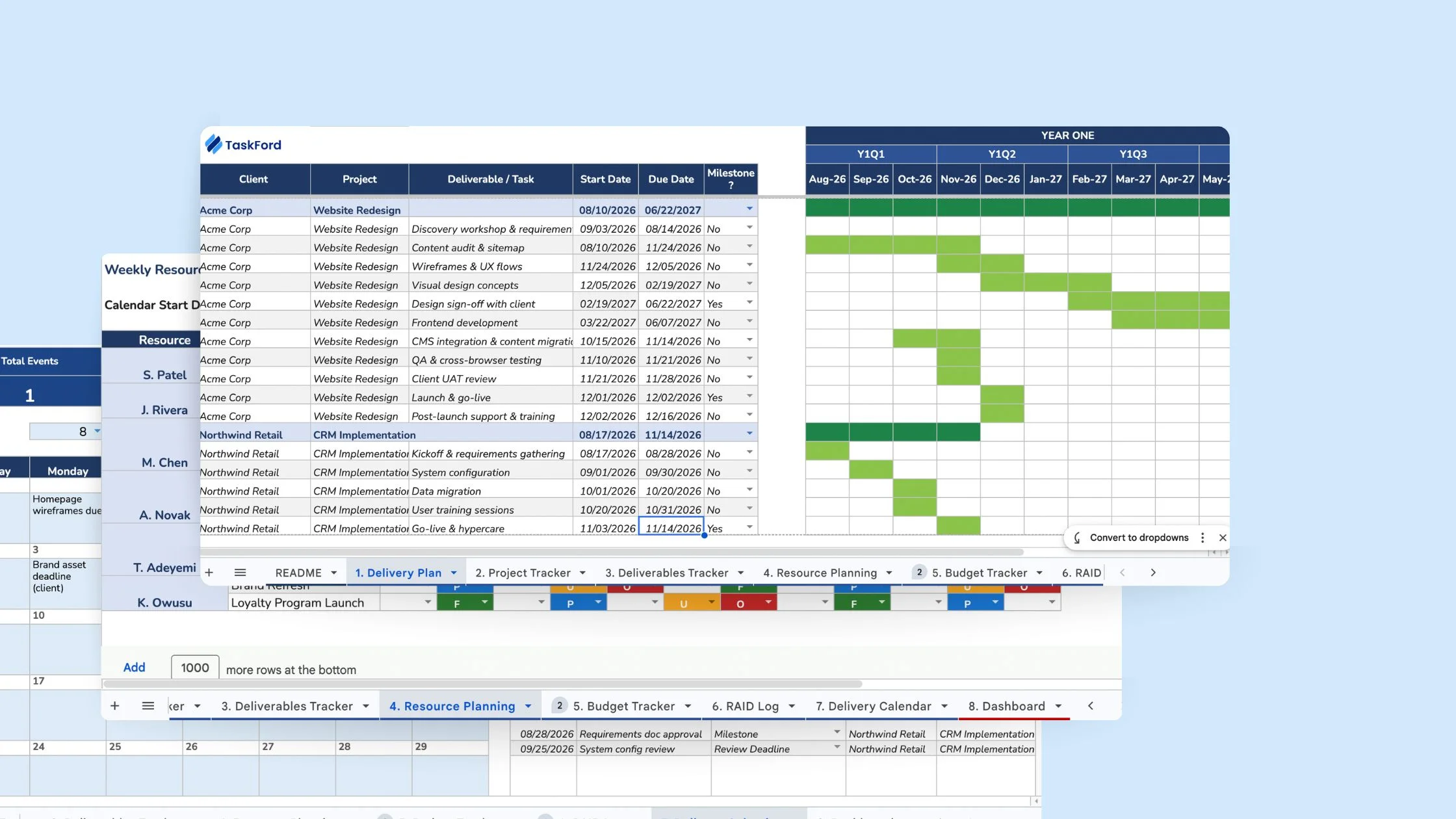
Managing bench time becomes much easier when resource information is visible in one place. TaskFord is an integrated work delivery platform built for teams that need more than basic task management. Its resource planning features can help consulting firms connect project work with resource capacity.
Resource Scheduler + Workload View
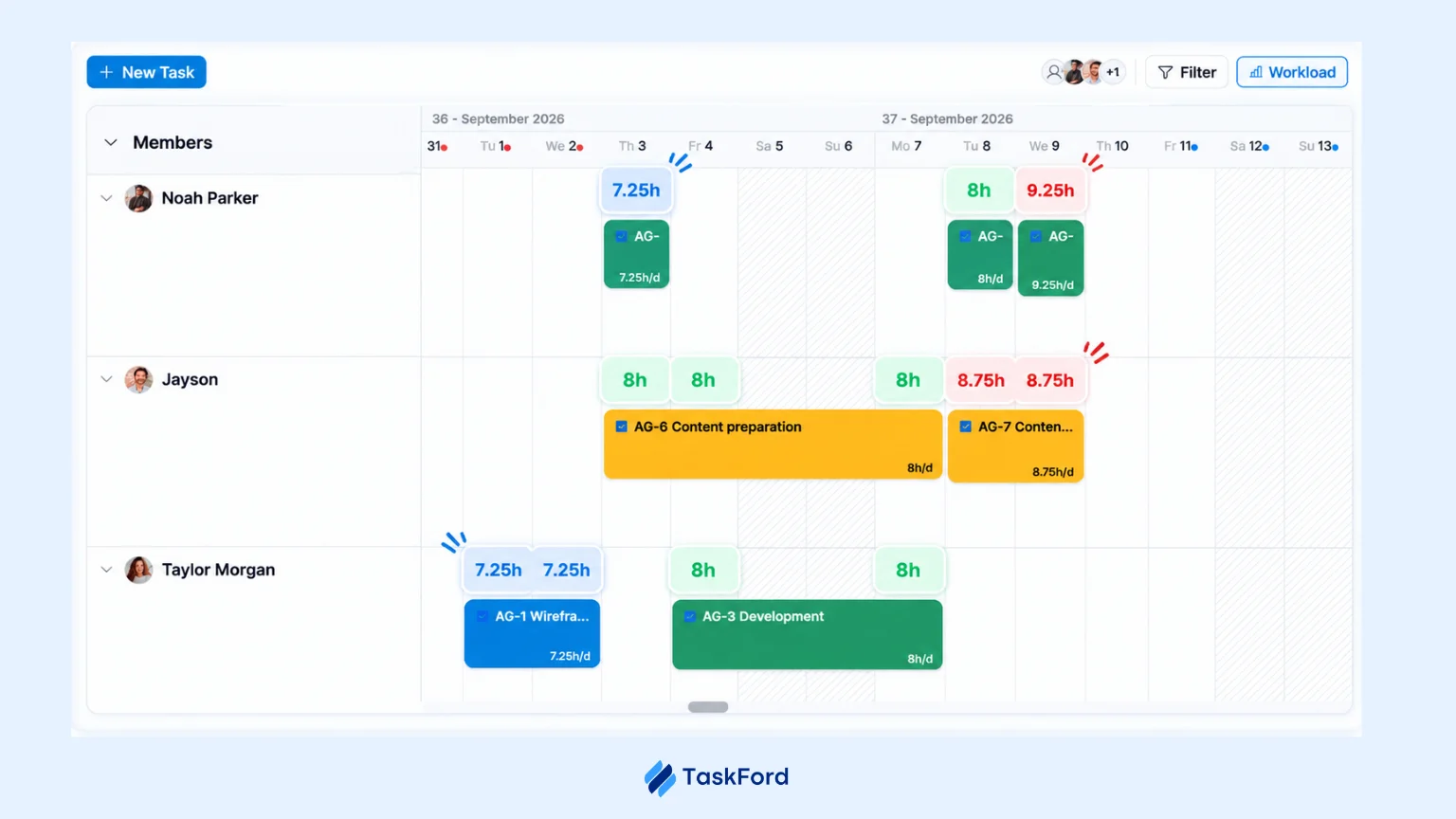
The Resource Scheduler shows how consultants are allocated across projects and when they are expected to become available. The Workload View shows how much work each person has compared with their available capacity.
Together, they help managers see who is overloaded, who has room for more work, and who may soon become available for a new assignment.
Capacity Planning
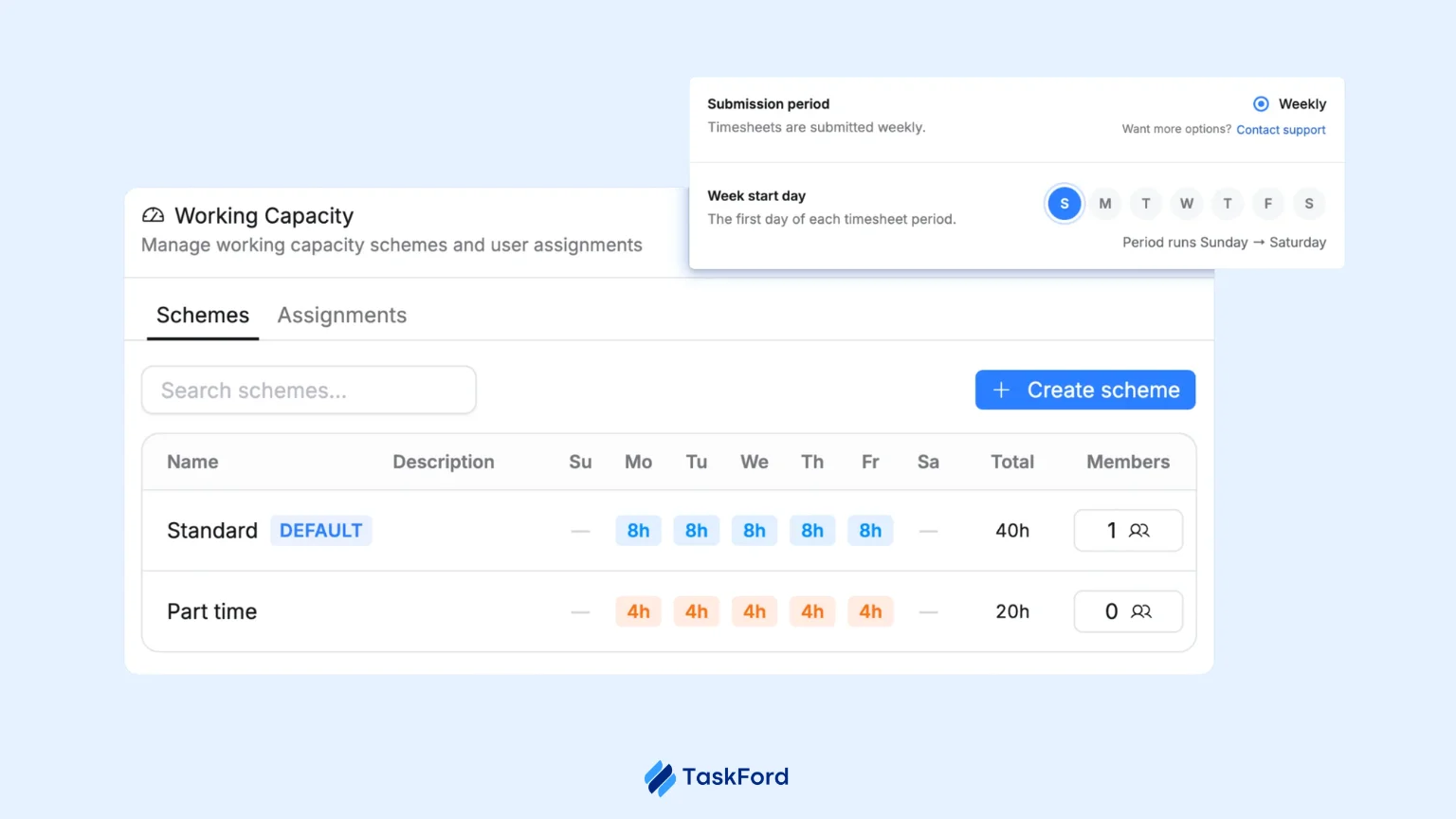
TaskFord lets teams define work capacity in hours per day, such as an 8-hour daily capacity for a team member. This gives managers a clear capacity baseline when planning assignments instead of relying only on a list of tasks.
Managers can then allocate work against that available capacity, such as assigning 4 hours to one project and 4 hours to another. This makes it easier to balance workloads, use available capacity, and spot potential bench time before it becomes a problem.
Unfamiliar? Try This Weekly Routine
Keep the weekly check short and practical. The goal is to update the plan, catch changes, and make sure every available person has a clear next step.
- Review the live schedule: Check current assignments, recent changes, and anything that has moved since the last review.
- Check next week’s gaps: Look for people becoming available, projects starting soon, and assignments that may need attention.
- Update the bench list: Remove people who have been assigned and add anyone who has become available.
- Confirm the next step: Every person on the bench should have a clear status, such as waiting for a project, supporting internal work, training, or taking time off.
- Follow up on changes: Turn anything that needs a decision into an action for the resource manager, project manager, or sales team.
A 20-minute weekly review is often enough to keep the list current and stop small staffing gaps from becoming long bench periods.
Conclusion
Bench time is part of consulting. Someone will finish a project on Friday and, somehow, the next assignment will be “still being finalized” on Monday.
The goal isn’t to keep every consultant busy every minute. It’s to know what’s coming, spot gaps early, and have a plan before someone’s calendar turns completely empty.
With better visibility into projects, people, skills, and capacity, consulting firms can spend less time playing staffing detective and more time getting the right people onto the right work.
Frequently Asked Questions
What is a healthy bench time for a consulting firm?
There is no single target that works for every consulting firm. The right level depends on project demand, team size, skills, and how predictable the firm’s sales pipeline is.
Who is responsible for managing bench time?
Bench management usually involves resource managers, project managers, and sales teams. Resource managers track availability, project managers understand upcoming staffing needs, and sales teams provide visibility into potential new work.
Should consultants be removed from the bench as quickly as possible?
Not always. Moving someone into work that doesn’t match their skills or creating unnecessary internal tasks can cause more problems. The goal is to find useful assignments that fit their skills and capacity.
How can consulting firms identify bench time trends?
Track bench-related data over time, such as how often people become unassigned, how long gaps last, and which roles or skills experience the most downtime. Looking at the pattern can reveal recurring staffing issues.
Can bench time be affected by project delivery delays?
Yes. When a project finishes later than planned, consultants may become available later than expected. This can also affect the people waiting to take over their next assignments, making staffing plans harder to coordinate.
Related Articles











![Professional Services Project Plan Template [Free Excel Download]](/marketing/blog/professional-services-project-plan-template-free-excel-download.webp)




Subscribe for Expert Tips
Unlock expert insights and stay ahead with TaskFord. Sign up now to receive valuable tips, strategies, and updates directly in your inbox.