How to Boost Work Efficiency with a Worklog System
Boost work efficiency with a worklog system! Learn to track tasks, manage time, and analyze productivity for better performance. Get practical tips to streamline workflows today!
In today’s fast-paced professional landscape, boosting efficiency is a critical goal for individuals and teams alike. One proven method to achieve this is by implementing a worklog—a powerful tool for tracking tasks, managing time, and analyzing productivity patterns. A well-maintained worklog provides a structured framework that empowers professionals to take control of their workday, ensuring that every minute is spent purposefully.
This article dives deep into how a worklog can elevate work efficiency, offers detailed strategies for maintaining one. We’ll also address challenges and provide actionable solutions to make your worklog a cornerstone of success.
What Is a Worklog?
A worklog is a record of the tasks and activities completed during a workday, along with the time spent on each. Unlike a simple to-do list, it tracks actual work performed, helping individuals and teams understand how their time is used.
By maintaining a worklog, professionals can improve time management, monitor progress, identify productivity patterns, and make more informed decisions about their workload.
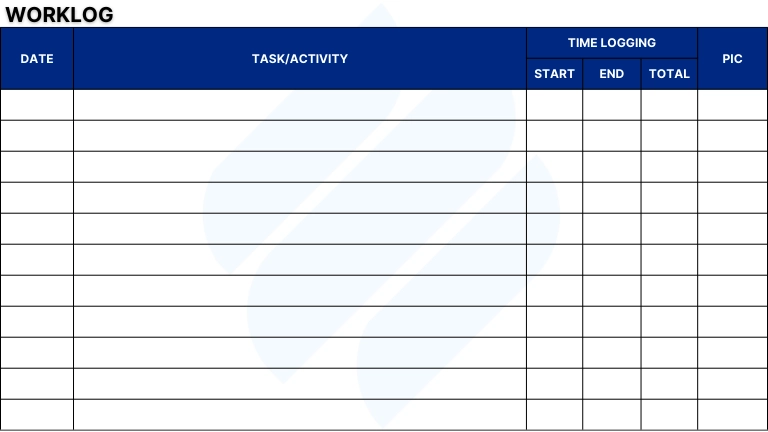
Benefits of Maintaining a Worklog
1. Improved Time Management
Keeping a worklog helps employees track how much time they spend on various tasks. By analyzing these logs, individuals can identify time-consuming activities and find ways to complete them more efficiently. For example, if an employee realizes they spend too much time on emails, they can set specific time blocks for email management to minimize distractions.
2. Enhanced Productivity
With a worklog, you can structure your day around high-impact tasks, reducing distractions. This aligns with task management principles, ensuring accountability and focus. Imagine a graphic designer logging hours on client revisions versus brainstorming— the worklog highlights where effort yields the most value.
3. Clear Progress Tracking
Worklogs act as a timeline of achievements, ideal for long-term projects. By integrating timesheet, you can monitor milestones and spot delays early. For complex initiatives, an advanced roadmap within your worklog system can visualize progress across phases.
4. Better Communication and Collaboration
Shared worklogs enhance team transparency. Team members can review logs for resource planning, ensuring balanced workloads and avoiding duplicated efforts. This fosters collaboration, a key aspect of project management.
5. Increased Accountability
A worklog holds you accountable by documenting your efforts. For teams, it ensures tasks are completed on schedule, supporting budget management by preventing overruns due to procrastination or mismanagement.
6. Effective Decision-Making
Managers can analyze worklog data for cost management and resource management. For example, if a worklog shows a team member consistently over-allocated, adjustments can be made to optimize performance and reduce burnout.
Implementing an Effective Worklog System
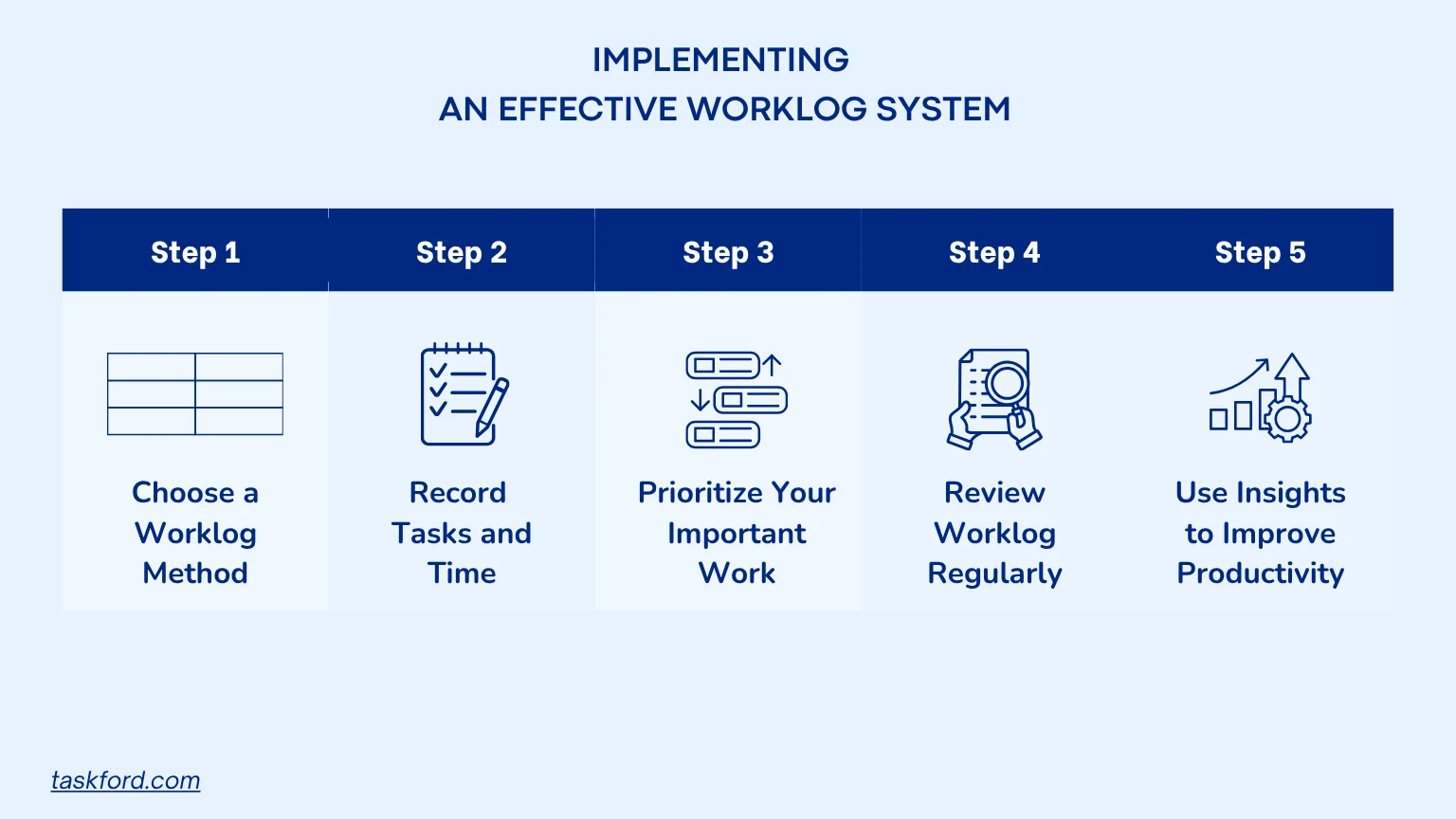
Step 1: Choose a Worklog Method That Fits Your Workflow
The first step is selecting a worklog format that matches your work style and daily responsibilities. Some professionals prefer simple spreadsheets, while others use dedicated work management software that combines worklogs with task tracking and reporting features. The goal is to choose a system that is easy to update and review consistently.
A good worklog tool should help you record tasks quickly, track time accurately, and organize information in a way that makes productivity analysis straightforward.
Step 2: Record Tasks and Time as You Work
To get the most value from a worklog, record activities throughout the day rather than trying to remember everything afterward. Real-time logging improves accuracy and provides a clearer picture of how your time is actually spent.
Include details such as:
- Task or activity completed
- Time spent on the task
- Project or client associated with the work
- Task status (completed, in progress, or blocked)
- Important notes, challenges, or follow-up actions
The more consistently you capture this information, the easier it becomes to identify productivity patterns and areas for improvement.
Step 3: Prioritize Your Most Important Work
A worklog should not only track completed tasks but also help you stay focused on high-priority work. At the beginning of each day, identify the tasks that will have the greatest impact and monitor your progress throughout the day.
By comparing planned work against completed work, you can determine whether your time is being spent on meaningful activities or diverted toward lower-value tasks. This practice improves focus, accountability, and overall productivity.
Step 4: Review Your Worklog Regularly
A worklog becomes truly valuable when you analyze the information it contains. Set aside time each week or month to review your entries and identify trends that may be affecting your efficiency.
Pay attention to:
- Tasks that consistently take longer than expected
- Common distractions or interruptions
- Repetitive work that could be automated
- Areas where time is not being used effectively
These insights can help you refine your workflow and make better decisions about how you allocate your time.
Step 5: Use Insights to Improve Productivity
The ultimate purpose of a worklog is continuous improvement. Once you identify patterns in your work habits, take action to optimize your workflow. You may choose to adjust your schedule, improve task prioritization, eliminate inefficiencies, or adopt new tools that streamline your work.
Over time, these small improvements can compound into significant gains in productivity, helping you accomplish more while making better use of your time.
Overcoming Challenges in Maintaining a Worklog
While worklogs offer significant benefits, maintaining them consistently can be challenging. Here are some common obstacles and ways to overcome them:
- Consistency Issues: Many professionals struggle to update their worklogs regularly, especially during busy periods. Setting reminders or incorporating work logging into your daily routine can help build consistency and improve tracking accuracy.
- Time Constraints: Recording tasks may seem time-consuming, particularly when managing multiple responsibilities. Using simple templates or digital tools that automate time tracking can make the process faster and easier.
- Accuracy Concerns: Delaying entries often leads to forgotten details and incomplete records. Logging tasks immediately after completion helps ensure your worklog remains accurate and useful for productivity analysis.
- Resistance to Change: Some employees may view worklogs as a form of micromanagement. Clearly communicating how worklogs improve visibility, project planning, and productivity can encourage adoption and increase participation.
Best Practices for Sustaining a Worklog
To make your worklog a lasting habit, follow these tips:
- Keep It Simple: Focus on key details to avoid overwhelm.
- Use Automation: Tools like TaskFord automate time tracking and resource planning.
- Make It a Habit: Log at set times daily.
- Review Regularly: Analyze data for portfolio management insights.
- Encourage Team Adoption: Promote worklogs for project management and collaboration.
Consider a scenario: A project manager uses a worklog to track a product launch. By logging tasks like design, development, and marketing, they identify bottlenecks (e.g., prolonged design revisions). With TaskFord, they adjust resource planning, reallocating staff to meet deadlines while keeping costs in check via cost management.
Streamline Work Logging with TaskFord
Maintaining a worklog becomes much easier when you have the right tools in place. TaskFord helps teams track work, manage projects, and monitor productivity from a single platform.
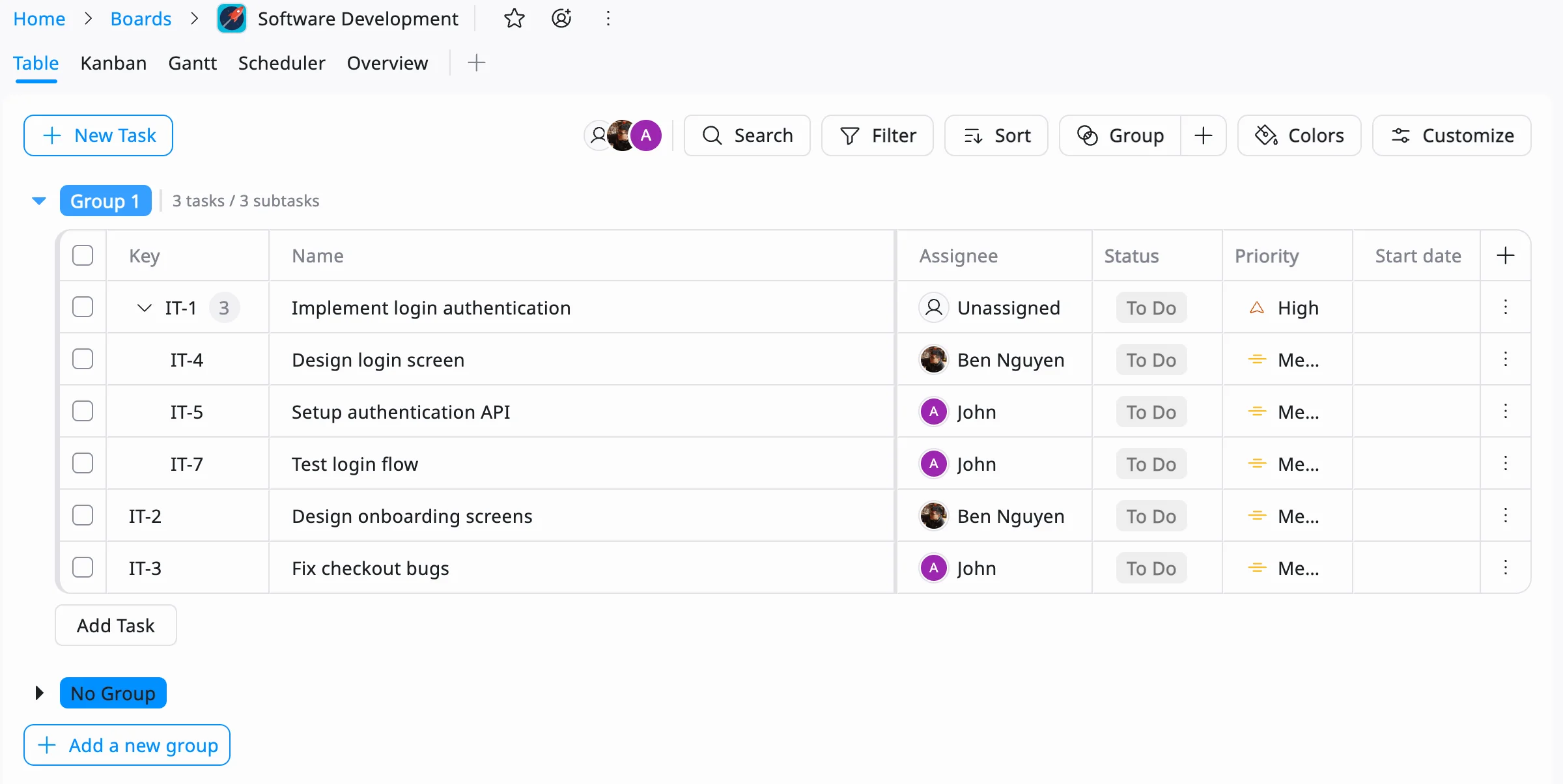
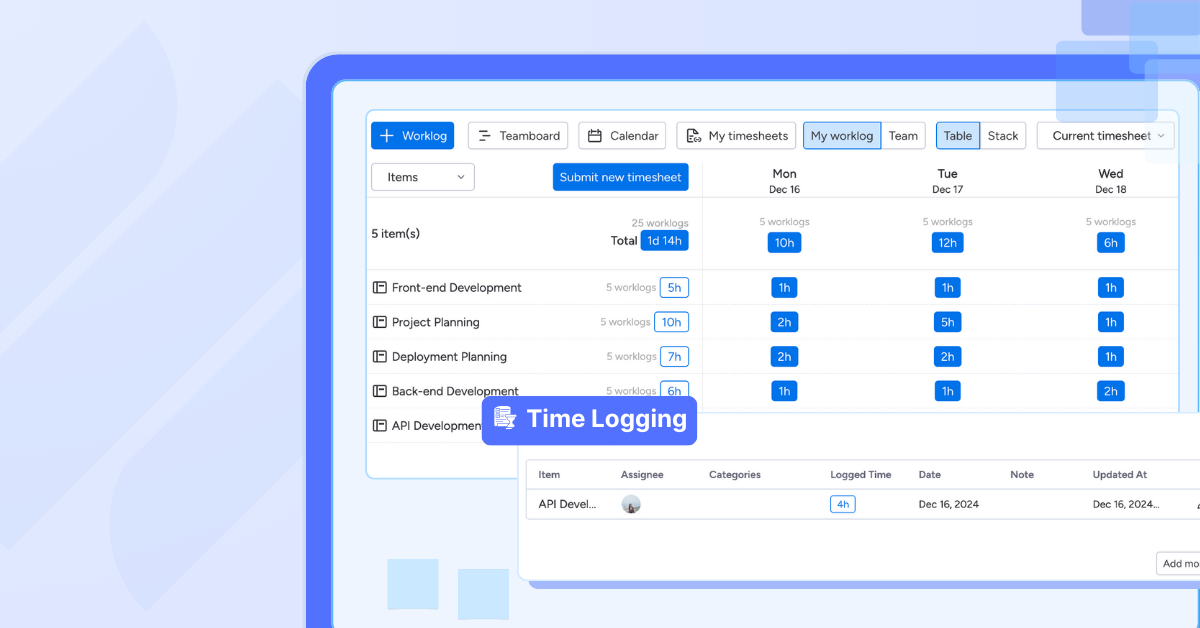
With Table View, teams can use a structured worklog format to record tasks, track progress, and organize work across projects. Instead of relying on scattered spreadsheets or manual notes, all work activities are stored in a centralized workspace that is easy to update and review.
TaskFord also includes Time Tracking with Time Logs, allowing employees to record the exact amount of time spent on tasks and projects. This provides greater visibility into workloads, helps identify productivity trends, and supports more accurate project planning.
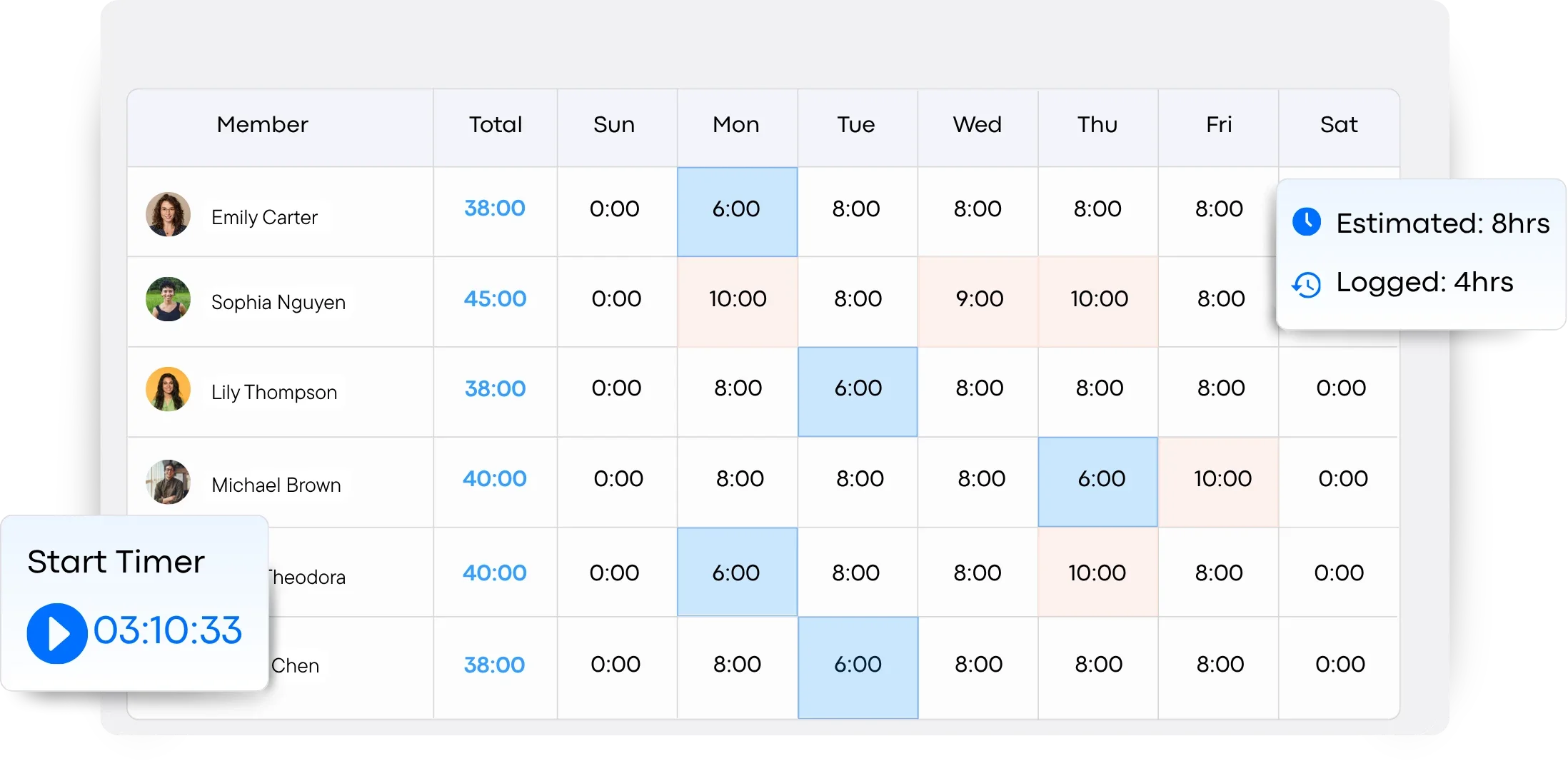
Key benefits of using TaskFord for work logging include:
- Centralized worklogs through an intuitive Table View
- Built-in time tracking and detailed time logs
- Improved visibility into team productivity and project progress
- Better resource allocation based on actual work data
- Easier reporting and performance analysis
By combining worklogs and time tracking in one platform, TaskFord helps teams stay organized, improve accountability, and make more informed decisions about how work is managed.
Conclusion
A worklog is a game-changer for work efficiency. By systematically tracking tasks, time, and challenges, you unlock insights that drive task management, time tracking, and project management. Overcoming initial hurdles with consistency and the right tools—like TaskFord—transforms your worklog into a powerhouse of productivity. Whether you’re refining personal workflows or leading a team, a worklog supports budget management, resource planning, and portfolio management, ensuring success across projects.
Ready to take your efficiency to the next level? Join our waitlist now for TaskFord and discover how a cutting-edge worklog system can revolutionize your workday!
Frequently Asked Questions (FAQs)
1. What is a worklog?
A worklog is a record of the tasks, activities, and projects completed during a workday. It helps individuals and teams track progress, monitor workloads, and understand how time is being spent.
2. What should be included in a worklog?
A worklog typically includes task descriptions, project names, time spent, task status, and any notes or challenges encountered. The level of detail may vary depending on the individual or organization’s needs.
3. What is the difference between a worklog and a time log?
A worklog focuses on documenting the work completed, including tasks, progress, and outcomes. A time log specifically records the amount of time spent on activities. While a time log tracks hours, a worklog provides broader context about what was accomplished during those hours.
4. How often should you update a worklog?
For the most accurate records, it’s best to update your worklog throughout the day or immediately after completing a task. This reduces the risk of missing details and improves the quality of productivity insights.
5. Can worklogs improve team productivity?
Yes. Worklogs increase visibility into ongoing work, help managers balance workloads, identify bottlenecks, and improve accountability. They also provide valuable data for project planning and resource allocation.















































![How to Fill Out a Weekly Timesheet [+ Free Template Download]](/marketing/blog/weekly-timesheet-thumbnails.webp)









Subscribe for Expert Tips
Unlock expert insights and stay ahead with TaskFord. Sign up now to receive valuable tips, strategies, and updates directly in your inbox.