What Happens When You Don’t Log Time (and How to Fix It)
Discover the hidden costs of not logging time and learn effective steps to build a consistent timelog system that enhances productivity and accountability.
Effective time management is essential for productivity, whether you’re a freelancer managing multiple clients, a project manager leading a team, or a small business owner juggling countless tasks. Logging time, the practice of tracking how hours are spent on tasks, projects, or personal activities, is at the heart of this discipline. Yet, many people skip this step, unaware of the consequences it triggers. Failing to log time can lead to inefficiencies, missed deadlines, financial losses, and burnout.
This comprehensive guide explores the pitfalls of not logging time, why people avoid it, how TaskFord can help, and clear steps to fix the problem.
What Is a Timelog?
A timelog records how you spend your time, detailing the duration of each task or project. Unlike a to-do list, it shows exactly how long activities take, such as 2 hours on emails or 3 hours on a design project. This data helps you analyze productivity and make smarter scheduling decisions. You can log time manually with a spreadsheet or project management software for automation. Consistent logging provides valuable insights, empowering freelancers, team leaders, or students to control their time.
(To learn more about timelog, check out our guide on What Is A Timelog?)
Why Logging Time Matters
Time is a limited resource, and understanding how it is spent is essential for improving productivity and efficiency. A timelog provides valuable insights that help individuals and teams work smarter, stay accountable, and make better decisions.
- Improves Time Visibility: Shows exactly where your time is spent, helping you identify productive and unproductive activities.
- Boosts Productivity: Reveals inefficiencies and distractions so you can focus on higher-priority work.
- Enhances Planning and Scheduling: Provides accurate data for estimating tasks and setting realistic deadlines.
- Increases Accountability: Creates a transparent record of work completed by individuals and teams.
- Supports Better Decision-Making: Offers insights into workload, project progress, and resource allocation.
- Prevents Costly Guesswork: Replaces assumptions with data, reducing errors, delays, and budget overruns.
Consequences When You Don’t Log Time
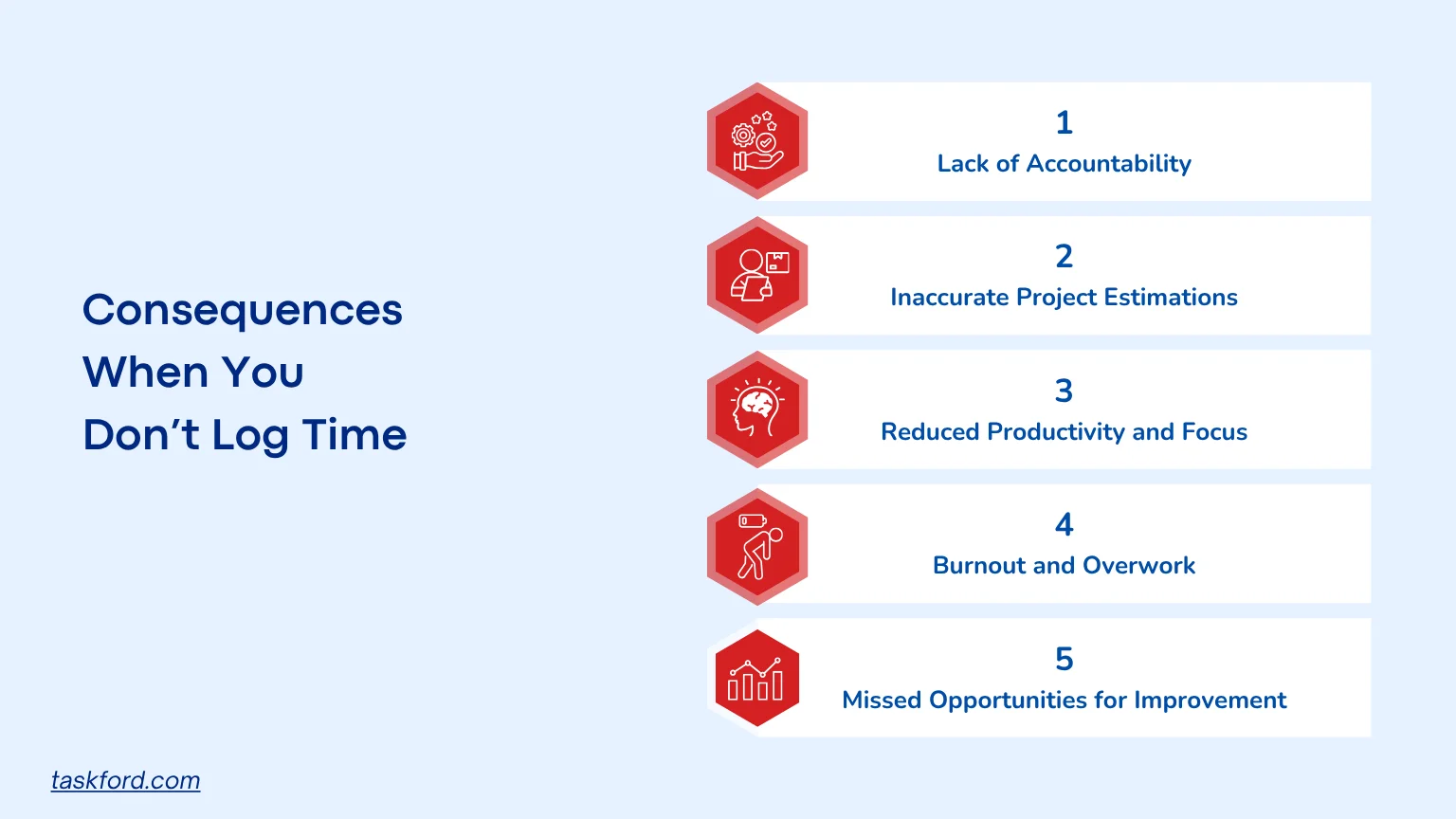
Lack of Accountability and Transparency
Without a timelog, there is no objective record of how time is spent. This makes accountability difficult for both individuals and teams.
For freelancers: A timelog is proof of your effort and credibility. Without it, you cannot show clients how long tasks take or justify the final invoice. If a client questions your billing, vague explanations can weaken your professional reputation and your ability to negotiate fair rates in the future.
For teams and managers: Time data helps leaders understand who is overloaded and who has capacity to take on more. Without it, tasks are unevenly distributed, and performance evaluations become subjective. Overburdened employees burn out while others remain underutilized.
A lack of transparency also damages trust between teams and stakeholders. When there is no clear record of effort or delays, accountability fades, and it becomes harder to identify where things went wrong.
Inaccurate Project Estimations
Accurate time tracking creates a valuable history of how long specific tasks and projects take. Without this data, future estimates are based on guesswork rather than real performance.
What goes wrong:
- Deadlines are missed because timelines are underestimated.
- Resources are overcommitted, spreading the team too thin.
- Budgets are thrown off because labor costs cannot be predicted.
Example: A web development team assumes a new feature will take 10 days. If they had logged previous projects, they would know similar features took closer to 15. The project ends late, costs increase, and client satisfaction drops.
Inconsistent time data makes every new plan riskier. Over time, that uncertainty undermines financial stability and client relationships.
Reduced Productivity and Focus
When you do not track time, it is easy to stay busy without being productive. A timelog provides visibility into how your day is actually spent, not just how it feels.
Hidden problems:
- Hours disappear into low-priority tasks or distractions such as emails or meetings.
- High-value activities receive less attention because you do not realize how much time is lost elsewhere.
- Focus declines because priorities are unclear.
Time logs act as a mirror, revealing the gap between perception and reality. They help you make conscious choices about where to direct your attention.
Burnout and Overwork
Failing to log time can hide how many hours you’re actually working, especially for remote workers or entrepreneurs who blend work and personal life. You might work late into the night, unaware you’re consistently clocking 12-hour days. Over time, this leads to burnout, harming your health, work quality, and relationships with colleagues or clients. A timelog helps set boundaries, ensuring time for rest and personal priorities, which is critical for sustainable productivity.
Missed Opportunities for Improvement
A timelog isn’t just about tracking hours, it’s about uncovering patterns. Without this data, you miss chances to identify inefficiencies or optimize processes. For example, a project manager logging time might notice that weekly status meetings consistently run over by 30 minutes, eating into productive hours. They could then shorten meetings or switch to written updates. Without a timelog, these inefficiencies persist, draining time and resources unnoticed.
Why People Avoid Logging Time
Understanding the barriers to time tracking is crucial for overcoming them. Here are common reasons people skip logging time:
- Perceived Time Burden: Many view logging as an extra task that distracts from core work, feeling it’s too time-consuming.
- Lack of Awareness: Some don’t realize how time tracking can improve productivity and decision-making.
- Resistance to Accountability: A timelog creates a visible record, which can feel uncomfortable for those who prefer autonomy or fear scrutiny.
- No Tools or System: Without access to user-friendly time-tracking tools, starting and maintaining a timelog feels overwhelming.
- Overconfidence: People who believe they have a good grasp of their time usage may skip logging, even if their estimates are off.
These challenges are real but addressable with the right tools and mindset, such as those provided by project management tools.
How to Fix It: Steps to Start Logging Time
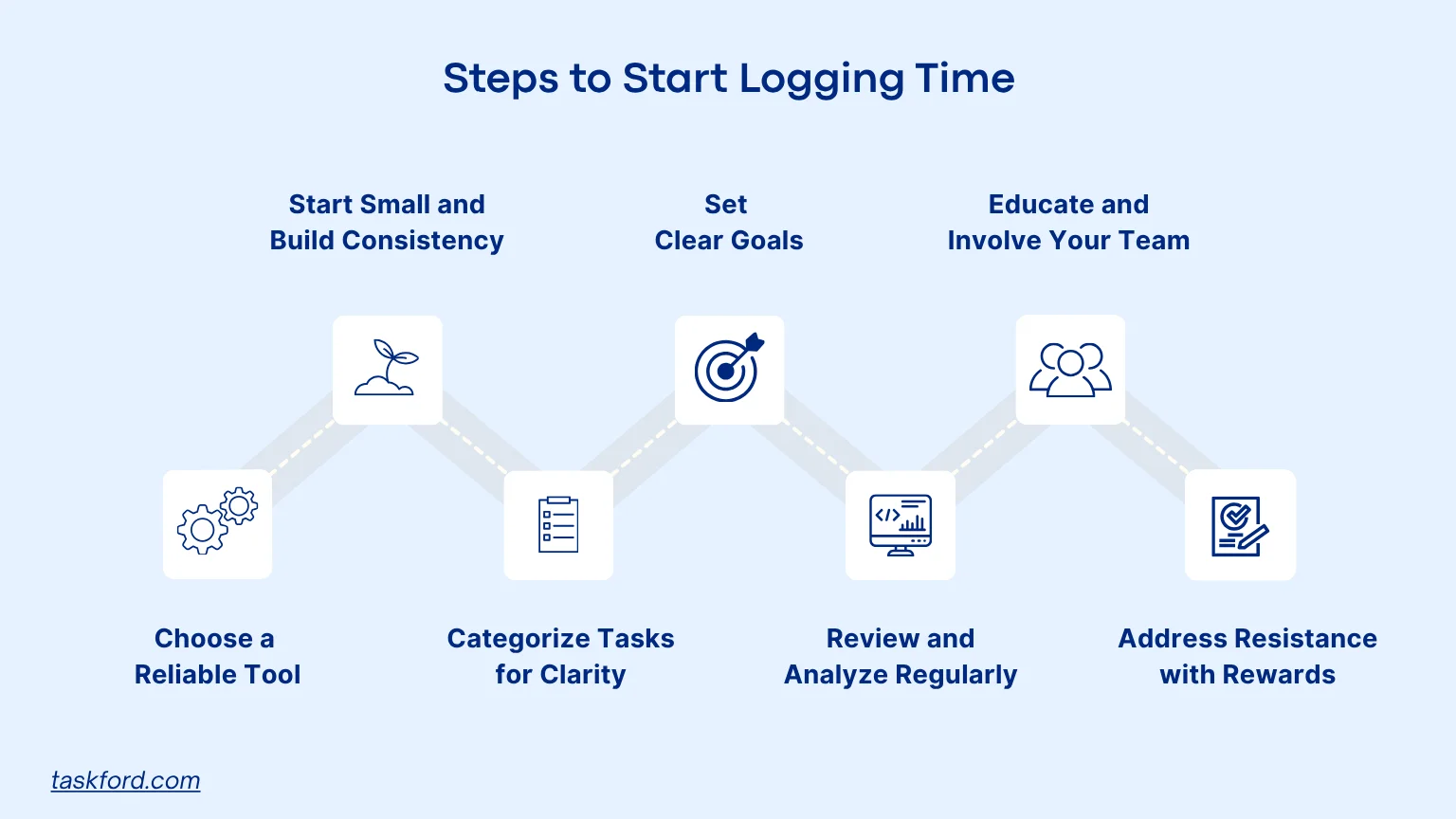
To overcome the pitfalls of not logging time, implement a timelog system with these practical steps:
- Choose a Reliable Tool: Select a time-tracking tool with a simple interface and robust reporting to categorize tasks and generate reports for invoicing or performance analysis.
- Start Small and Build Consistency: Log major tasks like client work or meetings for a week, using timers or daily estimates, with reminders to build a habit in just 5-10 minutes daily.
- Categorize Tasks for Clarity: Group tasks into “Client Work,” “Admin,” or “Personal Time” to identify time sinks, like excessive admin tasks, and prioritize high-value work.
- Set Clear Goals: Define your logging purpose, such as accurate billing, better project planning, or work-life balance, to stay motivated and focus on relevant data.
- Review and Analyze Regularly: Check your timelog weekly or monthly to spot patterns, adjust schedules, and set realistic deadlines for improved efficiency. If you notice recurring issues or persistent inefficiencies, use RCA (Root Cause Analysis) to identify the underlying causes behind time losses.
- Educate and Involve Your Team: Explain timelogs’ benefits for workload balance, train your team on time-tracking tools, and foster an empowering culture.
- Address Resistance with Incentives: Reward consistent logging with recognition or treat it as a personal challenge to reduce time on low-value tasks.
How TaskFord Can Help You Log Time Effectively
Logging time consistently is much easier when the process is built into your daily workflow. TaskFord provides multiple ways to record, organize, and analyze time spent on work, helping teams maintain accurate timelogs while gaining valuable productivity insights.
Step 1: Record Work Activities in Table View
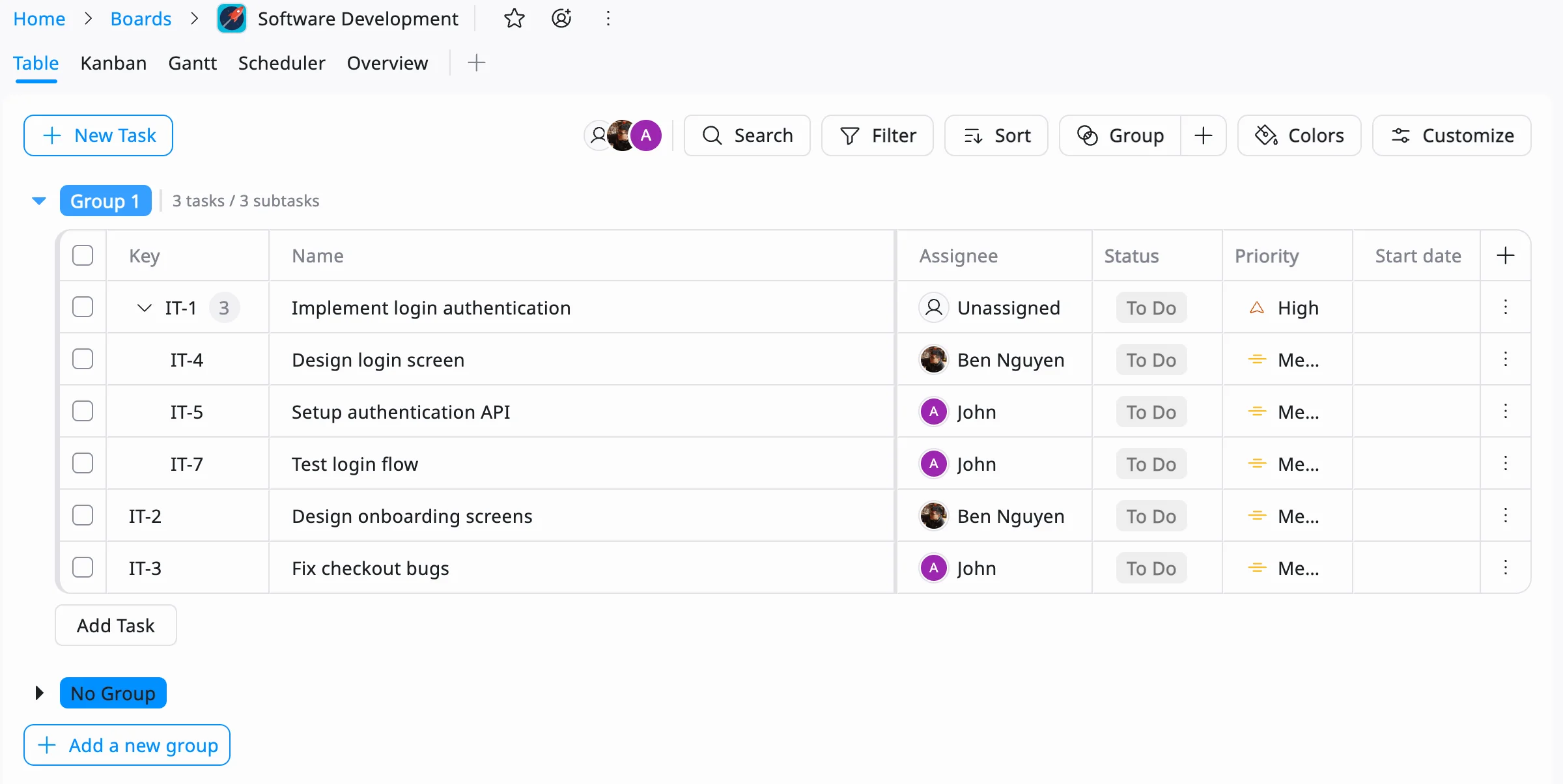
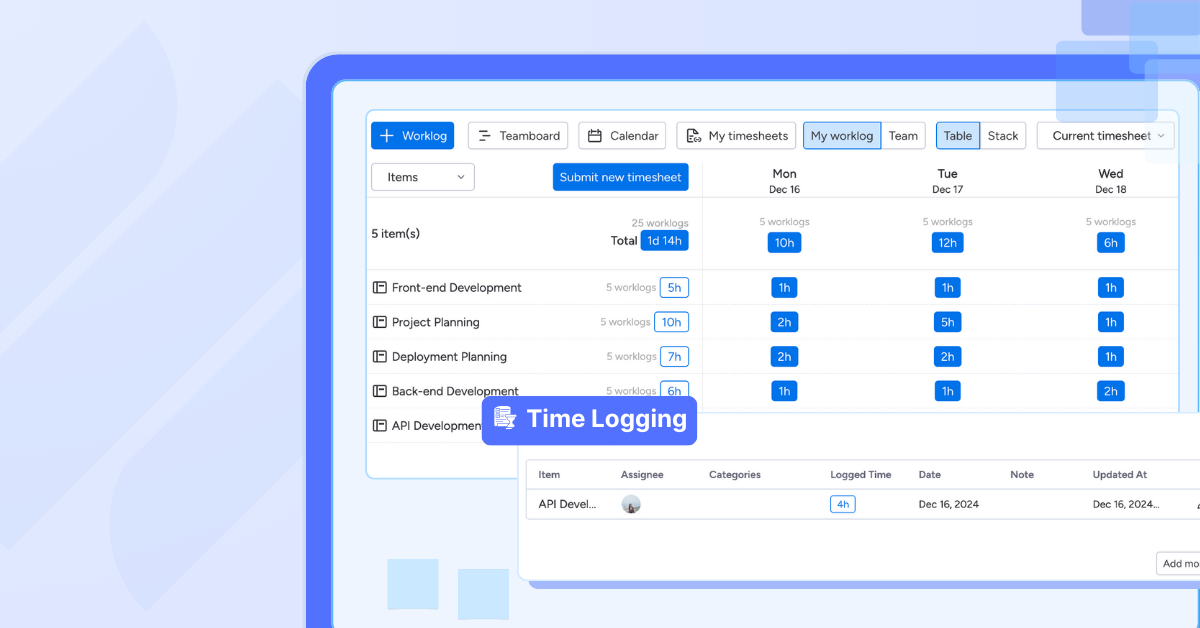
TaskFord’s Table View acts as a centralized worklog where teams can view, update, and organize tasks in a spreadsheet-like format. This makes it easy to keep a record of completed work, track progress, and maintain a structured history of daily activities.
Step 2: Log Hours with Timesheets or Stopwatch
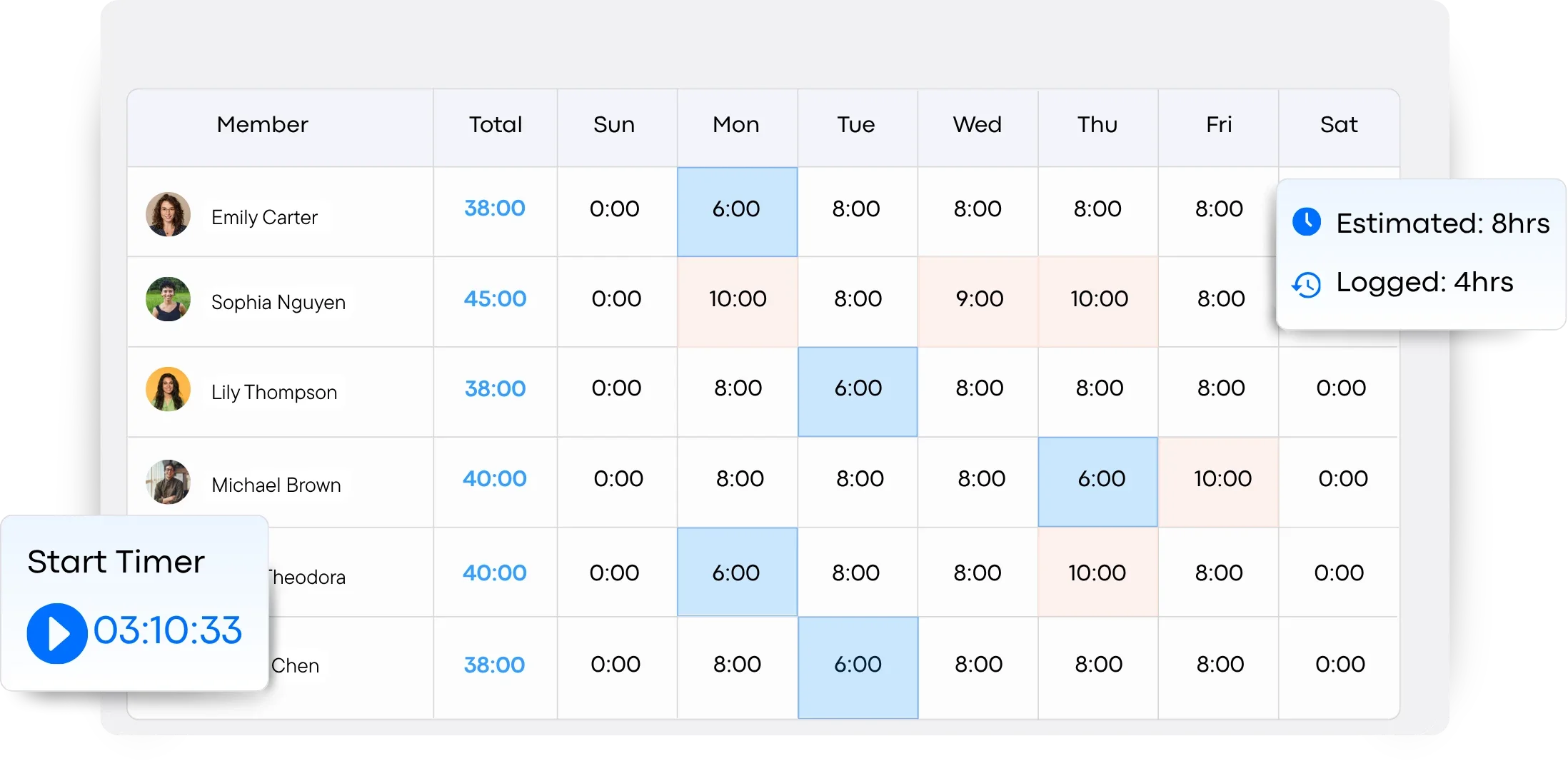
TaskFord gives users the flexibility to log time in the way that works best for them. Team members can manually enter hours using timesheets or use the built-in stopwatch to track time in real time while working on tasks, ensuring accurate and consistent time records.
Step 3: Gain Insights with Reporting Dashboards
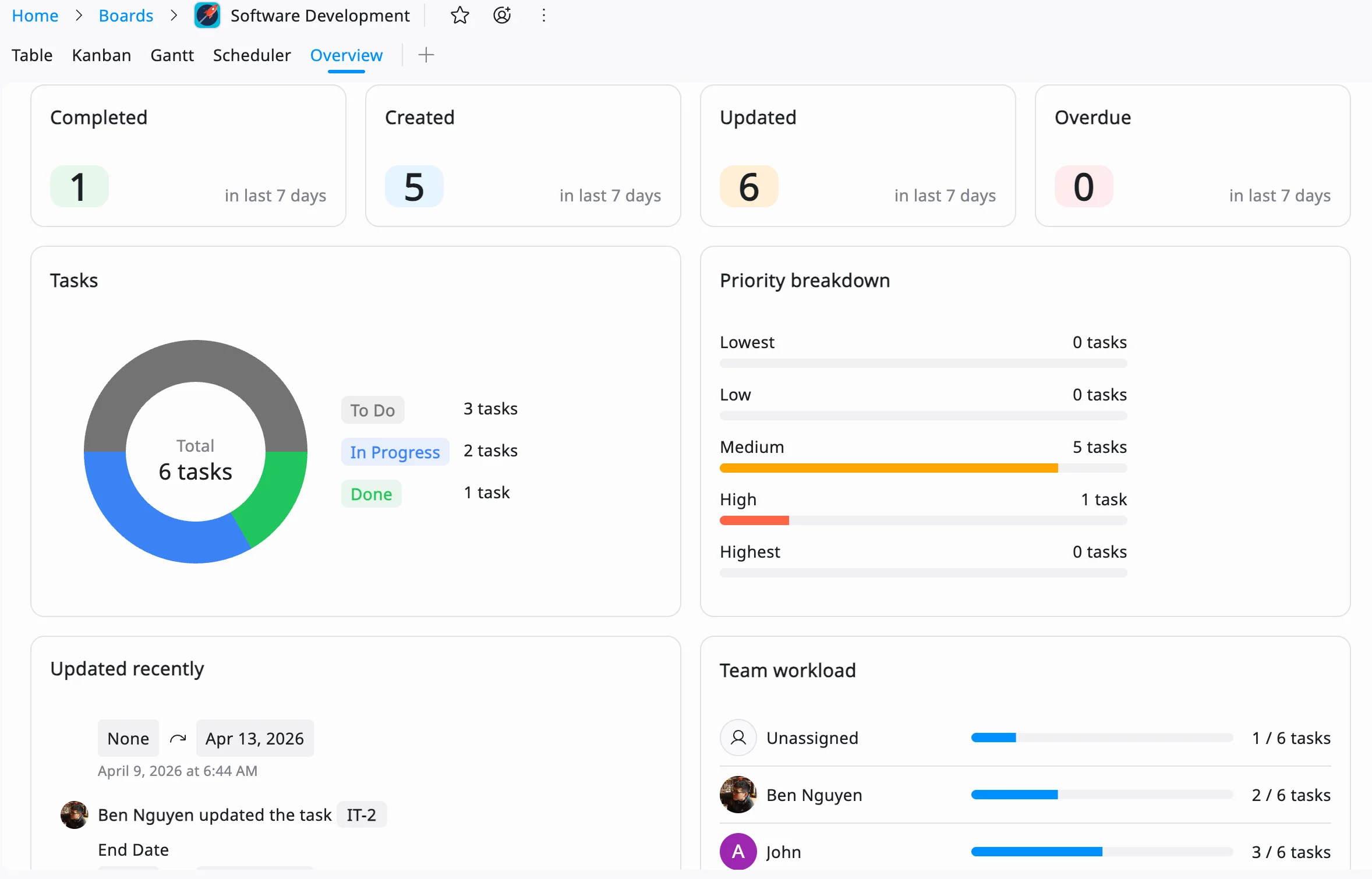
TaskFord’s reporting dashboards help transform time data into actionable insights. Teams can analyze tracked hours, monitor productivity trends, understand workload distribution, and identify opportunities to improve efficiency across projects.
By combining worklogs, time tracking, and reporting in one platform, TaskFord makes it simple to maintain accurate timelogs and gain a clearer understanding of how time is spent.
Overcoming Common Time-Tracking Challenges
While time tracking offers valuable insights, maintaining accurate timelogs can sometimes be challenging. The good news is that most obstacles can be addressed with the right habits and tools.
- Tedious Logging: Choose a time-tracking solution with a simple interface and streamlined workflows to reduce the effort required for logging time.
- Forgetting to Log Time: Use built-in timers, timesheets, or reminders to capture work as it happens and minimize missed entries.
- Inconsistent Records: Establish standardized task categories and logging practices to ensure data remains accurate and easy to analyze.
- Limited Visibility into Data: Use reporting dashboards to transform raw time entries into meaningful insights about productivity, workload, and resource allocation.
- Team Adoption Issues: Encourage consistent usage by making time tracking part of daily workflows and clearly communicating its benefits to the team.
Conclusion: Take Control of Your Time Today
Neglecting to log time can lead to inefficiencies, financial setbacks, and burnout, but a timelog system can transform how you manage your day. With TaskFord’s simple, reliable platform, you can track time effortlessly, gain clarity, and make data-driven decisions to boost productivity.
Ready to take the first step? Start by exploring TaskFord, setting clear goals, and reviewing your timelog regularly.
Learn more
- 5 Project Time Tracking Myths That Are Holding You Back
- Time Tracking Software Trends To Watch in 2026















































![How to Fill Out a Weekly Timesheet [+ Free Template Download]](/marketing/blog/weekly-timesheet-thumbnails.webp)









Subscribe for Expert Tips
Unlock expert insights and stay ahead with TaskFord. Sign up now to receive valuable tips, strategies, and updates directly in your inbox.