The Ultimate Guide to Timesheets: Beyond Tracking Hours
Maximize efficiency with timesheets! Learn how this tool optimizes payroll, client billing, and project management. Discover tips and TaskFord’s automation for better time tracking.
What is a Timesheet?
A timesheet is a record used to track how time is spent on work during a specific period, such as daily, weekly, or monthly. It captures not just hours worked, but also what the time was spent on—including tasks, projects, or activities.
In modern teams, timesheets go beyond payroll. They help organizations understand workload distribution, monitor project progress, control costs, and improve planning. When used consistently, timesheets provide visibility into how work happens, making them a valuable tool for managers and teams—not just an administrative requirement.
The Evolution of Timesheets
Timesheets have evolved alongside changes in how teams work. What started as a basic way to record hours has gradually become a tool for visibility, planning, and accountability.
Early timesheets were paper-based, with employees manually writing down hours worked. This method was simple but slow, error-prone, and difficult to review or analyze at scale.
As organizations expanded, spreadsheets replaced paper. They made calculations easier and offered more flexibility, but also introduced issues such as version conflicts, inconsistent formats, and heavy manual effort to consolidate data.
Modern timesheets are built into digital systems that connect time data to tasks, projects, and teams. These systems provide structured workflows, clearer oversight, and more reliable insights—allowing teams to move beyond recording hours and focus on understanding how work is performed.
Why Timesheets Matter in Modern Teams
Timesheets play an important role in helping teams understand how work is actually carried out. Beyond recording hours, they provide visibility into where time is spent across tasks, projects, and initiatives.
For managers, timesheets support better planning and decision-making. They reveal workload distribution, highlight capacity constraints, and help identify inefficiencies before they affect delivery. This visibility is especially important for teams working across multiple projects or departments.
Timesheets also promote accountability and transparency. When time data is consistently tracked and reviewed, expectations become clearer and collaboration improves. Used effectively, timesheets help modern teams align daily work with broader goals and deliver outcomes more predictably.
Transition to Digital Timesheets
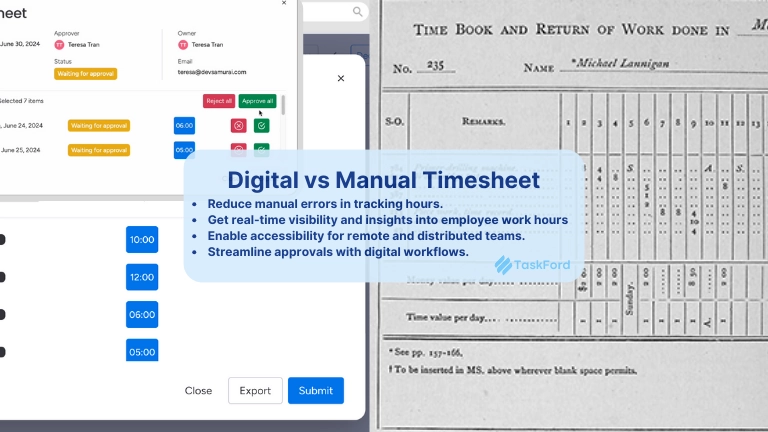
With technological advancements, timesheets have shifted from manual records to digital platforms, including spreadsheets, online time tracking software, and cloud-based solutions. This transition has improved how organizations track and manage time by enabling them to:
- Reduce manual errors in recording and calculating work hours
- Gain real-time visibility into employee time across tasks and projects
- Support remote and distributed teams with accessible, centralized timesheets
- Streamline reviews and approvals through structured digital workflows
Learn more: The Best Employee Time Tracking Apps in 2026 for Project Managers and Team Leads
By moving to digital timesheets, teams replace fragmented, manual processes with more accurate, transparent, and manageable time tracking systems.
Key Components of a Timesheet
A solid timesheet isn’t rocket science—it just needs the right pieces. Here’s what to include:
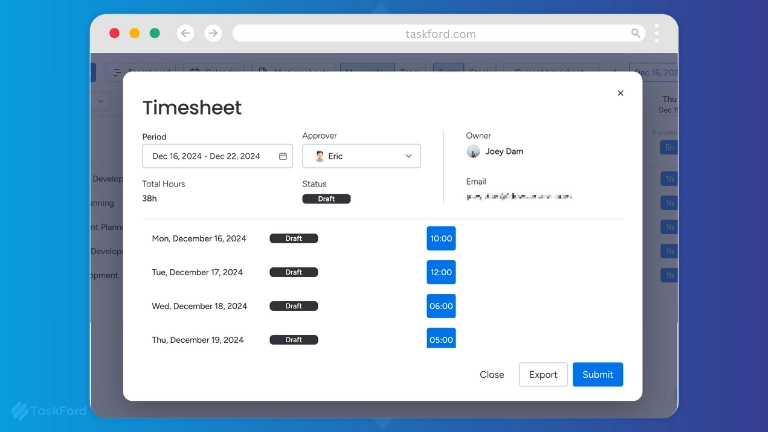
- Employee Details
- Full name (e.g., “Jane Doe”)
- Employee ID (e.g., “JD-123”)
- Department or team (e.g., “Marketing”)
This ties the timesheet to the right person.
- Time Entries
- Start and end times (e.g., 9:00 AM–5:00 PM)
- Breaks (e.g., 30-minute lunch)
- Overtime (e.g., 2 extra hours)
Log these daily for precision.
- Task and Project Breakdown
- Task description (e.g., “Drafted email campaign”)
- Project name (e.g., “Q2 Product Launch”)
- Billable or non-billable hours
This shows where time goes—and who’s paying for it.
- Total Hours
- Daily totals (e.g., “Monday: 8 hours”)
- Weekly or monthly summaries (e.g., “Week: 40 hours”)
Perfect for payroll and project updates.
- Approval Process
- Supervisor sign-off (e.g., “Approved by John Smith”)
- Notes for discrepancies
Keeps everything legit and accountable.
Putting It TogetherImagine a designer’s timesheet: “Sam Lee, ID 567, Design Team. Monday: 9 AM–5 PM, 1-hour lunch, 7 hours total. Task: Created logo for Client X (billable).” Add a manager’s approval, and you’ve got a clear, useful record. Digital tools make this even simpler—just click, log, and go.
Benefits of Implementing Timesheets
Implementing timesheets provides organizations with more than a way to record hours. When used consistently, they support better control, visibility, and decision-making across teams.
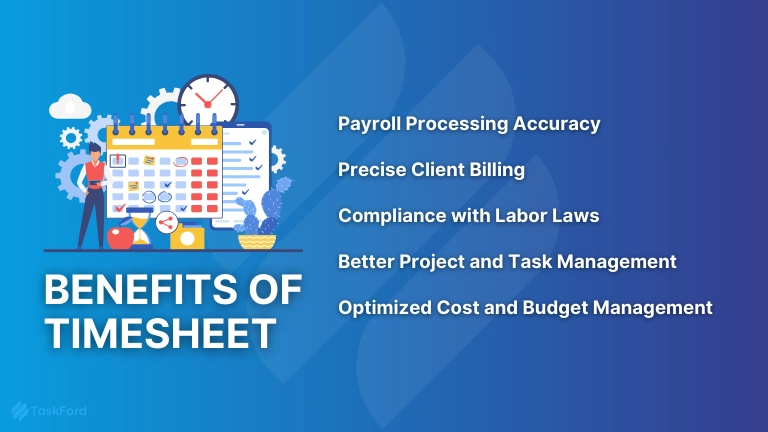
1. Payroll Processing Accuracy
Timesheets ensure that employees receive correct wages based on logged hours, preventing payroll disputes and compliance issues.
2. Precise Client Billing
For service-based businesses, timesheets provide a transparent record of billable hours, ensuring accurate invoices and building client trust.
3. Compliance with Labor Laws
Timesheets help businesses adhere to legal regulations regarding work hours, overtime, and breaks, reducing the risk of labor disputes.
4. Better Project and Task Management
By integrating timesheets with task management tools, businesses can track project progress, allocate resources effectively, and improve efficiency.
5. Optimized Cost and Budget Management
Timesheets provide insights into labor costs, enabling businesses to optimize budget management, control expenses, and eliminate inefficiencies.
Real-World ExampleA small ad agency used timesheet to catch a problem: their graphic team spent 60% of their week on non-billable tweaks. They shifted focus to client work, doubled revenue, and kept everyone happier. That’s the power of tracking time right.
Timesheets in Project Management
Timesheets play a key role in project management by connecting time spent to actual project work. Instead of tracking hours in isolation, they show how effort is distributed across tasks, milestones, and deliverables.
By reviewing timesheet data, project managers can compare planned versus actual effort, identify bottlenecks early, and adjust timelines or resources before delays escalate. This visibility also helps control costs and prevent scope creep by showing where time is being consumed.
Over time, timesheets build a valuable record of past projects. Teams can use this data to create more accurate estimates, distribute workloads more evenly, and improve delivery predictability.
Case Study: The Web Team WinA web development team tracked time by task using timesheets and discovered that testing accounted for nearly 50% of their total effort. By refining their testing process, they reduced this to 30%, allowing the project to be completed ahead of schedule and under budget. Timesheets helped the team turn hidden inefficiencies into clear, actionable improvements.
How to Implement Timesheets in Your Organization
1. Choosing the Right Timesheet System
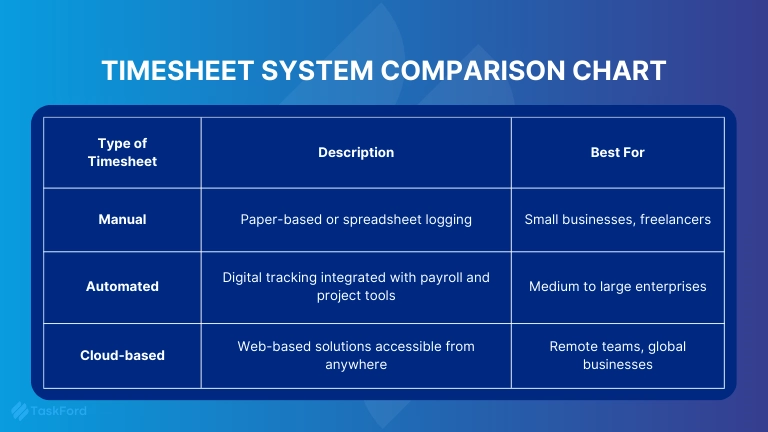
Selecting the right timesheet tool depends on company size, workflow, and industry needs.
| Type of Timesheet | Description | Best For |
|---|---|---|
| Manual | Paper-based or spreadsheet logging | Small businesses, freelancers |
| Automated | Digital tracking integrated with payroll and project tools | Medium to large enterprises |
| Cloud-Based | Web-based solutions accessible from anywhere | Remote teams, global businesses |
2. Training Employees on Time Tracking
Employees must understand how to log time accurately and assign tasks correctly. A well-structured onboarding process ensures organization-wide adoption.
3. Monitoring and Evaluating Timesheet Data
Regularly review:
- Data Accuracy – Detect and correct errors early.
- Employee Compliance – Ensure timesheets are submitted on time.
- Performance Insights – Use data to optimize workflow and resource management.
Always keep an eye for:
- No “12-hour coffee break” errors
- If everyone’s submitting on time
- Who’s outputting, who needs help?
Connecting Timesheets to Real Work and Delivery with TaskFord
Timesheets deliver the most value when they are connected to how work is planned and executed—not when they exist as standalone records.
TaskFord approaches timesheets as part of a broader work delivery system. Instead of tracking hours in isolation, TaskFord links time entries directly to tasks, projects, and milestones. This allows teams to see not only how much time was spent, but what that time contributed to. Here are key timesheet capabilities in TaskFord:
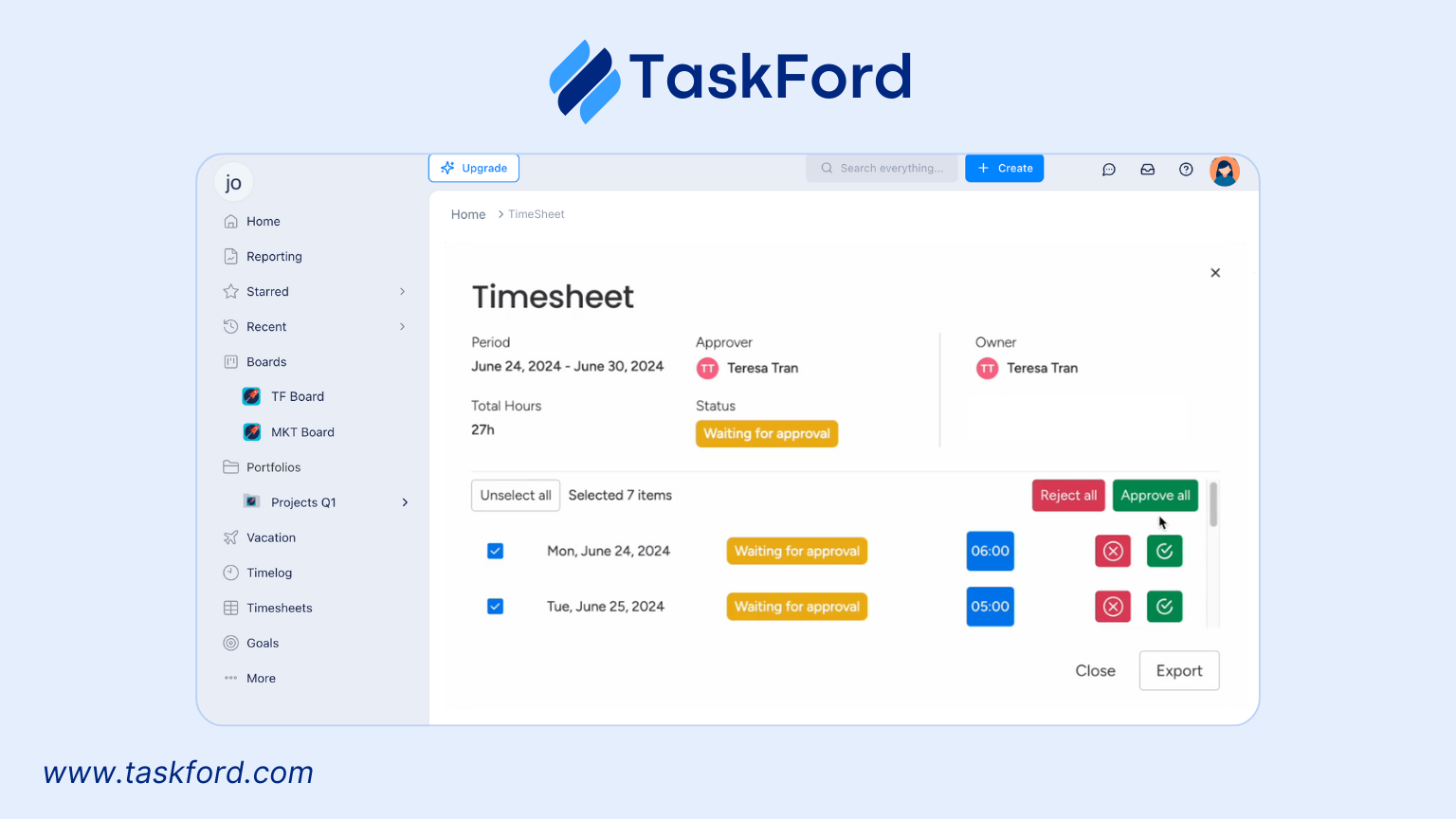
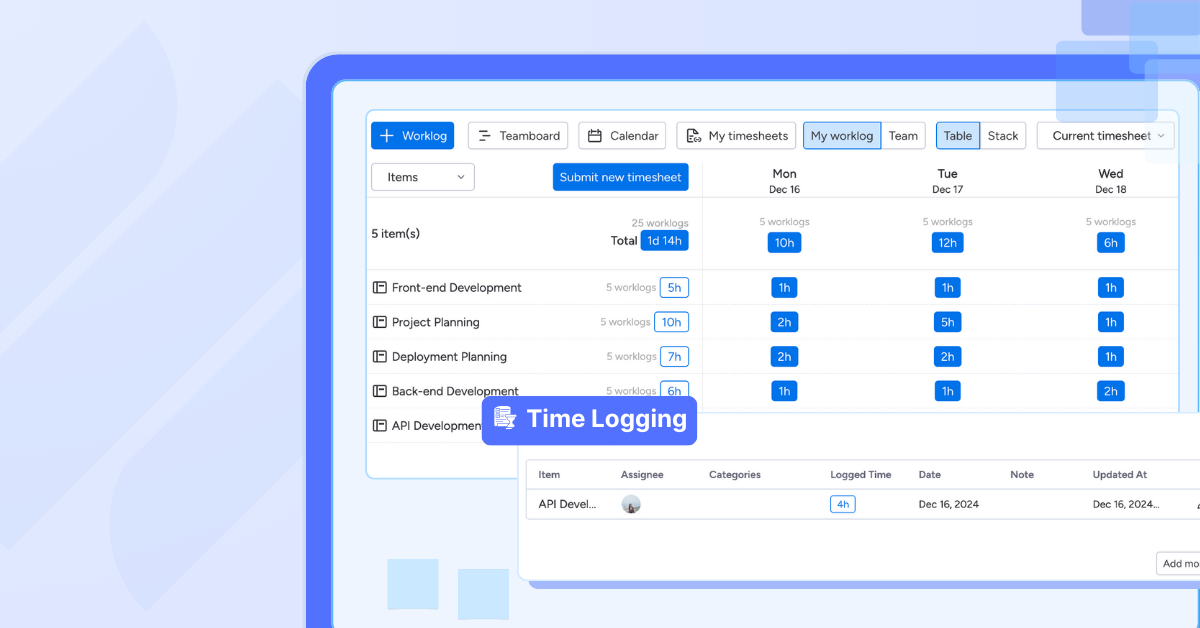
- Time Log Employees can easily record hours worked and categorize time by task, project, or client. This ensures time entries are tied directly to real work, not logged in isolation.
- Timesheet Approval Managers can review and approve employee timesheets through structured workflows. Customizable access levels control who can view, edit, or approve timesheets, helping maintain data integrity.
- Approval History Every approval and rejection is recorded, creating a clear audit trail that supports accountability, compliance, and transparent reviews.
- Individual and Team Timesheet Views Managers can switch between individual employee views and team-level timesheets, making it easier to monitor workloads, compare effort, and identify imbalances.
- Dashboard A centralized dashboard gives managers a real-time overview of team productivity, project hours, and timesheet status—without manual reporting.
By combining timesheets with planning, approvals, and visibility, TaskFord helps organizations move beyond basic time tracking and use time data to support better execution and predictable delivery.
Final Thoughts
Timesheets have evolved into more than a way to record hours. When used effectively, they provide visibility into how work is performed, support better planning, and help teams deliver more consistently.
Moving beyond manual tracking and disconnected tools allows organizations to use timesheet data with purpose—linking time to tasks, projects, and outcomes. With the right approach and system in place, timesheets become a foundation for productivity, accountability, and predictable delivery rather than an administrative chore.
You May Also Like:
- How to Fill Out a Weekly Timesheet [+ Free Template Downloads]
- Manage Multiple Employee TimesheetsWithout Spreadsheets: 5 Tools to Consider
- 5 Monthly Timesheet Templates To Download













































![How to Fill Out a Weekly Timesheet [+ Free Template Download]](/marketing/blog/weekly-timesheet-thumbnails.webp)








Subscribe for Expert Tips
Unlock expert insights and stay ahead with TaskFord. Sign up now to receive valuable tips, strategies, and updates directly in your inbox.