5 Free Capacity Planning Templates in Excel for IT, Marketing, and HR Teams
Download these five free Excel capacity planning templates tailored for IT, marketing, and HR teams to optimize resource management and ensure project success.
Every team runs into the same challenge: more work than time and limited visibility into who’s actually available. IT, Marketing, and HR teams all face the risk of overcommitting, burning out staff, or missing deadlines without clear capacity planning.
With the right structure, capacity planning becomes much easier. A clear Excel template can quickly show workloads, availability, and gaps so teams can plan with confidence.
In this post, we’re sharing 5 free capacity planning templates in Excel for IT, Marketing, and HR teams to help you balance resources and deliver work on time.
What Is Capacity Planning?
Capacity planning is figuring out how much work your team or business can handle and making sure you have enough resources like people, equipment, or time – to get it done. It helps you avoid overloading your team or wasting resources.
For more details, read our guide on What Is Capacity Planning?
What Is a Capacity Planning Template?
A capacity planning template is a pre-built spreadsheet, usually in Excel or Google Sheets, that helps teams compare available capacity with project demand. It provides a structured way to allocate resources, track workloads, and identify overallocated or underutilized team members.
Most capacity planning templates include team availability, workload allocation, utilization calculations, and project timelines. They’re a great starting point for small teams, but as projects become more complex, many organizations move to dedicated resource planning software for real-time visibility and automation.
Why Use An Excel Capacity Planning Template?
Microsoft Excel capacity planning templates are a practical choice for teams that need a simple and cost-effective way to manage resources. They offer enough flexibility for day-to-day planning while keeping processes easy to understand and maintain.
- Affordable and Accessible: Excel is often already available within businesses, making it a low-cost option compared to dedicated capacity planning software.
- Easy to Use: Since most people are familiar with Excel, teams can start using templates quickly without extensive training.
- Customizable for Different Needs: Templates can be tailored to track tasks, employee availability, project timelines, or resource allocation based on your workflow.
- Track Resource Allocation: Excel helps managers see who is assigned to tasks, reducing the risk of overloading some team members while others remain underutilized.
- Use Historical Data for Better Planning: Past project data can be stored and reviewed to improve forecasting, scheduling, and future resource decisions.
5 Free Capacity Planning Templates in Excel
Below are five free Excel-based capacity planning templates, tailored for IT, marketing, and HR teams to optimize resource allocation and project execution.
1. Comprehensive Capacity Planning Template
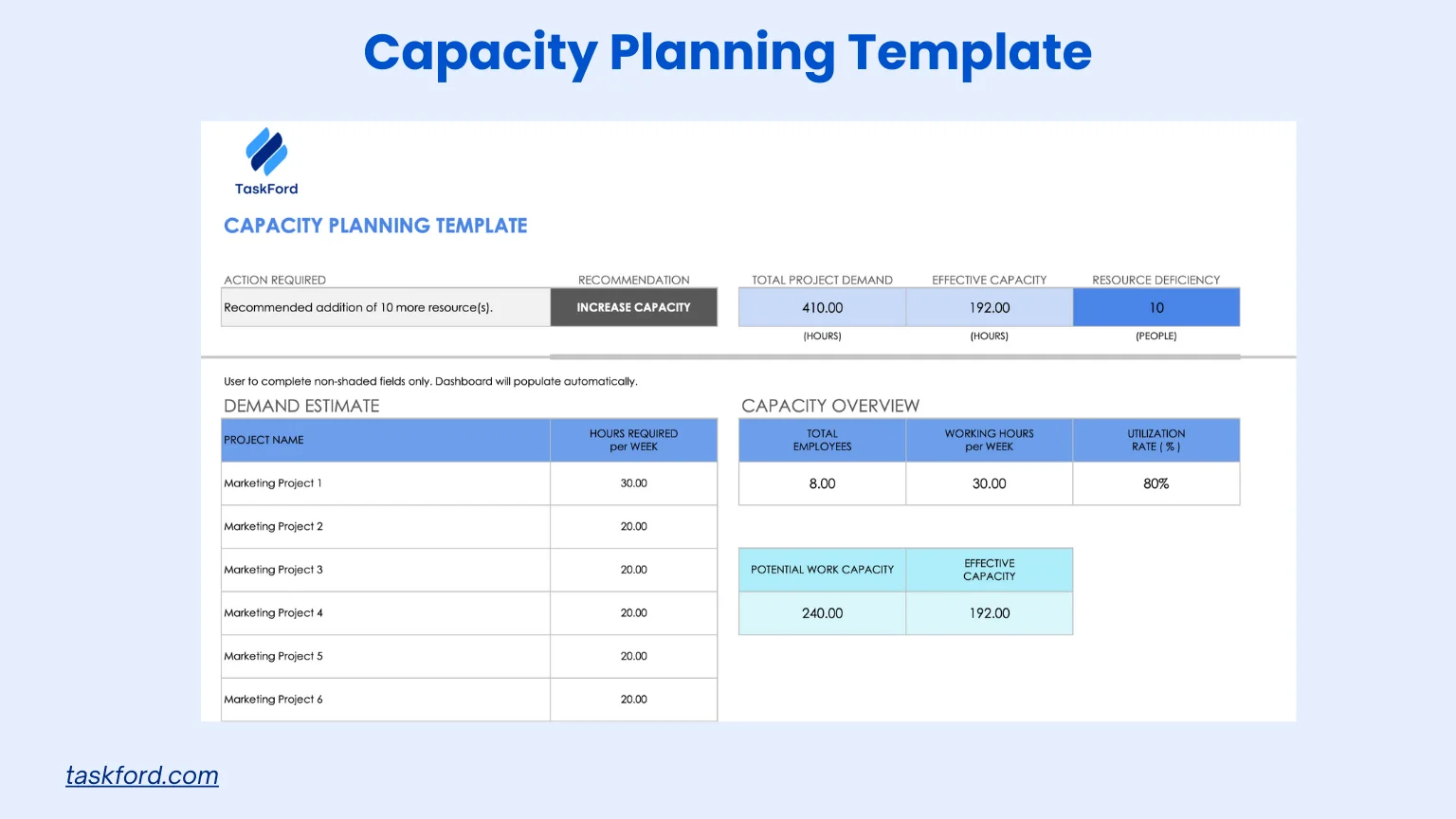
Best for: Cross-Functional IT and Marketing Teams
Overview: The Comprehensive Capacity Planning Template is a versatile tool designed for project managers and portfolio managers needing a holistic view of resource allocation across multiple projects. This template is ideal for organizations managing complex portfolios with diverse resource requirements, such as IT and marketing teams collaborating on a product launch.
Key Features:
- Demand estimation: Allows input of estimated employee hours needed per week for projects, teams, or portfolios.
- Capacity determination: Calculates current resource capacity and compares it with demand to identify gaps or surpluses.
- Actionable insights: Provides recommended actions, such as increasing capacity or redistributing workload, based on data entered.
Use Case for IT and Marketing Teams: For a product launch involving IT (e.g., app development) and marketing (e.g., campaign materials), the template estimates hours needed for coding, testing, content creation, and ad campaigns. It shows the IT team is at 80% capacity, while marketing has surplus hours, allowing managers to redistribute content tasks to marketing, ensuring no team member is overworked and the launch stays on schedule.
Why It’s Effective: The template’s structured format simplifies balancing capacity and demand across IT and marketing teams. Its dashboard-style interface provides a clear snapshot of resource utilization, making it easy to communicate needs to stakeholders. The actionable insights help managers quickly address capacity gaps, ensuring efficient collaboration and timely project delivery.
2. Project Capacity Planning Template
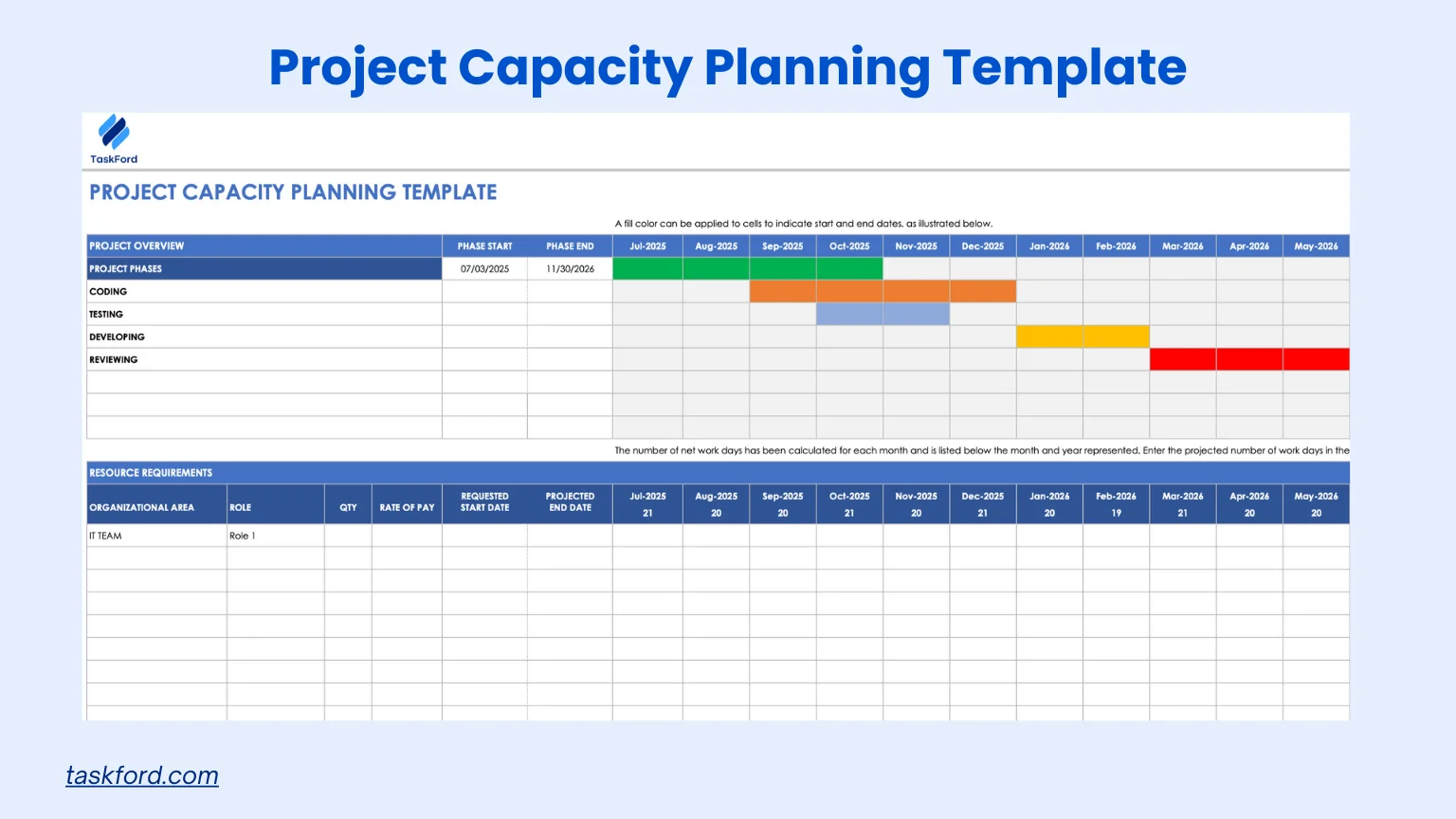
Best for: IT Teams Managing Software Projects
Overview: The Project Capacity Planning Template is tailored for project managers who need to anticipate resource needs for a single project. This template organizes personnel, materials, and equipment requirements into separate sections, ensuring all aspects of a project are adequately resourced, making it perfect for IT teams working on software development.
Key Features:
- Resource categorization: Separates human resources (e.g., developers, testers) from non-human resources (e.g., software, servers).
- Phase-based planning: Allows scheduling of resources based on project phases, from initiation to execution.
- Visual timeline: Displays timeline in a graph format for easy interpretation.
Use Case for IT Teams: For a software development project, the template schedules developers, testers, and cloud servers across phases like coding, testing, and deployment. It shows a lead developer is overbooked during the testing phase, while a tester has available hours, allowing managers to reassign tasks to keep the project on track.
Why It’s Effective: By focusing on a single IT project, this template allows granular control over resource allocation, ensuring no phase is under-resourced. Its visual timeline makes it easy to spot imbalances early, enabling proactive adjustments.
3. Team Capacity Planning Template
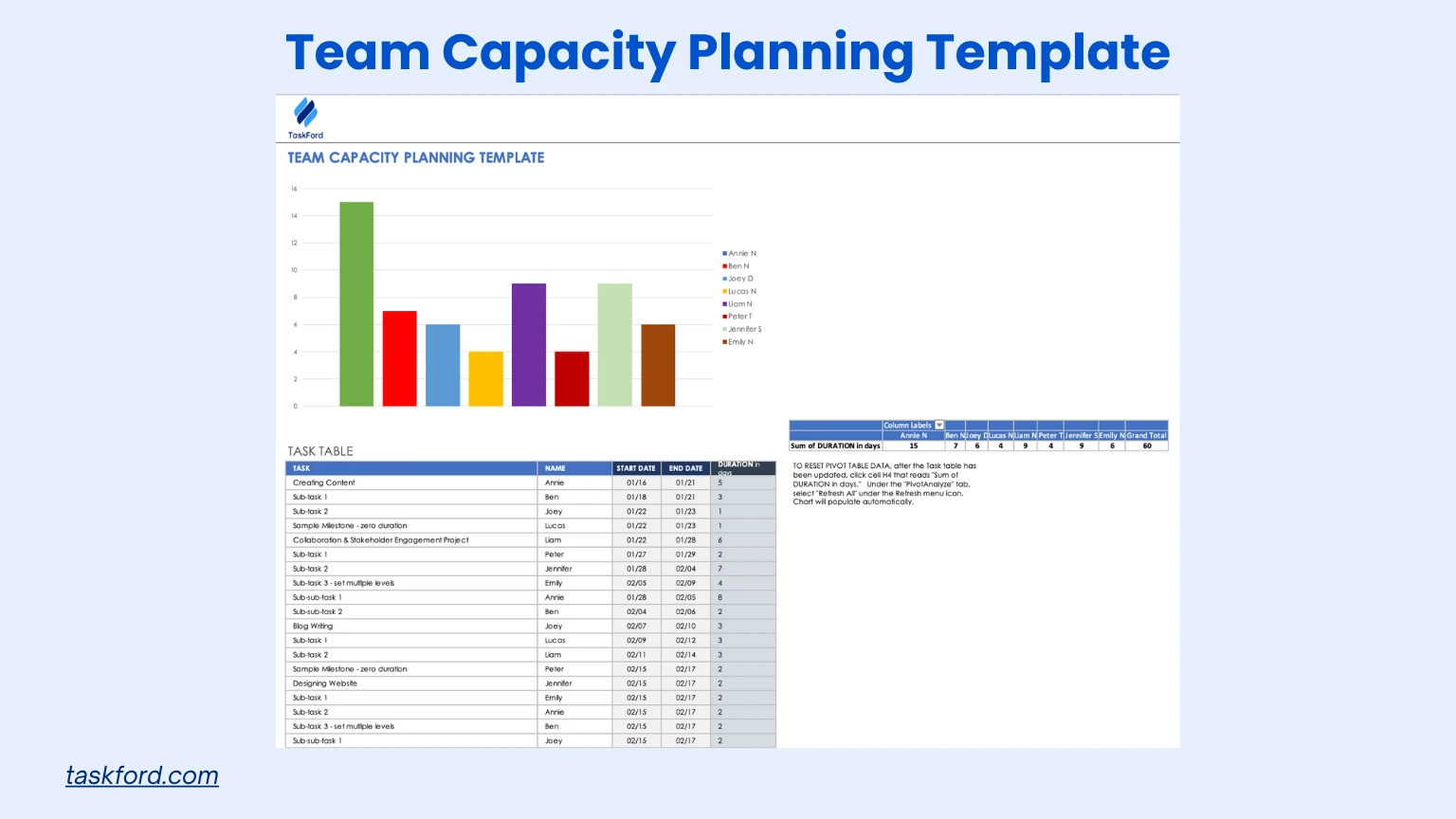
Best for: Marketing Teams Running Campaigns
Overview: The Team Capacity Planning Template is designed for team leads and managers who want to optimize resource allocation within a specific team. This template is particularly useful for tracking tasks, subtasks, and team member availability, making it ideal for marketing teams managing campaigns.
Key Features:
- Task-level tracking: Enter details for tasks and subtasks, including start/end dates and duration.
- Bar graph forecast: Visualizes team resource allocation and capacity needs over time.
- Skill-based allocation: Allows assignment of tasks based on team members’ skill sets.
- Dynamic updates: Automatically updates visualizations as new data is entered.
Use Case for Marketing Teams: For a social media campaign, the template assigns tasks like content creation and ad design to team members with skills in copywriting or graphic design. It shows a copywriter is booked for 30 hours, leaving 10 hours free, while a designer is overbooked at 45 hours, prompting task reassignment to balance workloads and meet campaign deadlines.
Why It’s Effective: The template’s focus on team-level planning ensures marketing team workloads are balanced while meeting campaign deadlines. Its bar graph forecast helps managers quickly identify overworked or underutilized team members. The skill-based allocation and dynamic updates make it easy to adapt to changing campaign needs, ensuring efficient resource use.
4. Agile Resource Capacity Planning Template
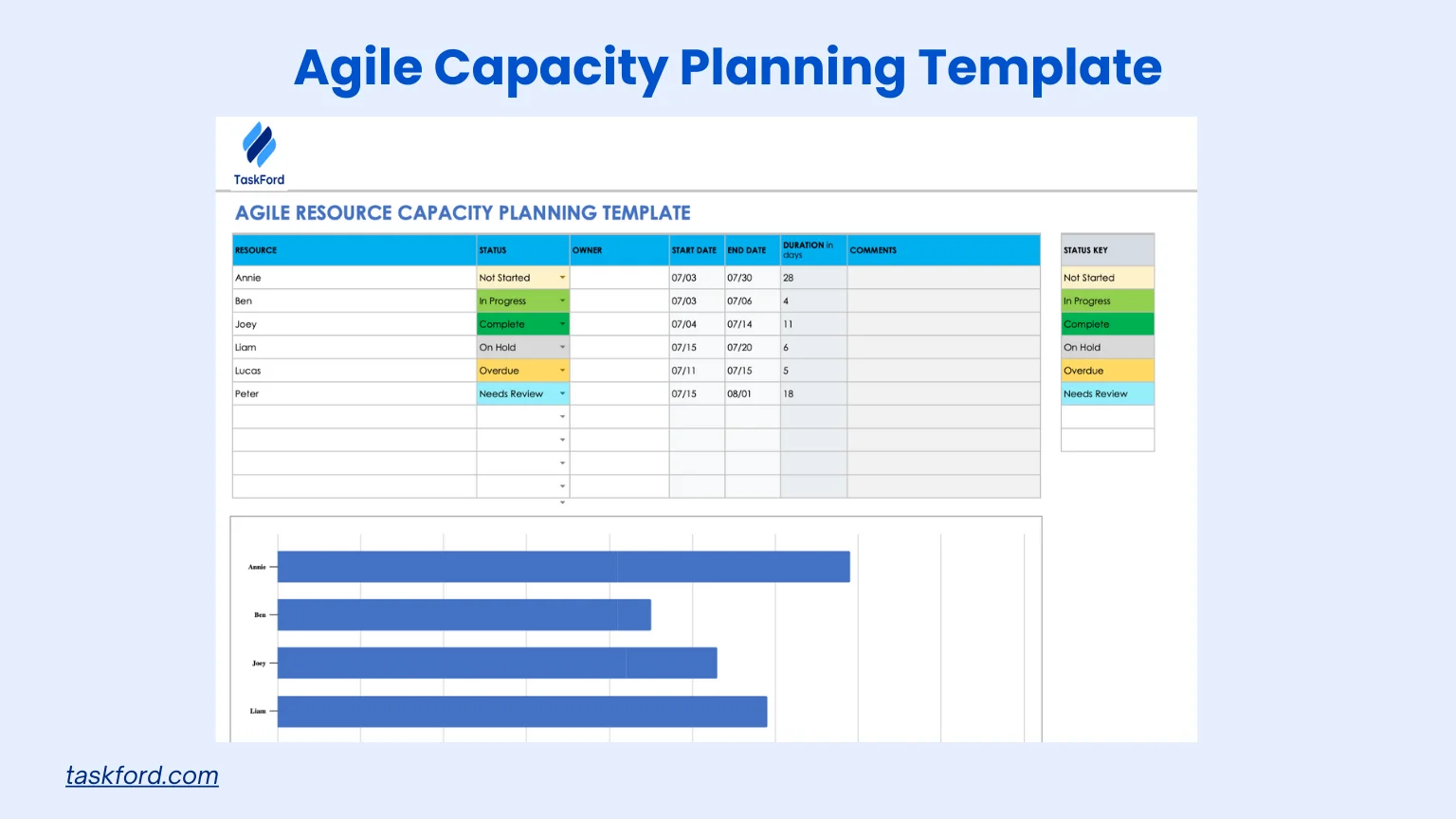
Best for: IT Teams Using Agile Methodologies
Overview: The Agile Resource Capacity Planning Template is tailored for Agile teams, particularly those using Scrum or Kanban methodologies. It helps Scrum masters and product owners plan resources for sprints, ensuring teams have the capacity to deliver iterative releases, ideal for IT teams developing software.
Key Features:
- Sprint-based planning: Tracks resources by sprint, including start/end dates and task durations.
- Role-specific allocation: Assigns tasks to roles like project managers, developers, and QA engineers.
- Gantt chart integration: Visualizes resource distribution across sprints for easy tracking.
Use Case for IT Teams: For an app development sprint, the template plans resources for developers and engineers, showing a developer is booked for 32 hours on coding, while the Scrum master has 10 hours free for sprint planning. Reassigning planning tasks ensures the sprint delivers user stories and bug fixes on time.
Why It’s Effective: This template aligns with Agile principles, emphasizing flexibility and iterative planning for IT teams. By incorporating sprint-based tracking and Gantt charts, it helps prioritize tasks and adapt to changing requirements. The role-specific allocation ensures resources match team skills, supporting successful sprint delivery.
Read Also: Capacity Planning vs Resource Planning
5. Human Resources Capacity Planning Template
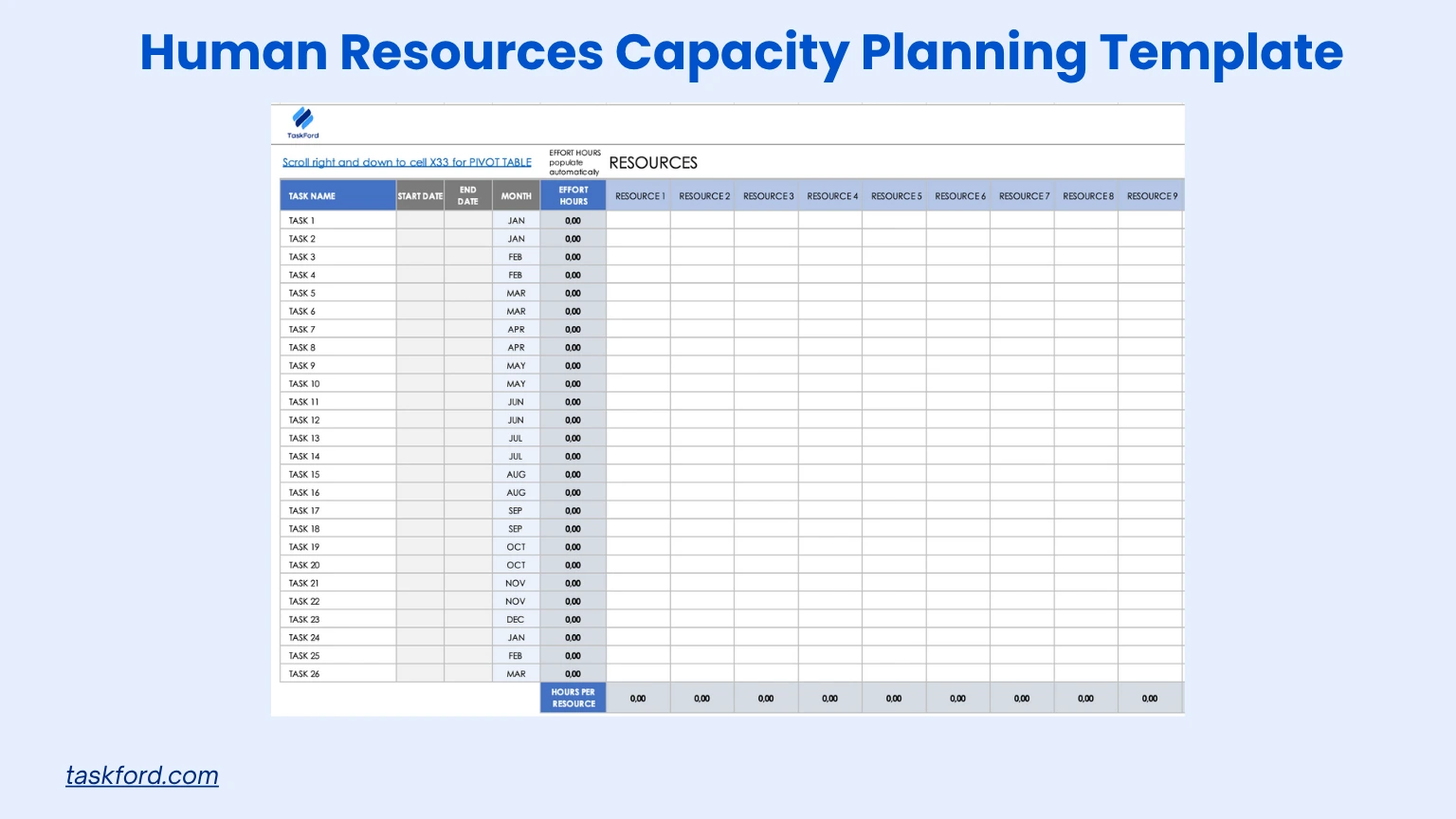
Best for: HR Teams Managing Workforce Planning
Overview: The Human Resources Capacity Planning Template is designed for HR departments to manage workforce capacity effectively. It focuses on planning employee availability, skills, and workload to support organizational goals and project demands, perfect for HR teams overseeing training or hiring.
Key Features:
- Workforce analysis: Tracks employee availability, skills, and hours allocated to projects or tasks.
- Workload balancing: Evaluates employee workloads to prevent burnout and ensure equitable task distribution.
- Skill gap identification: Identifies areas where additional training or hiring is needed.
- Capacity forecasting: Predicts future staffing needs based on project pipelines and growth.
Use Case for HR Teams: For a company-wide training program, the template shows an HR manager is overbooked with 50 hours of tasks, while a coordinator has 20 hours available. Reassigning logistical tasks balances workloads, ensuring the program launches on time and supports employee development.
Why It’s Effective: This template provides a structured approach to managing HR workforce capacity, ensuring employees are utilized effectively without overextension. Its focus on skill gaps and workload balancing supports long-term planning and employee satisfaction. The capacity forecasting feature helps HR teams anticipate future needs, aligning with organizational goals.
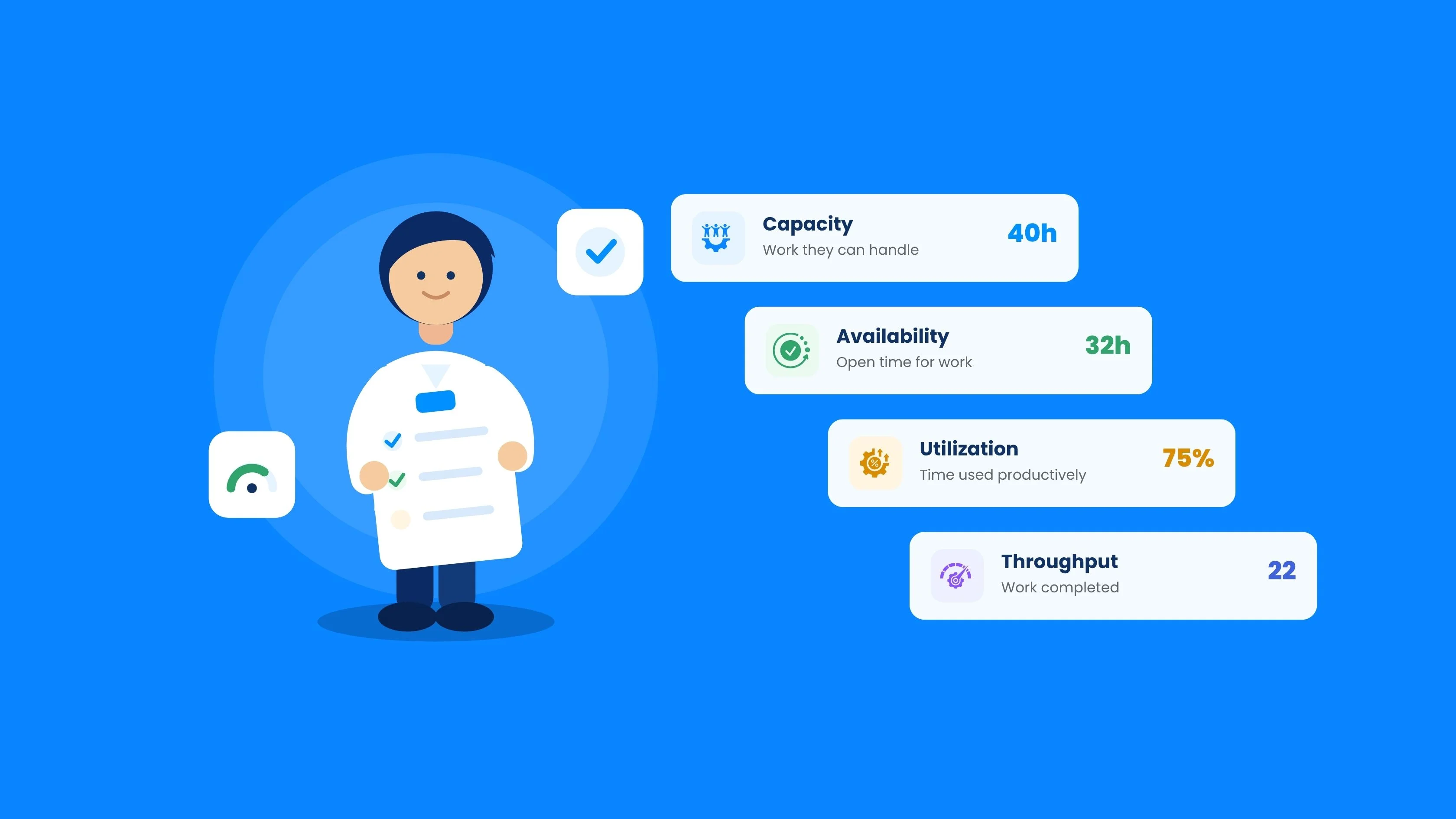
Read also: The Difference Between Capacity, Availability, Utilization, and Throughput
Tips for Effective Capacity Planning with Excel Templates
To maximize these templates, follow these best practices for resource management and capacity planning:
- Define Project Goals: Outline objectives, timelines, and deliverables before allocating resources.
- Update Regularly: Track actual hours versus planned hours to refine planning and reduce errors.
- Use Visuals: Leverage Excel’s charts or conditional formatting to highlight resource imbalances.
- Include Non-Working Time: Account for holidays, vacations, or training for realistic estimates.
- Explore Advanced Tools: Pair Excel templates with resource planning and capacity planning tools like TaskFord for automation and collaboration.
Learn more: Capacity planning vs Resource Planning
Limitations of Excel Templates and Next Steps
Excel capacity planning templates are a great starting point, especially for smaller teams. But as projects multiply and more people get involved, spreadsheets can start to feel harder to manage. That is usually the point where teams begin looking for tools that save time and offer clearer visibility.
- Manual Updates Can Become a Burden: Keeping spreadsheets accurate often means constant manual edits, which can take up valuable time and increase the chance of mistakes.
- Multiple Versions Create Confusion: When files are shared back and forth, it is easy for teams to end up working from outdated copies or conflicting versions.
- Limited Visibility as Teams Grow: Excel works well for simple planning, but it can be harder to get a real-time view of workloads across several teams or projects.
- Dedicated Tools Make Planning Easier: Resource planning software can bring everything into one place, automate updates, and make workloads easier to track.
- The Next Step as You Scale: Moving beyond Excel does not have to happen overnight. Many teams simply upgrade when they need a solution that grows with them.
Scaling Capacity Planning Beyond Spreadsheets with TaskFord
As teams grow, capacity planning often becomes harder to manage in spreadsheets. Tracking workloads across projects, updating plans, and maintaining visibility can quickly add complexity.
TaskFord - The Integrated Work Delivery Platform helps support this next stage by centralizing capacity data, improving visibility into team availability, and making it easier to adjust plans as priorities change.
TaskFord goes beyond basic task management by connecting projects, resources, schedules, and costs in one unified system. It allows teams to plan work around real capacity, track progress, monitor time and expenses, and keep projects on track from start to finish.
Below is a detailed breakdown of TaskFord’s key features relevant to capacity planning:
- Real-Time Workload Tracking: Monitors team capacity and task assignments in real time, providing a clear view of who is overbooked or underutilized, helping prevent burnout and optimize resource allocation for projects like software development or marketing campaigns.
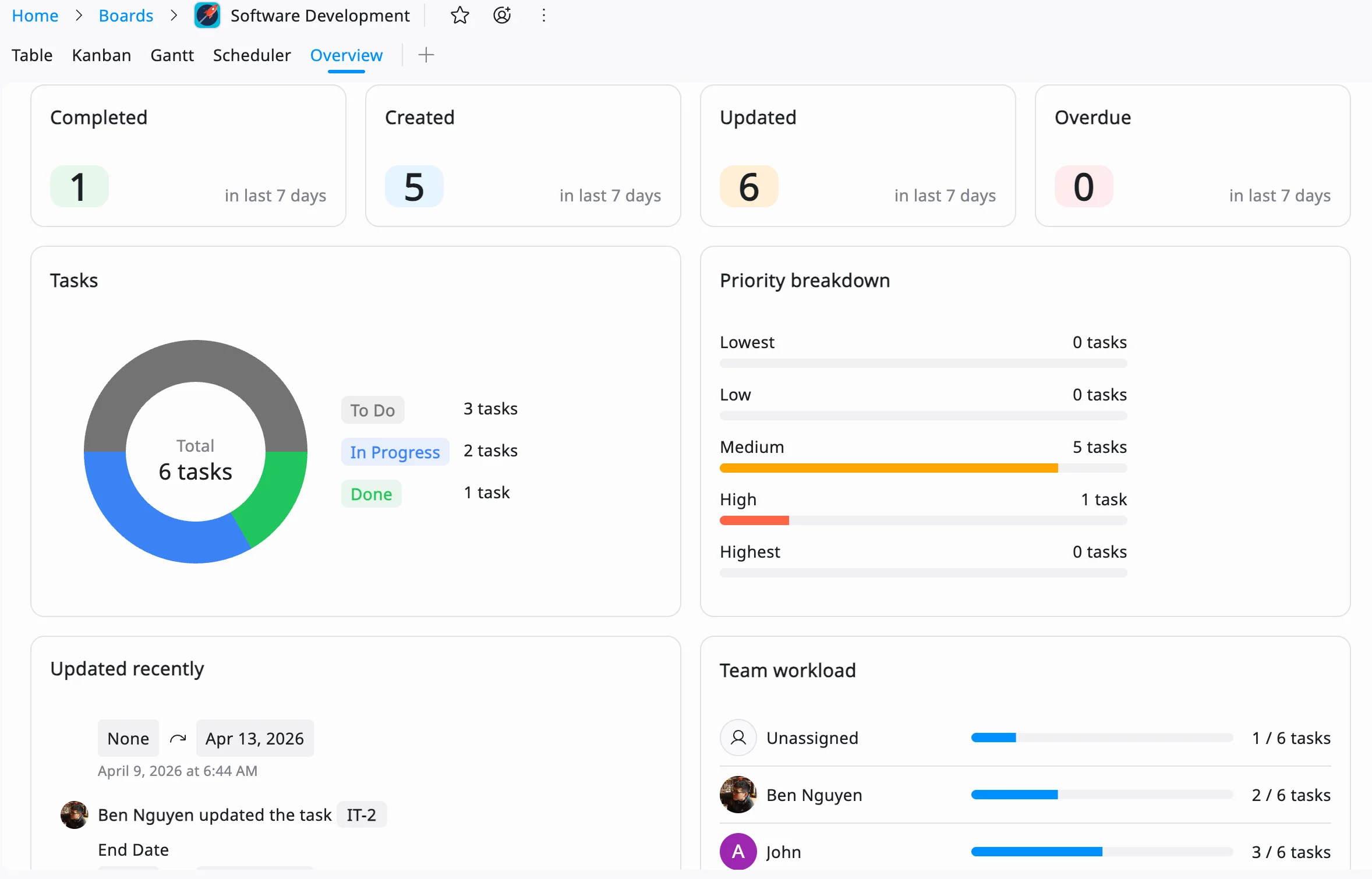
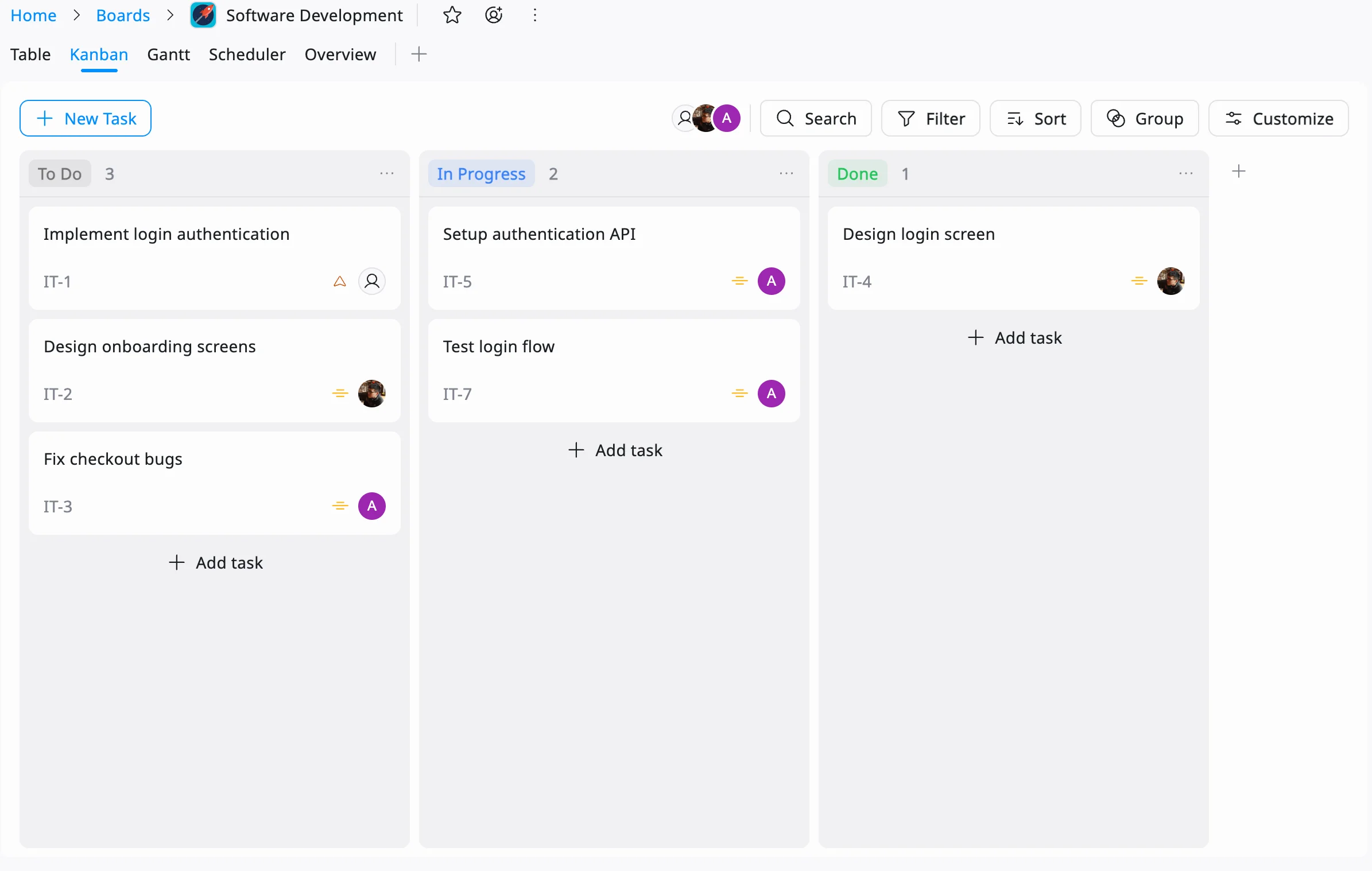
- Kanban Boards: Kanban boards provide a clear visual of tasks across stages like to-do, in progress, and completed. This makes it easy to identify team members with a high volume of work-in-progress or pending tasks, helping managers quickly spot overload, rebalance assignments, and keep work flowing efficiently.
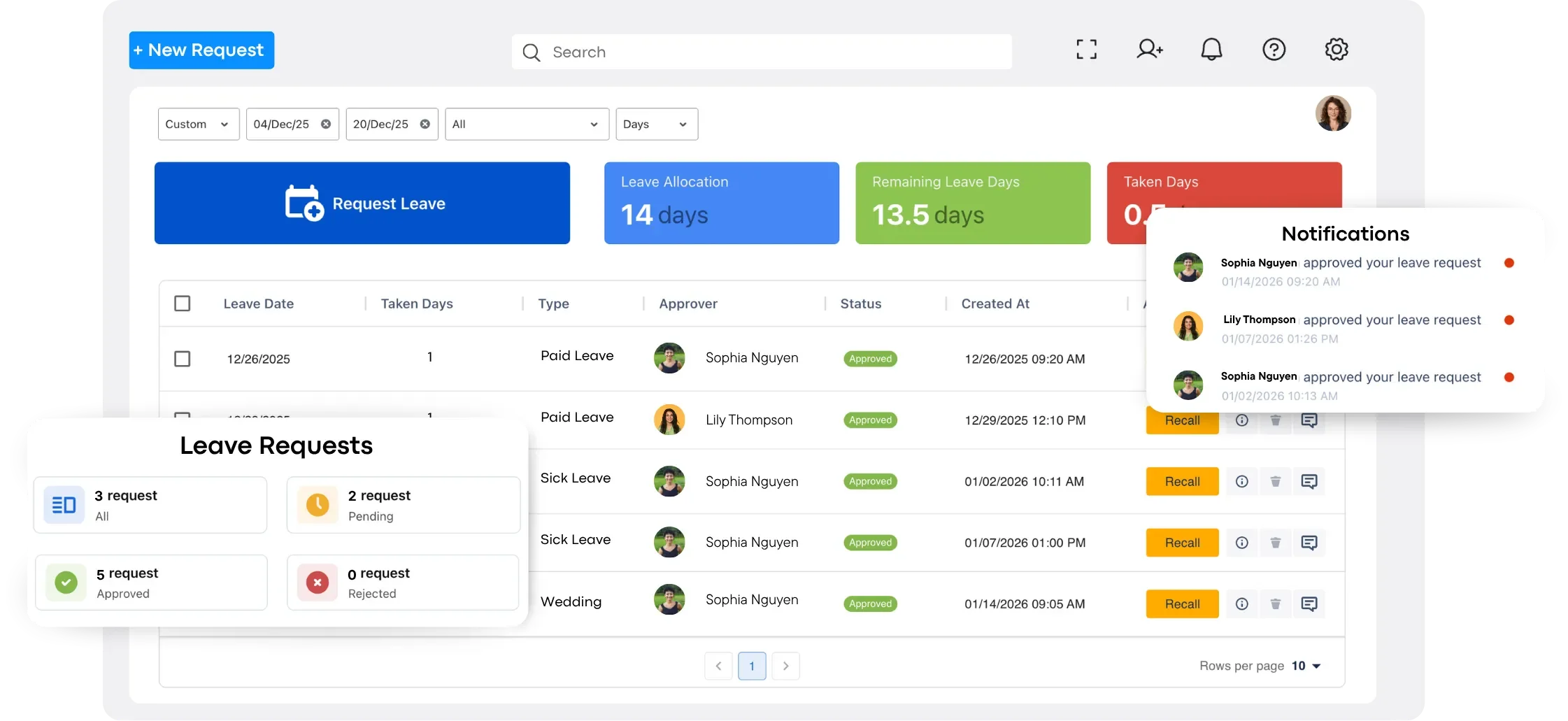
- Leave Management: Tracks vacation schedules and time-off requests, integrating them into capacity planning to ensure accurate resource availability forecasts, critical for HR teams planning training or IT teams managing sprint schedules.
These features make TaskFord an ideal platform for IT, marketing, and HR teams, enhancing the functionality of the Excel templates by providing automation, real-time insights, and integration capabilities.
Conclusion
Effective capacity planning transforms how IT, marketing, and HR teams achieve project goals, enabling balanced resource allocation and consistent delivery. By leveraging these free Excel capacity planning templates, you gain practical tools to align team capacity with project demands, prevent burnout, and maximize efficiency. Start using these templates today to unlock smarter resource management, ensuring your projects succeed and your team thrives in a fast-paced environment.
Frequently Asked Questions
What is a capacity planning template?
A capacity planning template is a pre-built spreadsheet, typically for Excel or Google Sheets, that helps teams estimate available capacity, allocate resources, and monitor workloads over time. Most templates include formulas to calculate utilization and identify capacity gaps, making them a practical solution for teams that do not yet use dedicated resource planning software.
When should you use a capacity planning template?
A capacity planning template is ideal for small teams, single projects, or organizations getting started with resource planning. As projects grow and workloads become more complex, many teams move to capacity planning software for real-time visibility, automation, and collaboration.
Are there different types of capacity planning templates?
Yes. Capacity planning templates come in formats such as Excel and Google Sheets and are designed for different planning needs. You can find templates for project capacity planning, team capacity planning, workforce planning, Agile sprint planning, and resource planning for departments like IT, marketing, and HR.
What’s the difference between a capacity planning template and a resource scheduling template?
A capacity planning template gives you a high-level view of team availability and utilization to determine whether you have enough capacity for upcoming work. A resource scheduling template focuses on assigning specific tasks, dates, and team members. Together, they help teams plan workloads and execute projects more effectively.
What are the steps of capacity planning?
Capacity planning typically involves measuring available capacity, forecasting future demand, comparing demand with available resources, adjusting workloads or timelines to close gaps, and reviewing the plan regularly as priorities change. For a more detailed explanation, read our guide on What Is Capacity Planning?.
Related Articles









































































![What is an Effective Resource Management Plan Template [Free Download]](/marketing/blog/resource-management-plan-template.webp)



Subscribe for Expert Tips
Unlock expert insights and stay ahead with TaskFord. Sign up now to receive valuable tips, strategies, and updates directly in your inbox.