Website Development Planning Process — Step-by-Step Guide 2026
Learn how to plan and allocate resources effectively for a successful website project, improving team efficiency, budgets, timelines, and project outcomes.
Planning a website is more than just coding and design—it requires careful resource management to ensure smooth development, cost-effectiveness, and timely delivery. The web development resource planning process plays a crucial role in defining how effectively a project is executed.
With the increasing complexity of modern websites, companies need structured planning to allocate resources efficiently. This guide explores the complete process of web development resource planning in 2026, covering everything from team allocation to budget management and workflow optimization.
Website Development Resource Planning Process
What Is Resource Planning in Web Development?
Resource planning in web development is the process of organizing and allocating the people, time, budget, and development tools required to build and launch a website or web application. It ensures that developers, designers, QA testers, and other stakeholders are assigned the right work at the right time, helping teams deliver high-quality websites on schedule while avoiding resource conflicts and unnecessary costs.
Key Elements of Resource Planning
- Resource Identification: Determining the types and quantities of resources needed, such as human, financial, physical, and time resources.
- Resource Allocation: Assigning resources to tasks or projects based on priority, availability, and skill matching.
- Scheduling: Planning the timing and duration of resource use for efficiency and coordination.
- Monitoring and Control: Tracking resource usage and adjusting as needed to meet goals.
- Risk Management: Identifying and mitigating potential resource-related risks, like shortages or conflicts.
- Tools and Techniques: Using software and methods to enhance planning and accuracy.
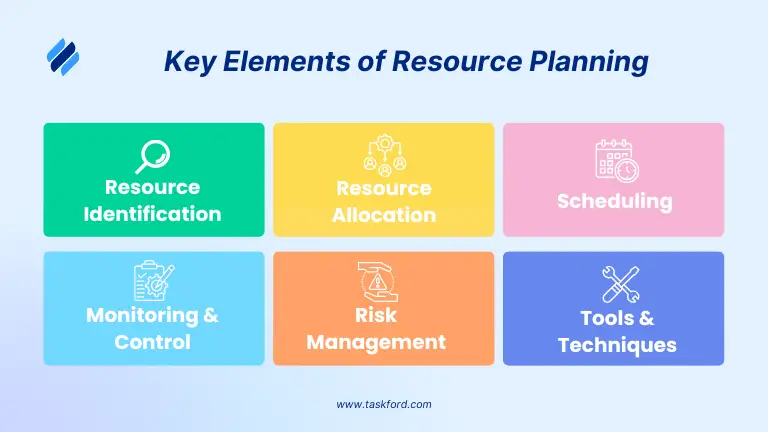
These steps ensure resources are managed effectively to achieve project or operational objectives.
Why Is Resource Planning Important in the Web Development Process?
Effective resource planning plays a crucial role in delivering web development projects on time, within budget, and to a high standard. By allocating the right people and resources throughout each phase of development, teams can work more efficiently while reducing common project challenges.
- Balances Team Workloads: Distributes tasks across developers, designers, QA engineers, and project managers to prevent burnout and avoid idle time.
- Keeps Development on Schedule: Ensures each project phase—from design and development to testing and deployment—has the resources needed to meet deadlines.
- Optimizes Development Costs: Helps allocate budgets wisely by preventing unnecessary hiring, overtime, and underutilized resources.
- Improves Cross-Functional Collaboration: Aligns designers, developers, testers, and stakeholders so work progresses smoothly with fewer communication gaps.
- Reduces Project Risks: Identifies potential resource shortages, scheduling conflicts, and bottlenecks early, allowing teams to address issues before they impact delivery.
Proper planning saves time, money, and frustration, setting the stage for a successful website launch.
Step-by-Step Website Development Resource Planning Process
Planning resources effectively is key to ensuring a website development project runs smoothly, stays within budget, and meets its deadlines. Below is a detailed, step-by-step process to guide you through resource planning for website development in 2026.
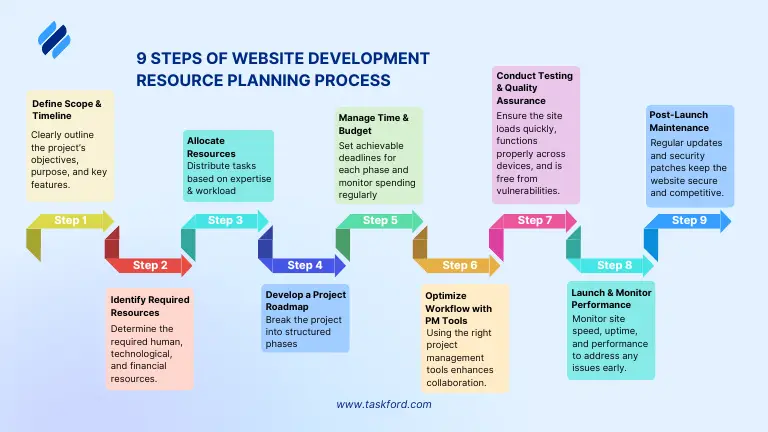
Step 1: Understand Project Scope & Timeline
Before allocating resources, clearly outline what the project entails and what you aim to achieve.
-
Identify the purpose of the website: Different types of websites require different levels of planning and resources. Identifying the purpose of the website helps determine the necessary features and technical requirements.
Example: Building a corporate website that focuses on brand awareness and lead generation, requiring strong SEO, a blog, and a contact form.
-
Set clear business goals: Once the purpose is defined, establish measurable goals using the SMART framework (Specific, Measurable, Achievable, Relevant, and Time-bound).
Example: Increasing organic traffic by 40% in six months through strategic content creation and SEO optimization.
-
Determine key features and functionalities: After setting goals, create a list of must-have features based on business needs. This helps prioritize essential functions while avoiding unnecessary costs.
Example: Core features - content management, user authentication, SEO tools.
-
Establish a realistic timeline: Define project milestones and deadlines to keep development on track.
Example: Plan for wireframing (2 weeks), development (4 weeks), and testing (3 weeks) to keep the project on track.
A well-structured project scope ensures the website aligns with business objectives while maintaining efficiency in resource allocation.
Step 2: Identify Required Resources
After defining the scope and timeline, the next step is identifying the resources needed for the project. Resources fall into three major categories: human resources (developers, designers, content creators), technology resources (design tools, coding framework, hosting platforms) and budget planning (estimate costs for tools and any third-party services)
- Tips: Utilize the Resource Breakdown Structure RBS to categorize resources into human, technology, and financial segments.
- Example: A team might include a UX designer, two front-end developers, a back-end developer, and a content strategist.
Step 3: Allocate Resources
With the resources identified, the next step is proper allocation to ensure that everything progresses smoothly. The development team should be assigned tasks based on their expertise, and critical phases such as wireframing and core functionality development should be prioritized.
Project managers should allocate time and effort efficiently to avoid resource overload. Using resource management tools such as Trello or Monday.com helps in tracking workloads and deadlines. A well-planned resource allocation strategy helps prevent bottlenecks and ensures that all tasks are completed within the stipulated timeframe.
Step 4: Develop a Project Roadmap
A website development roadmap provides a structured approach to executing the project. It divides the project into key phases, ensuring that all necessary tasks are completed in the right order.
Example:
Planning & Research → Wireframing & Design → Development → Content Creation & SEO → Testing & Debugging → Launch & Monitoring.
Step 5: Manage Time & Budget Constraints
One of the biggest challenges in web development is managing time and budget constraints. Projects often experience delays due to poor time management, leading to increased costs.
Setting realistic deadlines for each phase ensures that the project stays on track. It is essential to estimate how long each task will take based on available resources and team capacity.
Tip: The Eisenhower Matrix (Urgent-Important Matrix) helps manage time and budget constraints by prioritizing tasks based on urgency and importance.
Step 6: Optimize Workflow with Project Management Tools
Using the right project management tools enhances collaboration and efficiency. There are various tools available for different aspects of website development, such as Jira and TaskFord for task management, Slack and Microsoft Teams for communication, and Figma and Adobe XD for design collaboration.
Implementing workflow automation wherever possible helps save time and reduce errors. Automated notifications for task deadlines, Kanban boards for visualizing progress, and centralized documentation ensure that the team stays aligned and productive.
Step 7: Conduct Testing & Quality Assurance
Before launching the website, extensive testing must be conducted to identify and fix errors. Testing includes functionality testing, performance testing, security testing, and compatibility testing.
Tip: Using tools such as Google Lighthouse, Selenium, and BrowserStack, or AgileTest helps automate the testing process, making it more efficient.
Step 8: Launch & Monitor the Website
Once the website passes testing, it is ready for launch. Deployment should be done on a secure hosting platform that offers reliable uptime and fast performance. Before launching, it is important to set up analytics tools such as Google Analytics and Google Search Console to track user behavior and site performance.
The initial launch phase should be closely monitored to identify any technical issues that may arise. The development team should be prepared to address bugs or performance issues immediately. Having a rollback plan in place ensures that any major problems can be resolved quickly.
Step 9: Post-Launch Maintenance & Resource Planning
Website development does not end at launch. Continuous maintenance is required to ensure security, performance, and content relevance. Regular updates to plugins, frameworks, and security patches keep the website secure.
Monitoring website analytics helps identify areas that need improvement. If certain pages have high bounce rates or slow load times, they should be optimized accordingly. Businesses should also plan for scalability, ensuring that the website can handle increased traffic and additional features in the future.
Quarterly resource planning sessions help align web development goals with business growth. This ensures that the website remains an effective tool for achieving business objectives.
Common Website Development Resource Planning Mistakes to Avoid
Avoiding these common mistakes can help keep your web development project on schedule, within budget, and running smoothly from start to finish.
-
Underestimating the Project Scope: Incomplete requirements often lead to unexpected work, missed deadlines, and budget overruns. Clearly define project goals, features, and deliverables before development begins, and include buffer time for changes.
-
Allocating Resources Without Considering Skills: Assigning tasks based solely on availability instead of expertise can reduce productivity and increase rework. Match developers, designers, and QA engineers to tasks that align with their skills and experience.
-
Ignoring Team Capacity: Overloading team members or overlooking existing commitments creates bottlenecks that can delay the project. Regularly review workloads and balance assignments based on each person’s availability.
-
Treating Testing as an Afterthought: Delaying quality assurance until the end of development often results in more bugs and rushed fixes. Plan testing activities throughout the project lifecycle and allocate sufficient QA resources.
-
Failing to Plan for Post-Launch Maintenance: A website requires ongoing updates, security patches, performance monitoring, and feature enhancements after launch. Include post-launch maintenance in your resource plan to ensure the website remains secure and performs well over time.
Final Thoughts
Effective resource planning is the backbone of successful website development. By following this structured process—from defining the scope to post-launch maintenance—you can deliver a website on time, within budget, and to the highest standards. In 2026, with technology evolving rapidly, staying organized and adaptable is more critical than ever. Apply these steps to your next project to streamline planning, avoid pitfalls, and exceed expectations.
FAQs for Website Development Planning Process
1. What is the most important step in resource planning for web development?
Understanding the project scope and timeline is critical. Without clear goals and deadlines, resource allocation becomes inefficient, leading to delays and cost overruns.
2. What is the best way to manage web development costs?
Break down the expenses into design, development, tools, and hosting. Use budget-tracking software to monitor costs.
3. How can I speed up web development without compromising quality?
- Use agile development methods.
- Automate testing & deployment. Assign tasks based on team expertise.
4. What tools are best for managing a web development project?
Jira or TaskFord for tasks, Slack for communication, and Figma for design collaboration are top choices. Pick tools that suit your team’s needs.
5. How often should a website be updated post-launch?
Regular updates should be made monthly for security, while major updates should occur quarterly to improve performance and user experience.
Related Articles
















































































![What is an Effective Resource Management Plan Template [Free Download]](/marketing/blog/resource-management-plan-template.webp)




Subscribe for Expert Tips
Unlock expert insights and stay ahead with TaskFord. Sign up now to receive valuable tips, strategies, and updates directly in your inbox.